Zoho Books vs Xero: Complete Accounting Comparison for 2026
Feature-by-feature comparison of Zoho Books vs Xero for small and mid-sized businesses. Covers pricing, multi-currency, inventory, eCommerce support, and when each platform is the better choice.
Zoho Books and Xero are two of the most capable cloud accounting platforms for small and mid-sized businesses. They overlap on many features, but they're built around different philosophies. Xero is an accounting-first product with a beautiful interface and a massive accountant network. Zoho Books is a business-platform-first product where accounting is one piece of a larger operational ecosystem. This comparison breaks down the real differences so you can decide which fits your business.
Disclosure: Zolify is an Official Zoho Authorized Partner. We implement Zoho Books for our clients and migrate businesses from Xero. We're upfront about this because it means we know both platforms deeply, including their limitations. This comparison is honest because our reputation depends on it.
Quick Summary
Choose Zoho Books if: You want accounting tightly integrated with CRM, inventory, and operations in a single platform. You sell physical products, run multi-channel eCommerce, or want to automate manual accounting workflows without paying for a stack of add-ons.
Choose Xero if: Your accountant or bookkeeper is deeply embedded in the Xero ecosystem, you're based in the UK/Australia/New Zealand, you value a polished and intuitive UI, or you rely on Xero's large third-party app marketplace.
Feature-by-Feature Comparison
Pricing
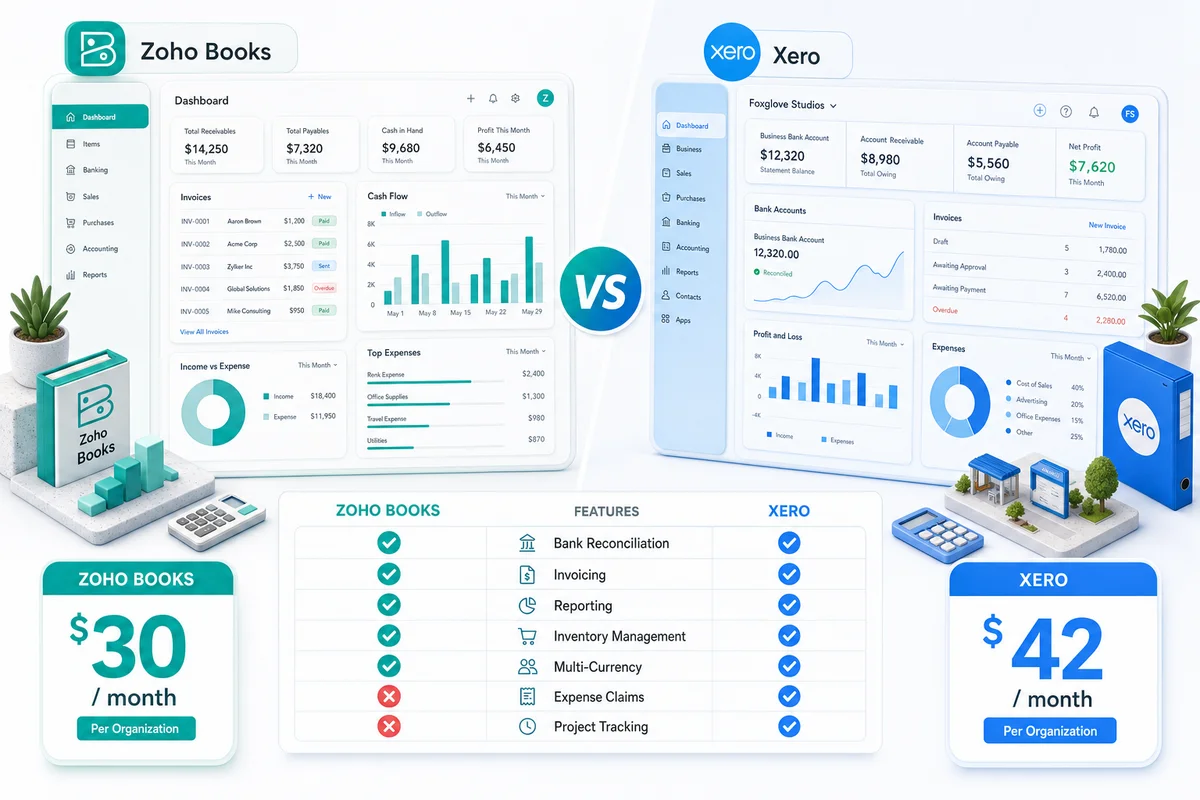
| Plan Tier | Zoho Books | Xero |
|---|---|---|
| Starter/Entry | $20/month (Standard) | $29/month (Starter) |
| Mid-tier | $50/month (Professional) | $55/month (Growing) |
| Full-featured | $70/month (Premium) | $78/month (Established) |
| Top-tier | $150/month (Elite) | None |
| Users included | Varies by plan (3-15) | Unlimited on all plans |
| Platform bundle | Zoho One: $37/user/month (45+ apps) | No bundle option |
Verdict: Zoho Books is cheaper at every tier, but the real story is the platform. Xero's per-plan pricing is 10-30% higher than the equivalent Zoho Books tier. That gap looks modest on paper. Where the math shifts dramatically is when you factor in everything else a business needs. Xero charges for accounting only; inventory, CRM, project management, and helpdesk are all separate subscriptions. Zoho One bundles 45+ apps at $37/user/month. For a 5-person team that needs accounting, CRM, and inventory management, the annual cost difference can exceed $5,000.
Xero's advantage on users: Xero includes unlimited users on all plans. Zoho Books caps users by tier. If you have a large team that needs accounting access and you do not need the broader Zoho ecosystem, Xero's unlimited user model can be more cost-effective.
Core Accounting Features
| Feature | Zoho Books | Xero |
|---|---|---|
| Double-entry accounting | Yes | Yes |
| Invoicing | Excellent (customizable templates) | Excellent (clean, professional) |
| Bill management | Good | Good |
| Bank reconciliation | Good (growing bank support) | Excellent (1,000+ bank feeds globally) |
| Accounts receivable | Excellent | Excellent |
| Accounts payable | Good | Good |
| Journal entries | Yes | Yes |
| Recurring transactions | Yes | Yes |
| Purchase orders | Standard and above | All plans |
| Fixed asset management | Professional and above | Built-in on all plans |
| Quotes and estimates | Yes | Yes |
Verdict: Essentially even, with Xero ahead on bank feeds. Both platforms handle double-entry accounting well. Xero's direct bank feed connections now cover 1,000+ financial institutions globally, which gives it a real edge in bank reconciliation, particularly in the UK, Australia, and New Zealand. Zoho Books' bank feed coverage is strong in the US and India and continues to expand.
Where Zoho pulls ahead is in day-to-day usability. Payment reminders are more configurable. Invoice templates go deeper. Purchase orders are available at lower plan tiers than Xero.
Multi-Currency
| Capability | Zoho Books | Xero |
|---|---|---|
| Multi-currency support | Standard and above | Growing and above |
| Number of currencies | 180+ | 160+ |
| Auto exchange rates | Yes | Yes |
| Invoicing in foreign currency | Yes | Yes |
| Bills in foreign currency | Yes | Yes |
| Foreign currency bank accounts | Yes | Yes |
| Realized gain/loss tracking | Yes | Yes |
| Unrealized gain/loss reports | Yes | Yes |
| Base currency change | Not possible | Not possible |
Verdict: Effectively a tie. This is one of the few areas where Zoho Books and Xero are matched. Both handle automatic exchange rate updates, foreign currency bank accounts, and gain/loss tracking without add-ons. Zoho Books supports a wider currency range (180+ vs 160+), but you're unlikely to run into the limit on either platform. If multi-currency is your deciding factor, you'll be fine with both.
Where Zoho Books pulls ahead for international eCommerce sellers is the native link between multi-currency transactions and multi-channel inventory. Currency conversion, landed costs, and marketplace payouts reconcile inside the same system rather than across disconnected apps. For a practical guide, see Multi-Currency eCommerce Accounting with Zoho Books.
Inventory Management
| Capability | Zoho Books | Xero |
|---|---|---|
| Basic inventory tracking | Standard and above | All plans (limited) |
| FIFO costing | Yes | No (weighted average only) |
| Composite/bundled items | Via Zoho Inventory | No |
| Warehouse management | Via Zoho Inventory (multi-warehouse) | No (requires Cin7 or DEAR) |
| Serial/batch tracking | Via Zoho Inventory | No (requires add-on) |
| Barcode scanning | Via Zoho Inventory | No (requires add-on) |
| Purchase orders | Yes | Yes |
| Reorder point alerts | Via Zoho Inventory | Basic (via tracked inventory) |
| Multi-channel inventory sync | Via Zoho Inventory | Via Cin7/DEAR ($200-400/month) |
Verdict: Zoho wins decisively for product-based businesses. Xero's built-in inventory is basic: it tracks quantities and costs, and not much more. For anything beyond simple stock counts, Xero users need third-party inventory apps like Cin7, DEAR Inventory, or Unleashed. These add-ons cost $200-400/month and introduce data sync complexity.
Zoho Inventory integrates natively with Zoho Books. Same database. Same login. Real-time sync. It handles multi-warehouse management, composite items, serial tracking, barcode scanning, and multi-channel inventory sync out of the box. If you sell physical products, this is one of the strongest arguments for Zoho.
eCommerce Support
| Capability | Zoho Books + Zoho Inventory | Xero + Add-ons |
|---|---|---|
| Shopify integration | Native via Zoho Inventory | Via A2X ($35-99/month) |
| Amazon integration | Native via Zoho Inventory | Via A2X ($35-99/month) |
| WooCommerce integration | Via Zoho Inventory | Via Amaka or third-party ($20-50/month) |
| eBay integration | Via Zoho Inventory | Via third-party app |
| Etsy integration | Via Zoho Inventory | Via third-party app |
| Multi-channel order management | Built into Zoho Inventory | Requires Cin7 ($349+/month) |
| Marketplace payout reconciliation | Native | Via A2X or manual |
| Inventory sync across channels | Native (real-time) | Via add-on (delayed sync) |
Verdict: Zoho is significantly better for eCommerce. This is the widest gap in the entire comparison. Xero-based eCommerce businesses typically pay for A2X (marketplace accounting), Cin7 or DEAR (inventory management), and separate connectors for each sales channel. The add-on stack routinely runs $350-600/month on top of the Xero subscription, before counting any CRM or automation costs.
Zoho handles all of this natively through the Books + Inventory combination. Orders from Shopify, Amazon, eBay, WooCommerce, and Etsy flow into Zoho Inventory, which syncs with Zoho Books automatically. One database. One login. Real-time inventory counts across every channel, with automatic COGS and revenue recognition posting to your books.
For a multi-channel seller doing $500K–2M in annual revenue, the connector cost savings alone frequently exceed $5,000 a year. That's before you count the time reclaimed from manual reconciliation and data-sync troubleshooting.
For a detailed breakdown of how Zoho manages stock, orders, and accounting across Shopify, Amazon, WooCommerce, eBay, and Etsy from a single dashboard, see Multi-Channel Inventory Management with Zoho: Shopify, Amazon, and WooCommerce.
Automation and Workflows
| Capability | Zoho Books | Xero |
|---|---|---|
| Bank rules | Excellent (advanced matching) | Good |
| Recurring transactions | Yes | Yes |
| Payment reminders | Configurable sequences | Basic automated reminders |
| Workflow automation | Zoho Flow + Workflow Rules | Limited (via Xero HQ for practices) |
| Custom scripting | Deluge scripting | Not available |
| Scheduled functions | Yes | Not available |
| Approval workflows | Yes (multi-level) | Not available natively |
| Conditional logic | Yes (via Deluge and Flow) | Via Zapier/Make (external) |
Verdict: Zoho Books wins on automation. Xero is a clean, efficient accounting tool, but it doesn't try to be an automation platform. Workflow rules, approval chains, scheduled functions, and custom scripting aren't part of its design philosophy. If you want automation, you connect Xero to Zapier or Make and build it externally.
Zoho Books includes native workflow rules, integrates with Zoho Flow for cross-app automation, and supports Deluge scripting for custom logic. You can build multi-step approval workflows, auto-generate recurring documents with conditional logic, and trigger actions across the Zoho ecosystem, all without external tools or additional subscriptions.
For businesses that want to reduce manual accounting work, this is a meaningful difference.
Reporting and Tax
| Capability | Zoho Books | Xero |
|---|---|---|
| Standard financial reports | Good | Good |
| Custom report builder | Good | Good |
| Dashboard | Good | Good (clean, visual) |
| Scheduled reports | Yes | Yes |
| Advanced analytics | Zoho Analytics (powerful, native) | Limited built-in analytics |
| Tax compliance (UK/ANZ) | Functional | Excellent (MTD, BAS, GST native) |
| Tax compliance (US) | Good (1099, sales tax) | Good (sales tax via partnerships) |
| VAT returns | Yes | Yes (stronger in UK) |
| Export formats | PDF, Excel, CSV | PDF, Excel, Google Sheets |
Verdict: Xero wins for UK/ANZ tax compliance. Zoho wins for advanced analytics. Xero has deep, native integrations with HMRC for Making Tax Digital (MTD), the ATO for Business Activity Statements (BAS), and IRD for GST returns. If you operate in the UK, Australia, or New Zealand, Xero's tax compliance tools are the strongest on the market.
For advanced business intelligence, Zoho Analytics is in a different league. It pulls data from Books, Inventory, CRM, and other Zoho apps into a unified analytics platform with custom dashboards, cross-module data blending, and advanced visualizations. Xero's built-in reporting is clean and functional, but it does not offer anything comparable to this level of analysis.
Integrations and Ecosystem
| Category | Zoho Books | Xero |
|---|---|---|
| Third-party app marketplace | 200+ apps | 1,000+ apps |
| CRM integration | Zoho CRM (native) | Salesforce, HubSpot (via marketplace) |
| Payroll | Zoho People (basic) or third-party | Gusto, Deel, and others (via marketplace) |
| eCommerce | Zoho Inventory (native) | A2X, Cin7, DEAR (marketplace) |
| Payment processing | Stripe, PayPal, Razorpay, etc. | Stripe, GoCardless, etc. |
| API access | Excellent | Excellent |
| Custom scripting | Deluge scripting | Not available |
| Accountant tools | Zoho Practice Manager | Xero HQ + Xero Workpapers |
Verdict: Xero wins for breadth of third-party integrations. Zoho wins for depth of native ecosystem. Xero's app marketplace is roughly 5x larger than Zoho's. If you need a niche integration (a specific industry tool, a particular payroll provider, a specialized reporting add-on), Xero is more likely to have it.
Zoho's advantage is the opposite: fewer third-party apps, but a vast native ecosystem. CRM, inventory, HR, project management, helpdesk, marketing automation, analytics, and custom app building are all first-party Zoho products that share the same database and authentication. No syncing. No middleware. No monthly connector fees.
Mobile App
| Capability | Zoho Books | Xero |
|---|---|---|
| Invoice creation | Yes | Yes |
| Expense tracking | Yes | Yes |
| Receipt capture (OCR) | Yes | Yes (Hubdoc included) |
| Bank reconciliation | Yes | Yes |
| Mileage tracking | Yes | Yes |
| Offline access | Limited | Limited |
| App store rating (iOS) | 4.5+ | 4.5+ |
Verdict: Essentially even. Both mobile apps cover the core workflows that business owners need on the go. Xero includes Hubdoc (a receipt capture and document management tool it acquired in 2018) in all plans, which gives it a slight edge in document capture and processing. Zoho Books' mobile app is equally functional for day-to-day operations.
Accountant Access and Collaboration
| Capability | Zoho Books | Xero |
|---|---|---|
| Accountant portal | Yes (Zoho Practice) | Yes (Xero HQ, industry leading) |
| Accountant/bookkeeper network | Growing | Massive (400,000+ globally) |
| Client management dashboard | Zoho Practice Manager | Xero HQ |
| Workpaper tools | Limited | Xero Workpapers (strong) |
| Advisor directory | Yes | Yes (well-established) |
| Certification program | Zoho Partner program | Xero Advisor certification |
Verdict: Xero wins. This is Xero's strongest advantage. Xero was built with accountants in mind from day one. Xero HQ gives accounting firms a dashboard to manage all their clients in one place. Xero Workpapers provides tools for end-of-year compliance work. The Xero Advisor certification program has trained over 400,000 accountants and bookkeepers globally.
If your accountant is a Xero specialist, switching away from Xero creates real friction. Their workflows, tools, and reporting are built around the platform. That's not a trivial consideration.
Zoho Books has a Partner program and practice management tools, but the accountant ecosystem is smaller. If you switch to Zoho Books, your accountant may need time to learn the interface and reporting.
When Xero Is the Better Choice
- You are based in the UK, Australia, or New Zealand. Xero dominates these markets for good reason. Tax compliance tools are the strongest available for MTD, BAS, and GST. Bank feed coverage is excellent. Your accountant almost certainly knows Xero.
- Your accountant is deeply embedded in the Xero ecosystem. If your accountant manages dozens of clients through Xero HQ and uses Xero Workpapers for compliance, switching creates disruption for them. That disruption has a cost.
- You prioritize UI and user experience. Xero's interface is genuinely one of the best in accounting software. Clean, intuitive, and well-designed. Zoho Books is functional and capable, but Xero's UX is more polished.
- You need niche third-party integrations. With 1,000+ apps in its marketplace, Xero is more likely to have the specific integration you need: a specialized payroll provider, an industry-specific tool, or a niche reporting add-on.
- You're a service-based business with simple needs. If you don't sell physical products, don't need inventory management, and don't need CRM integration, Xero covers everything you need with a clean interface and unlimited users.
When Zoho Books Is the Better Choice
- You sell physical products or run eCommerce. The Zoho Books + Zoho Inventory combination provides native multi-channel order management, warehouse tracking, and inventory sync that Xero cannot match without expensive add-ons. If you're migrating from a tool that lacks inventory entirely — like FreshBooks — see our Zoho Books vs FreshBooks comparison for eCommerce sellers.
For sellers currently on Wave Accounting — a free tool that works at early stage but hits structural limits on Shopify, Amazon, and WooCommerce as volume grows — our Zoho Books vs Wave Accounting for eCommerce sellers covers exactly when the switch makes financial sense.
For an eCommerce-focused cost breakdown of Xero against Zoho Books — covering Xero's inventory gap, per-channel connector costs, and real monthly total for Shopify, Amazon, and WooCommerce operators — see Xero vs Zoho Books for eCommerce Sellers.
If you sell specifically on Amazon (FBA, FBM, or both), see our breakdown of Amazon seller accounting with Zoho Books for FBA fee reconciliation, COGS tracking, and reimbursement recovery that generic accounting tools miss.
- You want one platform, not a stack of tools. If you're currently paying for Xero + an inventory tool + a CRM + project management + marketing automation, Zoho One replaces all of it at a lower total cost. One login. One database. One bill.
- You need automation without external tools. Workflow rules, approval chains, Deluge scripting, and Zoho Flow give you automation capabilities that Xero doesn't offer natively. If your accounting team spends hours on repetitive manual work, this matters.
- Cost is a real factor. The per-plan savings are modest ($5-15/month), but the total cost of ownership savings are significant when you factor in add-ons, CRM, inventory tools, and middleware connectors that Xero businesses typically need.
- You're already using Zoho products. If you run Zoho CRM, Zoho Projects, or Zoho People, adding Zoho Books gives you native data flow between systems that no third-party integration can replicate.
- You're scaling internationally. Zoho operates in 180+ countries and supports a wide range of currencies, languages, and regional tax formats. While Xero is strong in its core markets (UK, ANZ, US), Zoho is built for global operations from the ground up.
Total Cost of Ownership: The Full Picture
The subscription price isn't the real cost. Here's what a mid-sized business actually pays:
| Component | Zoho Ecosystem | Xero + Add-ons |
|---|---|---|
| Accounting software | $50/month (Zoho Books Professional) | $55/month (Xero Growing) |
| Inventory management | Included in Zoho Inventory ($0-79/month) | Cin7/DEAR ($200-349/month) |
| eCommerce connectors | Included in Zoho Inventory | A2X ($35-99/month per channel) |
| CRM | Included in Zoho One | HubSpot/Salesforce ($50-300/month) |
| Workflow automation | Included in Zoho Flow | Zapier/Make ($20-100/month) |
| Receipt capture | Included | Included (Hubdoc) |
| Analytics/BI | Zoho Analytics ($24-115/month) | Add-on or manual ($50-200/month) |
| Monthly total | $50-200/month | $410-1,100+/month |
| Annual total | $600-2,400/year | $4,920-13,200+/year |
Or with Zoho One: $37/user/month covers Books, Inventory, CRM, Analytics, Flow, Projects, and 40+ other apps. For a 5-person team, that is $185/month, and the entire business runs on one platform.
The numbers speak for themselves. Even if Xero is the better standalone accounting tool (and in some areas it is), the total cost of running a business on the Xero stack is significantly higher than running it on Zoho.
Migration: Moving from Xero to Zoho Books
If you've decided to make the switch, here's what the migration involves.
What migrates cleanly:
- Chart of accounts
- Customer and vendor contacts
- Products and services
- Open invoices and bills
- Bank transactions and reconciliation history
- Opening balances
What requires careful work:
- Historical transaction detail (we migrate this, but it takes time to verify)
- Bank rules (must be recreated in Zoho Books)
- Recurring transactions (set up fresh)
- Third-party integrations (reconnected or replaced with Zoho-native alternatives)
- Custom reports (rebuilt in Zoho Books or Zoho Analytics)
Timeline: A standard Xero-to-Zoho migration takes 2-4 weeks, including setup, data migration, parallel testing, and go-live. Complex migrations with multi-entity structures or heavy historical data may take longer.
Every migration is reviewed by our in-house CA. We don't just move data; we verify that your chart of accounts is structured correctly, your opening balances match, and your reporting is accurate in the new system.
Cost: Professional migration with Zolify ranges from $2,500-10,000 depending on complexity, number of entities, and volume of historical data. For a detailed walkthrough, read our Xero to Zoho Books Migration Guide.
Ready to start? Talk to our migration team for a fixed-price quote.
Bottom Line
Xero is a polished, well-designed accounting platform with the strongest accountant ecosystem outside the US. If you're a service-based business in the UK, Australia, or New Zealand with a Xero-certified accountant, it's an excellent choice. The UI is clean, bank feeds are reliable, and tax compliance is built in.
Zoho Books is a platform play. It's not trying to be the prettiest accounting tool on the market; it's trying to be the accounting layer inside a broader business operating system. If you sell products, run eCommerce, need CRM integration, or want to automate manual workflows, Zoho Books (especially as part of Zoho One) delivers more capability at a lower total cost.
Our honest recommendation:
- If you're starting fresh, choose Zoho Books. The cost savings and ecosystem integration give you a better foundation for growth.
- If you're on Xero and your business is simple, single-entity, service-based, and your accountant loves Xero: stay on Xero. Switching for minor savings isn't worth the disruption.
- If you're on Xero and frustrated by add-on costs, inventory limitations, or the lack of automation: Zoho Books is worth serious evaluation.
- If you're already using other Zoho products, switching to Zoho Books is almost always the right move. The native integration eliminates an entire category of operational friction.
- If you sell products on multiple channels, Zoho Books + Zoho Inventory replaces what would be a $500+/month stack on the Xero side.
Need Help Deciding?
Zolify offers a free 30-minute discovery call where we review your current setup and help you evaluate whether Zoho Books is the right fit. We're an Official Zoho Authorized Partner with 100+ migrations completed and a CA on staff, but we'll tell you honestly if Xero is the better choice for your situation.
If you've already decided to switch, our Xero to Zoho Books migration service includes a detailed migration plan, data migration, parallel testing, and post-migration support. Get in touch for a fixed-price quote.
For ongoing accounting support after migration, explore our Managed Accounting services.
Frequently Asked Questions
For businesses that want accounting integrated with CRM, inventory, and operations in one platform, Zoho Books is the better value. Xero has a more polished UI and a stronger accountant ecosystem, especially in the UK, Australia, and New Zealand.
Zoho Books Professional costs $50/month versus Xero Growing at $55/month. The real savings come from Zoho One ($37/user/month), which includes Books, Inventory, CRM, and 40+ other apps, eliminating the need for costly Xero add-ons.
Yes. Zolify migrates chart of accounts, contacts, invoices, bills, bank transactions, and historical data from Xero to Zoho Books. Every migration is reviewed by our in-house CA. Typical timeline is 2-4 weeks.
Yes. Both handle multi-currency transactions, automatic exchange rate updates, and foreign currency bank accounts. Zoho Books supports 180+ currencies; Xero supports 160+. For cross-border eCommerce sellers, Zoho Books also integrates natively with Zoho Inventory for multi-currency order management.
Zoho Books is better for eCommerce. It natively integrates with Zoho Inventory for multi-channel order management across Shopify, Amazon, WooCommerce, eBay, and Etsy. Xero requires third-party apps like A2X or Cin7 for similar functionality, adding $50-350/month per channel in connector costs.
See exactly where your Shopify, Amazon, or WooCommerce ops are leaking — free.
Get a personalised eCommerce Ops Audit: inventory gaps, accounting leaks, and order-flow bottlenecks — with a Zoho fix roadmap. Delivered in 48 hours, at no cost.