Zoho vs HubSpot: Complete CRM & Marketing Comparison for 2026
Feature-by-feature comparison of Zoho vs HubSpot across CRM, marketing automation, and pricing. Covers the real differences to help you decide which platform fits your business.
For most growing businesses with 5 or more users, Zoho wins on cost and ecosystem depth. HubSpot wins for marketing-led teams that need the best email builder and inbound content tools, and for small teams that can stay within HubSpot's generous free tier. The pricing gap at scale is not a rounding error: a 10-person team paying for HubSpot's professional stack typically spends $40,000 to $50,000 a year. The same team on Zoho One pays under $5,000.
Zoho and HubSpot are two of the most widely used CRM and marketing platforms for small and mid-sized businesses. Both handle sales pipelines, marketing automation, and reporting; they're built for different buyers with different budgets. For eCommerce operators in particular, a third dimension matters heading into Q4: Zoho CRM handles BFCM post-purchase automation natively through Zoho Campaigns, while HubSpot typically requires Operations Hub or add-ons to match it. This comparison covers the practical differences so you can make an informed decision rather than relying on feature-list marketing.
Disclosure: Zolify is an Official Zoho Authorized Partner. We implement Zoho CRM and the broader Zoho ecosystem for our clients. We're transparent about this because it means we know Zoho deeply, including where it falls short. We also migrate businesses from HubSpot, so we know HubSpot's strengths and weaknesses firsthand. This comparison is honest because our reputation depends on it.
Quick summary
Choose Zoho if: You want a full business platform (CRM, marketing, accounting, operations) at a fraction of HubSpot's cost, you need deep customization and automation, and you're willing to invest in initial setup to get the most out of the ecosystem.
Choose HubSpot if: You want a polished, intuitive CRM with the strongest inbound marketing tools on the market, your team prioritizes ease of use over configurability, or you're a small team that can operate comfortably within HubSpot's generous free tier.
Feature-by-feature comparison
Pricing
| Plan | HubSpot | Zoho |
|---|---|---|
| Free CRM | $0 (up to 5 users, genuinely useful) | $0 (up to 3 users, limited) |
| Starter CRM | $20/seat/month (Sales Hub Starter) | $14/user/month (Zoho CRM Standard) |
| Professional CRM | $890/month base, 3 seats + $50/additional seat (Sales Hub Pro) | $23/user/month (Zoho CRM Professional) |
| Enterprise CRM | $3,600/month base, 5 seats + $120/additional seat (Sales Hub Enterprise) | $40/user/month (Zoho CRM Enterprise) |
| Marketing Hub | $890/month (Professional, 2,000 contacts) | Included in Zoho One or $8/month (Zoho Campaigns basic) |
| Full platform | Sales + Marketing + Service Pro: ~$2,670/month base | Zoho One: $37/user/month (all 45+ apps) |
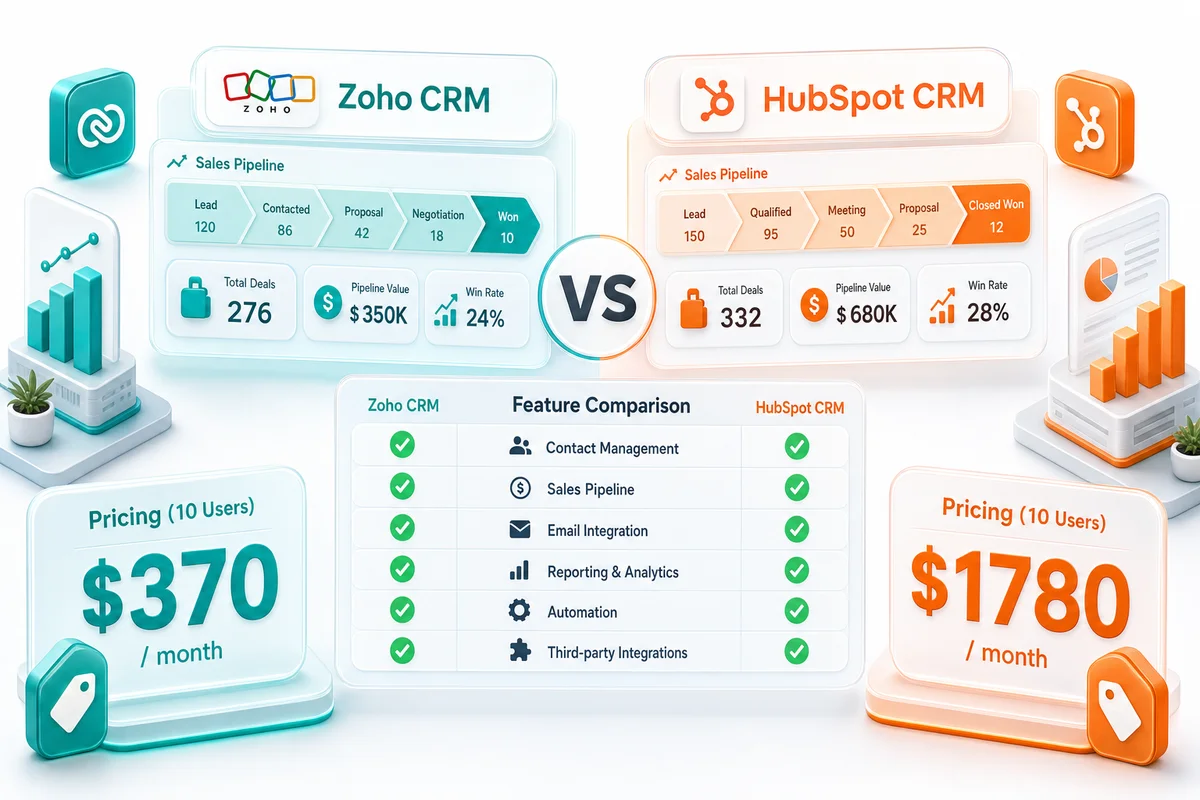
Verdict: Zoho wins on price at every tier beyond free. HubSpot's free CRM is genuinely excellent and beats Zoho's free offering. But the moment you need professional-grade features (sequences, custom reporting, A/B testing, workflow automation), HubSpot's pricing jumps dramatically. A 10-person team on HubSpot Sales + Marketing Professional costs $1,780/month or more. The same team on Zoho One costs $370/month. That's not a rounding error. That's $16,920/year in savings.
The catch: HubSpot's free tier is so capable that many small teams (2-5 people) never need to upgrade. If you can live within the free boundaries, HubSpot gives you a genuinely good CRM at zero cost.
Free tier
| Capability | HubSpot Free | Zoho CRM Free |
|---|---|---|
| Users | Up to 5 | Up to 3 |
| Contact storage | 1,000,000 contacts | 5,000 records |
| Deal pipeline | Yes (1 pipeline) | Yes (1 pipeline) |
| Email tracking | Yes (limited) | Yes (limited) |
| Forms | Yes | No |
| Live chat | Yes | No |
| Meeting scheduler | Yes | No |
| Email templates | 5 | 10 |
| Reporting dashboards | 1 dashboard, 10 reports | Basic reports |
| Mobile app | Full-featured | Full-featured |
Verdict: HubSpot wins the free tier decisively. This isn't close. HubSpot's free CRM includes forms, live chat, meeting scheduling, and email tracking features that Zoho reserves for paid plans. If your team is small and budget is zero, HubSpot Free is the better starting point. Zoho's free plan is functional but stripped down.
CRM core features
| Feature | HubSpot | Zoho CRM |
|---|---|---|
| Contact management | Excellent | Excellent |
| Deal pipelines | Good (limited pipelines on lower tiers) | Good (multiple pipelines on Pro+) |
| Lead scoring | Professional+ | Standard+ (rules-based), Zia AI scoring on Enterprise |
| Territory management | Enterprise only | Enterprise |
| Custom modules | Enterprise only | Enterprise |
| Custom fields | Yes (limits vary by tier) | Yes (generous limits) |
| Multiple currencies | Professional+ | Standard+ |
| Sales forecasting | Professional+ | Professional+ |
| Calling/telephony | Built-in (minutes vary by plan) | Built-in via Zoho PhoneBridge |
| Mobile CRM | Excellent (polished UI) | Good (functional, less polished) |
Verdict: Roughly even on core CRM. Both platforms handle contacts, deals, and pipelines well. HubSpot has a more polished mobile experience and slightly better out-of-box UX. Zoho offers more customization depth (custom modules, Canvas design) and includes features like multi-currency at lower plan tiers. For pure CRM functionality, the deciding factor is usually budget and ecosystem preference rather than feature gaps.
Marketing automation
| Capability | HubSpot Marketing Hub | Zoho Marketing Automation |
|---|---|---|
| Email campaigns | Excellent (polished drag-and-drop builder) | Good (functional builder) |
| Lead nurture sequences | Excellent (visual workflow builder) | Good (journey builder) |
| Lead scoring | Yes (behavioral + demographic) | Yes (behavioral + demographic) |
| Landing pages | Yes (drag-and-drop, built-in) | Via Zoho Sites or Zoho LandingPage |
| Blog/CMS | Full CMS Hub available | No native blog CMS |
| Social media management | Included | Via Zoho Social (separate app, included in Zoho One) |
| Ad management | Google, Facebook, LinkedIn ads tracking | Basic ad tracking |
| SEO tools | Built-in recommendations | No native SEO tools |
| A/B testing | Yes (emails, landing pages, CTAs) | Yes (emails) |
| Attribution reporting | Multi-touch attribution on Pro+ | Basic attribution |
| Contact-based pricing | Yes (costs increase with contacts) | Flat per-user pricing |
| BFCM/post-purchase automation | Requires Operations Hub ($790/mo) or third-party (Klaviyo) for eCommerce-native retention flows | Native: Zoho CRM workflow tags + Zoho Campaigns post-purchase journeys, no add-ons |
Verdict: HubSpot wins for marketing, especially inbound. HubSpot was built as a marketing platform first and added CRM later. That DNA shows. The email builder is more polished, the landing page tools are better, the SEO recommendations are genuinely useful, and the attribution reporting is more sophisticated. HubSpot's blog CMS and content strategy tools have no direct Zoho equivalent.
However: Zoho Marketing Automation is included in Zoho One at no extra cost. HubSpot Marketing Hub Professional costs $890/month as a standalone product. If your marketing needs are email campaigns, lead scoring, and basic nurture sequences, Zoho covers those at a fraction of the price. You pay the HubSpot premium for polish, content tools, and advanced attribution.
For eCommerce operators heading into Q4: Zoho's BFCM post-purchase automation runs natively inside Zoho One — buyer tagging, Campaigns journeys, and cohort reporting without add-ons. HubSpot needs Operations Hub or a third-party tool to reach the same outcome. See the full breakdown in the BFCM automation section below.
Email marketing and templates
| Capability | HubSpot | Zoho |
|---|---|---|
| Drag-and-drop email builder | Excellent (intuitive, modern) | Good (functional, improving) |
| Pre-built templates | 100+ polished templates | 50+ templates |
| Personalization tokens | Extensive (smart content) | Good (merge fields) |
| A/B testing | Subject lines, content, send times | Subject lines, content |
| Send-time optimization | Yes (AI-powered) | Yes (via Zia) |
| Deliverability tools | Built-in health monitoring | Basic |
| Transactional email | Via HubSpot or integrations | Via Zoho ZeptoMail (dedicated transactional service) |
| Email sending limits | Varies by plan and contact tier | Generous (based on plan) |
Verdict: HubSpot wins for email marketing polish. HubSpot's email builder is more intuitive, the templates look better out of the box, and the smart content personalization is more advanced. Zoho's email tools get the job done, but marketing teams accustomed to Mailchimp or HubSpot will notice the difference in template quality and builder experience.
Zoho's advantage: Zoho ZeptoMail is a dedicated transactional email service with excellent deliverability. For order confirmations, password resets, and system notifications, ZeptoMail is purpose-built and cost-effective.
Automation and workflows
| Capability | HubSpot Workflows | Zoho Blueprint + Workflow Rules |
|---|---|---|
| Visual workflow builder | Excellent (drag-and-drop) | Good (Blueprint is visual, workflow rules are form-based) |
| Trigger types | Form submissions, page views, list membership, deals, tickets | Record actions, field updates, schedules, webhooks |
| If/then branching | Yes | Yes |
| Delays and scheduling | Yes | Yes |
| Cross-object workflows | Professional+ | Yes (via Deluge scripting) |
| Webhook actions | Yes | Yes |
| Custom code actions | Yes (JavaScript, limited) | Yes (Deluge scripting, very flexible) |
| Approval processes | Yes | Yes (Blueprint) |
| Process enforcement | No (workflows run in background) | Yes (Blueprint enforces process steps in UI) |
| Workflow limits | Varies by plan (300 on Pro) | Generous (varies by plan) |
Verdict: Different strengths. HubSpot's workflow builder is more intuitive: marketing teams can build complex nurture sequences without technical help. Zoho Blueprint is unique: it enforces business processes in the UI, meaning salespeople cannot skip steps. This is powerful for operations-minded businesses that need process compliance, not just background automation.
Zoho's Deluge scripting gives technical teams far more flexibility than HubSpot's custom code actions. If you need complex conditional logic, API calls, or data transformations within workflows, Zoho is more extensible. If you want your marketing team to build their own workflows without developer support, HubSpot is easier.
Reporting and analytics
| Capability | HubSpot | Zoho |
|---|---|---|
| Built-in dashboards | Good (polished, limited on lower tiers) | Good |
| Custom report builder | Good (Professional+) | Good (Professional+) |
| Cross-module reporting | Yes (contacts, deals, tickets, marketing) | Yes (via Zoho Analytics) |
| Attribution reporting | Multi-touch attribution (Professional+) | Basic |
| Revenue attribution | Yes (Enterprise) | Via Zoho Analytics |
| Scheduled reports | Yes | Yes |
| Advanced BI | Limited (built-in only) | Zoho Analytics (full BI platform, included in Zoho One) |
| Embedded analytics | Enterprise | Yes (Zoho Analytics) |
| Custom formulas | Yes | Yes |
Verdict: HubSpot wins for out-of-box marketing reporting. Zoho wins for advanced business intelligence. HubSpot's built-in reporting is more polished and marketing-attribution-focused. But Zoho Analytics is a full business intelligence platform: data blending across CRM, Books, Inventory, and external sources, custom SQL queries, and advanced visualizations. For businesses that want deep operational analytics beyond marketing metrics, Zoho Analytics is significantly more capable than anything HubSpot offers natively.
Integrations and ecosystem
| Category | HubSpot | Zoho |
|---|---|---|
| App marketplace | 1,500+ integrations | 800+ integrations + 45+ native Zoho apps |
| Native ecosystem | CRM, Marketing, Sales, Service, CMS, Operations | CRM, Books, Inventory, Projects, Desk, HR, Marketing, Analytics, Creator, and 35+ more |
| Accounting integration | Via third-party (QuickBooks, Xero) | Zoho Books (native) |
| eCommerce | Shopify integration (native) | Zoho Inventory + Zoho Commerce |
| API quality | Excellent (well-documented, generous limits) | Good (well-documented, rate limits vary) |
| iPaaS/middleware | Operations Hub or third-party (Zapier, Make) | Zoho Flow (native) + third-party |
| Custom app building | Limited | Zoho Creator (full low-code platform) |
Verdict: HubSpot wins for third-party integrations. Zoho wins for native ecosystem breadth. HubSpot connects to more third-party tools out of the box. But Zoho's native ecosystem is broader: CRM, accounting, inventory, HR, project management, helpdesk, and marketing in one platform. If you want a connected business operating system rather than a CRM that integrates with external tools, Zoho's native ecosystem has no real HubSpot equivalent.
Ease of use
| Factor | HubSpot | Zoho CRM |
|---|---|---|
| Initial setup | Very easy (guided onboarding) | Moderate (more configuration options) |
| Learning curve for sales teams | Low | Moderate |
| Learning curve for marketing teams | Low | Moderate to high |
| Admin complexity | Low to moderate | Moderate to high |
| UI design | Modern, clean, consistent | Functional, improving (Canvas UI helps) |
| Documentation | Excellent (HubSpot Academy is outstanding) | Good (Zoho documentation is thorough but less polished) |
| Community/support | Large community, responsive support | Smaller community, good support |
Verdict: HubSpot wins on ease of use. This is one of HubSpot's genuine strengths. The interface is cleaner, the onboarding is smoother, and HubSpot Academy is one of the best free learning resources in the SaaS world. Zoho is more powerful in many areas, but that power comes with complexity. Teams that want a CRM they can adopt quickly with minimal training will have an easier time with HubSpot.
Zoho's counter: Canvas in Zoho CRM lets you design completely custom page layouts: industry-specific views, role-specific dashboards, simplified interfaces for specific teams. Once configured by an admin or partner, the end-user experience can be just as clean as HubSpot. The difference is that HubSpot is clean out of the box; Zoho requires configuration to get there.
Pricing at scale
This is where the comparison gets serious. HubSpot's pricing model charges based on both seats and marketing contacts. As your team and contact database grow, costs compound.
Scenario: 10 sales users + 25,000 marketing contacts
| Cost Component | HubSpot | Zoho |
|---|---|---|
| CRM (Sales Hub Pro) | $890/month base (3 seats) + $350 (7 additional seats) = $1,240/month | $23/user/month x 10 = $230/month (Zoho CRM Pro) |
| Marketing (Marketing Hub Pro) | $890/month (includes 2,000 contacts) + contact tier uplift for 25K = ~$1,290/month | Included in Zoho One or ~$50/month (Zoho Campaigns) |
| Service/Support | $890/month (Service Hub Pro, if needed) | Zoho Desk included in Zoho One |
| Operations/Sync | $790/month (Operations Hub Pro) | Zoho Flow included in Zoho One |
| Monthly total | $3,420 - $4,310/month | $370/month (Zoho One) or $280/month (CRM Pro + Campaigns) |
| Annual total | $41,040 - $51,720/year | $4,440/year (Zoho One) or $3,360/year |
The gap isn't subtle. A mid-sized business running HubSpot's professional stack can easily spend $40,000-50,000/year. The same operational footprint on Zoho One costs under $5,000/year. Even factoring in implementation costs and the learning curve, the total cost of ownership difference over 3 years is $100,000+.
HubSpot's contact pricing is the real issue. HubSpot charges based on marketing contacts. Every contact you email, target with ads, or include in workflows counts. As your database grows from 2,000 to 10,000 to 50,000 contacts, your marketing bill grows with it, even if your team size stays the same. Zoho charges per user, not per contact. Your database can grow without your bill growing. For the full breakdown of Zoho Campaigns pricing tiers, see our Zoho Campaigns review and pricing guide.
Zoho CRM vs HubSpot for Shopify and Amazon sellers
The standard Zoho vs HubSpot comparison assumes you're picking a CRM and maybe a marketing platform. For multi-channel eCommerce sellers, the comparison shifts. You're not just choosing a CRM; you're choosing the center of gravity for a stack that has to handle inventory across Shopify, Amazon, and WooCommerce, sync to accounting, and survive Q4 peak volume without per-contact pricing surprises.
What Zoho's native ecosystem means for sellers
A customer opens a support ticket three days after their Amazon order shipped. In Zoho, the agent opens Zoho Desk and sees the customer's CRM record, their Zoho Books invoice, and the shipment from Zoho Inventory, all without switching tabs. Native data, same platform.
In HubSpot, you'd need a Shopify connector (native), a separate Amazon integration (third-party), and accounting lives outside HubSpot entirely. The customer picture is always partial unless you've paid to stitch it together with middleware.
This matters during Q4. From Black Friday through Christmas, a peak-season Shopify seller may process 3 to 5 times normal order volume. Customer emails spike. Inventory moves fast. Zoho Inventory's multi-channel sync keeps Shopify, Amazon, and WooCommerce stock counts running from one master, so oversells from lagged channel updates don't happen. For how that sync works operationally, see Multi-Channel Inventory Management with Zoho.
Where HubSpot still wins for eCommerce
HubSpot's Shopify integration is well-built and well-documented. If your eCommerce strategy is a single Shopify store, content-driven acquisition, and email nurture sequences for new customer onboarding, HubSpot's marketing tools handle that better. The email builder is cleaner, the abandoned cart workflows are polished, and HubSpot Academy has practical eCommerce marketing content.
The inflection point is channels, operational data, or database size. Add Amazon. Add WooCommerce. Grow to 50,000 contacts. Each of those increases your HubSpot bill in a way that Zoho's per-user pricing doesn't.
Post-purchase retention at scale
Acquiring a new eCommerce customer costs five to seven times more than keeping one. Zoho CRM's RFM segmentation (Recency, Frequency, Monetary) gives sellers the building blocks for post-purchase automation: win-back sequences for first-time buyers, replenishment reminders, VIP tiers based on spend thresholds. Those workflows run inside Zoho CRM natively, without a separate retention tool and without a per-contact pricing meter running. See how eCommerce retention workflows in Zoho CRM operate end to end.
BFCM post-purchase automation: native vs add-ons
Most eCommerce sellers head into Black Friday without a CRM layer for first-time buyers. The campaign goes out, orders come in, and those buyers disappear into a marketing contact list with no cohort tag, no 30-day repeat purchase tracking, and no structured sequence to convert them from one-time deal hunters into repeat customers.
Zoho CRM handles this natively. Workflow rules tag every BFCM buyer on order creation. Zoho Campaigns fires the post-purchase journey: a day-3 review request, day-14 replenishment reminder, day-30 win-back for buyers who haven't returned. Zoho Analytics tracks 30-day repeat purchase rate for the BFCM cohort as its own segment. The whole setup stays inside Zoho One — no separate tool, no retention platform adding per-contact overhead, no middleware.
HubSpot can run post-purchase workflows. But eCommerce-specific retention — BFCM cohort tagging, replenishment triggers tied to order data, platform-native sync across Shopify and Amazon — typically requires Operations Hub at $790/month or third-party tools like Klaviyo. That's a meaningful addition to an already-high marketing contact bill.
For the full BFCM CRM configuration, including Shopify and Amazon workflow setup and Zoho Campaigns journey templates, see BFCM Customer Retention: Configuring Zoho CRM Before Black Friday. For the Q4 operational readiness checklist covering inventory sync, support routing, and post-purchase automation together, see eCommerce Peak Season on Zoho: Managing Q4 Operations in Real Time.
Case study: multi-channel home goods brand
Fictional but representative. Annual revenue: $4.2M across Shopify and Amazon. Previous stack: HubSpot Sales + Marketing Professional, 18 months.
With 38,000 marketing contacts and growing, their HubSpot spend had reached $2,900/month. Inventory required two connectors; accounting (Xero) had no deal-level visibility inside HubSpot. Every time a rep needed margin data on a deal, they opened a separate tab.
After migrating to Zoho One with Zolify handling the data migration and workflow rebuild, monthly SaaS dropped to $445. Zoho CRM now connects to Zoho Inventory and Zoho Books in a single record view. Their first BFCM post-migration ran post-purchase win-back sequences on Zoho Marketing Automation with no contact-tier overage. Three-year projected savings against their previous HubSpot stack: over $91,000.
When HubSpot is the better choice
Be honest with yourself about these scenarios:
- Small teams with tight budgets should start with HubSpot Free. It's the best zero-cost CRM available. If you can operate within the free tier's limits, there's no reason to pay for Zoho.
- Inbound marketing teams get more from HubSpot. If your business depends on blog content, SEO, landing pages, and lead nurture sequences, HubSpot's marketing tools are purpose-built for this. The CMS Hub, SEO recommendations, and content strategy tools have no direct Zoho equivalent.
- Marketing teams that need to work independently will adapt faster to HubSpot. The workflow builder, email editor, and landing page tools are designed for marketers, not developers, so campaigns don't require technical support to build.
- Multi-touch attribution reporting is stronger in HubSpot. Its attribution models (first touch, last touch, linear, full path) are more sophisticated than Zoho's out-of-box options. If understanding which marketing touchpoints drive revenue is central to your strategy, HubSpot does this better.
- Teams that resist change will adopt HubSpot faster. HubSpot Academy, the intuitive UI, and guided onboarding make it easier to roll out. If adoption is your biggest risk, HubSpot reduces it.
When Zoho is the better choice
- Businesses that need more than a CRM get better value from Zoho. If you also need accounting (Zoho Books), inventory management (Zoho Inventory), project management (Zoho Projects), HR (Zoho People), or helpdesk (Zoho Desk), Zoho One covers all of them for $37/user/month. Buying the HubSpot equivalent of each would cost 5-10x more.
- Teams scaling past 10 users or 10,000 contacts hit HubSpot's pricing wall quickly. The per-seat and per-contact charges make growth expensive. Zoho's per-user pricing is predictable and linear.
- Companies that need process enforcement, not just background automation, should look at Zoho Blueprint. It forces salespeople to follow defined steps; they literally can't skip stages or leave required fields empty. HubSpot workflows run in the background and don't enforce process in the UI. For businesses that need sales process compliance, Blueprint is a genuine differentiator.
- Deep customization requirements favor Zoho. Custom modules, Canvas page layouts, Deluge scripting, and Zoho Creator (low-code app builder) give you flexibility that HubSpot doesn't match. If your business has unique processes that a standard CRM can't handle, Zoho is more adaptable.
- Existing Zoho users get native integration that no third-party connector can replicate. Adding Zoho CRM to an existing Zoho stack (Books, Inventory, Desk) means data flows between deals and invoices, between support tickets and customer records, without middleware. For eCommerce sellers, that connected data is what makes post-purchase retention workflows practical without expensive add-ons.
- Once you're paying for HubSpot, you're paying a lot. Zoho delivers 80-90% of the functionality at 20-30% of the cost. The math is straightforward the moment you run it.
- International operations work better in Zoho. It handles multi-currency, multi-language, and global tax compliance more naturally than HubSpot. Zoho Corporation operates globally; HubSpot is US-centric by design.
Total cost of ownership: 10 users, CRM + marketing
| Category | HubSpot (Professional) | Zoho One |
|---|---|---|
| CRM licenses (10 users) | $1,240/month | $370/month |
| Marketing automation (25K contacts) | ~$1,290/month | Included |
| Email marketing | Included in Marketing Hub | Included |
| Helpdesk/service | $890/month (if added) | Included |
| Accounting integration | Third-party ($50-200/month) | Zoho Books included |
| Operations/data sync | $790/month (Operations Hub) | Zoho Flow included |
| Onboarding fee | $3,000-8,000 (required on Pro+) | $0 (optional partner setup) |
| Year 1 total | $53,000 - $60,000+ | $4,440 + implementation |
| Year 2 total | $50,000 - $55,000 | $4,440 |
| 3-year total | $153,000 - $175,000 | $13,320 + implementation |
Note: HubSpot requires paid onboarding for Professional and Enterprise plans. Zoho doesn't, though professional implementation still pays for itself quickly. Zolify has completed 100+ migrations from HubSpot, Salesforce, and legacy CRMs to Zoho, with a CA on staff reviewing every data mapping and a workflow specialist rebuilding automation logic. As an Official Zoho Authorized Partner, we have access to Zoho partner resources that reduce implementation time. A typical Zolify implementation for Zoho CRM + Marketing runs $3,000-10,000 depending on complexity. Even with that cost, the 3-year savings versus HubSpot exceed $130,000 for a 10-person team.
Migration guidance: HubSpot to Zoho
If you've decided to move from HubSpot to Zoho, here's what the migration involves. If you're coming from an older CRM or a spreadsheet-based setup rather than HubSpot, our legacy CRM to Zoho CRM migration guide covers those data patterns in more detail.
What migrates cleanly:
- Contacts and companies (all properties and custom fields)
- Deals and pipeline stages
- Email history and activity timeline
- Lists and segments
- Forms (recreated in Zoho Forms)
- Basic workflow logic
What requires rebuilding:
- Email templates (must be recreated in Zoho's builder)
- Complex workflows and sequences (must be rebuilt using Zoho Blueprint and workflow rules)
- Landing pages (no direct migration path; must be rebuilt in Zoho Sites or Zoho LandingPage)
- Reports and dashboards (must be recreated in Zoho Analytics)
- Third-party integrations (must be reconnected)
- HubSpot CMS content (blog posts, website pages); this is a separate website migration
Timeline: A typical HubSpot-to-Zoho migration takes 3-6 weeks for a mid-sized business. Simple migrations (CRM data only) can be completed in 1-2 weeks. Complex migrations (CRM + marketing automation + custom integrations) may take 6-8 weeks.
Zolify handles HubSpot-to-Zoho migrations end to end. We migrate contacts, deals, email campaigns, workflows, forms, and reports with zero data loss. Our team maps your HubSpot workflows to Zoho equivalents, rebuilds your automation in Blueprint, and trains your team on the new platform.
Learn more about our HubSpot to Zoho migration service
Bottom line
HubSpot is a polished, intuitive platform with the strongest inbound marketing tools on the market and a genuinely useful free tier. It's the right choice for small marketing-driven teams that can operate within the free CRM or justify the premium pricing for HubSpot's content and attribution tools.
Zoho is a full business platform that offers dramatically more value per dollar: CRM, marketing, accounting, inventory, HR, and operations in one ecosystem at a predictable per-user price. It's the right choice for cost-conscious, operations-minded businesses that want a connected platform rather than a collection of point solutions.
Our honest recommendation:
- If you're a team of 1-5 and budget is your top constraint, start with HubSpot Free. Hard to beat free.
- If you're growing past 5 users and need marketing automation, run the numbers. HubSpot's Professional pricing is where most businesses get sticker shock.
- If you already use Zoho Books, Zoho Inventory, or other Zoho apps, adding Zoho CRM is a straightforward decision. The native integration is worth more than HubSpot's UX advantage.
- If inbound content marketing is the core of your growth strategy and budget isn't the primary constraint, HubSpot's marketing tools are genuinely superior.
- If total cost of ownership over 3 years matters to your business, the math favors Zoho by a wide margin.
Ready to evaluate?
Zolify offers a free 30-minute discovery call where we review your current CRM and marketing stack and help you evaluate whether Zoho is the right fit. We're an Official Zoho Partner, but we'll tell you honestly if HubSpot is the better choice for your situation. A bad migration helps no one.
If you're ready to move forward, we offer full Zoho CRM implementations and HubSpot-to-Zoho migrations with fixed-price quotes. Or read through the HubSpot to Zoho CRM Migration Guide first — it covers data mapping, workflow rebuilds, common pitfalls, and realistic timelines. For teams migrating from Freshsales (another HubSpot competitor), the Freshsales to Zoho CRM migration guide covers the contact, deal, and pipeline mapping specifics.
If you're weighing implementation options — whether US-based Zoho consultants or a specialist firm — our breakdown of Zolify vs US-based Zoho consultants covers what the price and expertise gap actually means for your project.
Frequently Asked Questions
For cost-conscious businesses that want CRM + marketing + operations in one ecosystem, Zoho is better value. HubSpot has a superior free CRM and stronger inbound marketing content tools, but costs escalate rapidly as you scale beyond the free tier.
Zoho One costs $37/user/month for the full suite. HubSpot Sales Hub Professional starts at $890/month base (3 seats) plus $50/additional seat. For a 10-person team, Zoho One is $370/month vs HubSpot Sales + Marketing at $1,780/month, 79% less.
Yes. Zolify migrates contacts, deals, email campaigns, workflows, forms, and reports from HubSpot to Zoho with zero data loss. Typical migrations take 3-6 weeks.
Yes. Zoho Marketing Automation offers email campaigns, lead scoring, nurture sequences, social posting, and web analytics. It's less polished than HubSpot's marketing tools for inbound content, but it's included in Zoho One at no extra cost.
Yes. Zoho CRM tags BFCM buyers automatically via workflow rules, and Zoho Campaigns handles post-purchase sequences natively inside Zoho One — no separate retention tool required. HubSpot can run post-purchase workflows but eCommerce-specific retention sequences (cohort tagging, replenishment triggers, platform-native sync) typically require Operations Hub at $790/month or third-party tools like Klaviyo, adding cost and integration overhead.
See exactly where your Shopify, Amazon, or WooCommerce ops are leaking — free.
Get a personalised eCommerce Ops Audit: inventory gaps, accounting leaks, and order-flow bottlenecks — with a Zoho fix roadmap. Delivered in 48 hours, at no cost.