Tally to Zoho Books Migration: Complete Guide for Indian SMEs
Tally's ledger group structure, voucher model, and godown system don't map directly to Zoho Books. Here's how to handle every structural difference, from chart of accounts rebuild to GST e-invoicing setup, without losing data or disrupting operations.
A Tally to Zoho Books migration for an Indian SME typically takes 6 to 10 weeks from audit to go-live. You'll rebuild the chart of accounts from your Tally ledger export, reconstruct GST configuration, enter outstanding invoices individually as open documents, and run a parallel period before cutting over. Historical vouchers don't import directly — most businesses use a clean opening balance cutover instead.
Tally works. That's actually the problem. Businesses that have run Tally ERP 9 or Tally Prime for five or ten years have deeply embedded workflows: voucher entry habits, ledger structures built up over financial years, godown configurations that match their physical warehouse layout. Moving away from Tally isn't just a software switch. It's a structural migration.
And the structural differences between Tally and Zoho Books are what make this harder than, say, a QuickBooks migration. Tally's ledger group hierarchy, voucher-based entry model, and godown system don't have direct equivalents in Zoho. Each one needs a deliberate mapping decision before you move anything.
Zolify has completed 100+ migrations to Zoho Books, including a significant number from Tally ERP 9 and Tally Prime. This guide reflects what those engagements actually looked like.
TL;DR: Tally uses ledger groups, voucher types, and godowns, none of which map automatically to Zoho Books. A successful migration requires building a ledger-to-account mapping, converting voucher types to Zoho document types, and reconstructing GST configuration from scratch. Most Indian SMEs use a clean cutover date rather than importing historical vouchers. Plan for 6 to 10 weeks, with a parallel run before go-live.
Why Indian SMEs move from Tally to Zoho Books
Cloud access comes up most often. Tally on-premise means your accounts live on one machine, or you need a Tally.NET subscription and configuration for remote access. Remote teams can't get in cleanly. Your CA can't log in from their office. Zoho Books is browser-based, and that matters more than it used to.
Ecosystem integration is the other big driver. Zoho now spans over 55 applications (Zoho, 2026). If you're running Zoho CRM for sales, Zoho Inventory for stock, or planning to connect Shopify or Amazon, Zoho Books plugs into all of them natively. Tally needs middleware or custom integrations for any of that.
GST automation matters too. Zoho Books handles e-invoicing through direct IRP integration, generates e-way bills within the same workflow, and pulls GSTR reports for filing. Tally users often run separate utilities (GST Offline Tool, the e-way bill portal, third-party e-invoicing software) then reconcile manually across them. Zoho brings it into one place.
For a full picture of how Zoho connects eCommerce channels into one backend, see our Zoho for eCommerce guide. For a detailed look at how Zoho Books, CRM, and Inventory work as a connected system, see Zoho CRM, Books and Inventory integration.
Tally vs. Zoho Books: at a glance
| Factor | Tally ERP 9 / Prime | Zoho Books |
|---|---|---|
| Access model | On-premise (Tally.NET for remote) | Cloud-native; browser + mobile app |
| GST e-invoicing | Via third-party utility | Built-in IRP integration |
| eCommerce connectivity | No native connectors | Shopify, Amazon, Flipkart (via Zoho Inventory) |
| CRM and operations | External middleware required | Native Zoho ecosystem: CRM, Inventory, Desk |
| Multi-user | Requires specific setup and LAN/VPN | Role-based access; unlimited devices |
| Voucher model | Journal-entry vouchers | Structured documents (invoice, bill, payment) |
| Zoho One inclusion | N/A | Included ($37/user/month for 45+ apps) |
| One-time vs. subscription | One-time license (Tally Prime: ~₹18,000) | Monthly or annual subscription |
What makes Tally migration structurally different
This is the part most migration guides skip. Tally and Zoho Books are built on different accounting models. Understanding those differences before you start is what separates a clean migration from a six-month reconciliation headache.
Ledger groups vs. chart of accounts
Tally organises ledgers in a hierarchy of groups and sub-groups. At the top level you've got groups like Sundry Debtors, Sundry Creditors, Bank Accounts, Capital Account, Sales Accounts, and Purchase Accounts. Ledgers sit under these groups and inherit their behaviour. A customer's ledger under Sundry Debtors automatically behaves as a receivable.
Zoho Books uses a flat chart of accounts with account types: Accounts Receivable, Accounts Payable, Bank, Income, Expense, Equity. Individual accounts behave based on their type, not their group membership. The hierarchy doesn't transfer. You build the Zoho chart of accounts from scratch, using the Tally ledger list as your source.
Voucher types vs. document types
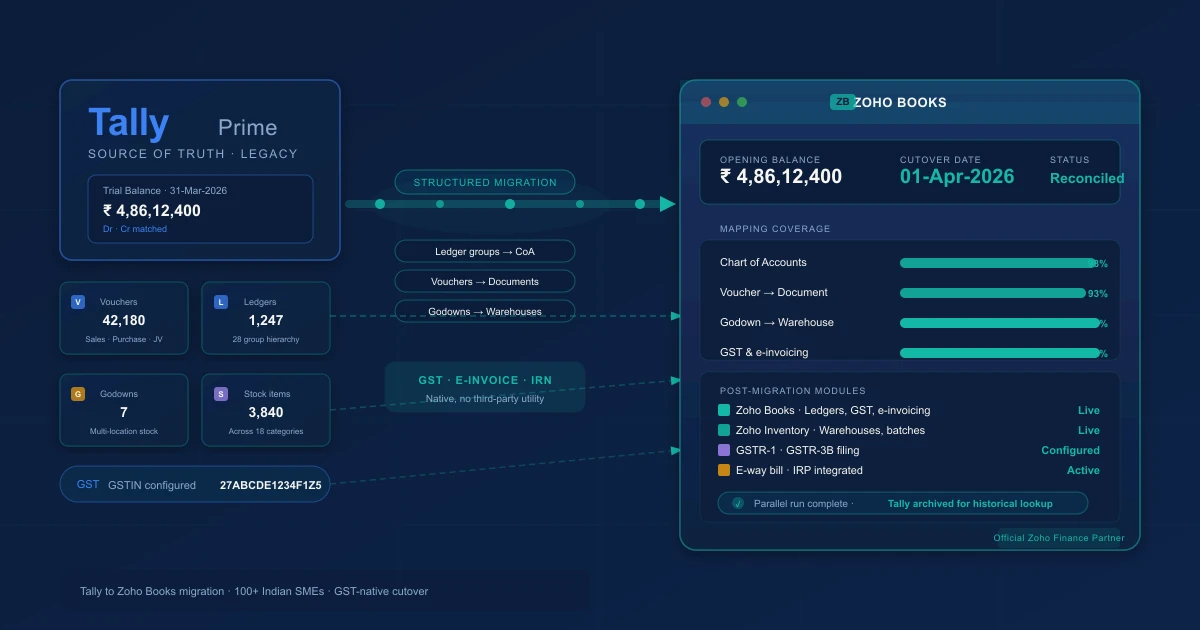
Tally's voucher model is the most misunderstood part of a Tally migration. In Tally, every financial event is a voucher: Sales Voucher, Purchase Voucher, Receipt Voucher, Payment Voucher, Journal Voucher, Contra Voucher. They're all entries into a general ledger at the core. Zoho Books uses distinct document types with their own workflows, status tracking, and automation.
Here's how they map:
| Tally Voucher Type | Zoho Books Document Type |
|---|---|
| Sales Voucher | Invoice |
| Purchase Voucher | Bill |
| Receipt Voucher | Payment Received (applied to invoice) |
| Payment Voucher | Vendor Payment (applied to bill) |
| Journal Voucher | Manual Journal |
| Contra Voucher | Bank Transfer (between accounts) |
| Debit Note | Credit Note (vendor-side) |
| Credit Note | Credit Note (customer-side) |
The difference isn't just naming. In Tally, a Sales Voucher is a journal entry that credits a sales ledger and debits a party ledger. In Zoho, an invoice has status, aging, payment links, and reminders built in. That's an improvement, but it means historical vouchers can't be imported as vouchers. They need to be converted to the appropriate document type, or entered as opening balances.
Godowns and stock configuration
Tally uses godowns to represent physical storage locations: a warehouse, a store, a section within a facility. Stock items are assigned to stock groups and sub-groups, and stock levels are tracked by godown.
Zoho Inventory (which connects to Zoho Books) uses warehouses and item categories. The mapping is:
| Tally | Zoho |
|---|---|
| Godown | Warehouse (in Zoho Inventory) |
| Stock Group | Item Category |
| Stock Sub-Group | Sub-category |
| Stock Item | Item |
| Unit of Measure | Unit |
Get this mapping documented before importing items. If you import items without assigning categories, you'll spend days reassigning them one by one afterwards.
If you're new to Zoho Books, our Zoho Books setup guide for accountants covers the chart of accounts and opening balance steps in detail.
Pre-migration audit: what to document before touching anything
Don't open Zoho Books until you've done this. The pre-migration audit is where migrations either go smoothly or produce three months of cleanup.
Full ledger export with group classification
Export your complete ledger list from Tally (Gateway of Tally > Display > List of Accounts). You want every ledger with its group assignment, opening balance, and whether it has outstanding entries. This becomes your source for building the Zoho chart of accounts.
Flag inactive ledgers. Most Tally installations have ledgers created years ago for vendors or customers who no longer exist. Don't carry these across. Clean them in Tally before exporting.
Outstanding debtors and creditors
The single most common post-migration problem we see: outstanding amounts that don't reconcile. Before migration, run the Outstanding Receivables and Outstanding Payables reports in Tally and verify them against your business records. Every open invoice and bill needs to carry across to Zoho as an open document, not as part of a lump opening balance. If you enter sundry debtors as a total balance, you lose individual invoice aging and collection tracking.
Export the outstanding ledger report and list every open transaction with date, party name, amount, and reference number. This list is what you'll use to create open invoices in Zoho after import.
Stock item list with opening stock quantities
Export the stock item list with current stock levels as of your planned cutover date. You need item name, stock group, unit of measure, and quantity per godown. If you're using Zoho Inventory alongside Zoho Books, you'll also need the item cost for opening stock valuation.
GST configuration details
Document your GSTIN, all HSN codes assigned to items, tax rates (CGST/SGST/IGST percentages), and state codes for your business locations. If you have multiple GSTINs for different branches, list each one separately. None of this transfers automatically. You'll rebuild it in Zoho's GST configuration from scratch.
Note your e-invoicing status too. If your aggregate annual turnover exceeds Rs 5 crore, you're already under the e-invoicing mandate. Zoho Books handles this natively once configured, but you need to register your GSTIN on the IRP portal separately if you haven't already.
Number series
Note your current invoice number series, bill number series, and any other document sequences you want to continue in Zoho. Zoho Books lets you set a custom prefix and starting number. Matching or continuing your Tally series prevents confusion for customers and vendors who reference document numbers.
Exporting from Tally: what transfers cleanly and what doesn't
Tally's export capabilities have improved in Tally Prime but remain limited compared to what migration actually requires.
Tally exports master data cleanly: ledgers, groups, and cost centres (via Data > Export > Masters > All Masters), stock masters including items, groups, and units (via Data > Export > Inventory Masters), and basic transaction data in XML or Excel format.
What needs manual preparation: voucher history exports exist but don't import directly into Zoho's document model. Opening balances come through the master export but need column reformatting for Zoho's import template. GST configuration isn't exportable in any portable format. Recurring entries (memorised vouchers in Tally) don't transfer either.
For the ledger master export, use Data > Export > Masters and select All Masters. The Excel output gives you ledger names, groups, and opening balances. You'll reformat this into Zoho's chart of accounts import template.
For stock items, use Data > Export > Inventory Masters. This gives you item names, groups, units, and rates. Zoho Inventory's item import template uses different column headers, so plan time for reformatting.
The practical approach for most businesses: use Tally exports as source documents for building the Zoho import files, rather than expecting a direct import. It's more work upfront, but it forces you to validate every account and item along the way.
Mapping Tally to Zoho Books: the full account type table
This mapping is the core of the migration. Every Tally ledger group maps to a Zoho account type. Build this as a spreadsheet before you create a single account in Zoho.
| Tally Group | Zoho Account Type |
|---|---|
| Sundry Debtors | Accounts Receivable |
| Sundry Creditors | Accounts Payable |
| Bank Accounts | Bank |
| Cash-in-Hand | Cash |
| Sales Accounts | Income |
| Purchase Accounts | Cost of Goods Sold |
| Direct Expenses | Cost of Goods Sold |
| Indirect Expenses | Expense |
| Direct Incomes | Other Income |
| Indirect Incomes | Other Income |
| Fixed Assets | Fixed Asset |
| Current Assets | Other Current Asset |
| Current Liabilities | Other Current Liability |
| Loans (Liability) | Long Term Liability |
| Capital Account | Owner's Equity |
| Reserves & Surplus | Owner's Equity |
| Duties & Taxes | Other Current Liability |
| Suspense Account | Other Current Asset (review and clear post-migration) |
The Duties & Taxes group in Tally holds GST output tax, input tax credit, and TDS payable ledgers. In Zoho Books, these are handled by the GST tax engine and don't need manual ledgers. Map them to Other Current Liability as a placeholder, then reconcile the balances into your GST configuration after setup.
Migration steps: the full sequence
Step 1: Set up Zoho Books organisation
Create your Zoho Books organisation first. In the initial setup wizard, configure:
- Legal business name and GSTIN
- Financial year start date (most Indian businesses: April 1)
- Base currency (INR)
- GST settings: registration type (Regular, Composition, etc.)
- Accounting method (accrual is correct for most businesses, so don't change it without a specific reason)
Don't connect bank feeds yet. Get the structure right first.
Step 2: Build the chart of accounts
Use your Tally ledger export and the mapping table above. Import accounts via Settings > Chart of Accounts > Import in Zoho Books. The Zoho template needs account name, account type, and description. Add any sub-accounts using the parent account field.
Review every account after import. Confirm that receivable accounts are typed as Accounts Receivable, payable accounts as Accounts Payable, and bank accounts as Bank. Wrong types at this stage produce wrong reports for as long as you use the system.
Step 3: Import customers and vendors
Create customers from your Sundry Debtors ledgers and vendors from Sundry Creditors. Zoho Books separates contacts into customers (for invoicing) and vendors (for bills). A contact can be both if the party is both a customer and a supplier.
The Zoho Contacts import template needs: display name, company name, email, phone, billing address, and GST treatment. Set GST treatment correctly for each contact: Registered Regular, Registered Composition, Unregistered, Consumer, or Overseas. This field determines which tax applies on invoices automatically.
Don't import a contact as just a name without GST details. You'll end up updating hundreds of records manually before you can invoice correctly.
Step 4: Import items and inventory
Import stock items via Zoho Inventory (if you're using it alongside Zoho Books) or directly in Zoho Books if you're not tracking stock. Map each stock group to an item category in Zoho, and each godown to a warehouse.
For each item you need: item name, category, unit of measure, rate, HSN code, and applicable tax rate. HSN codes are required in Zoho for GST compliance. If they weren't consistently assigned in Tally, fix them during this import rather than patching them one by one afterwards.
Step 5: Enter opening balances
This is the most consequential step. Opening balances establish Zoho's financial position as of the cutover date. Get them wrong and every report going forward is wrong.
Enter opening balances via Settings > Opening Balances in Zoho Books. You need the trial balance from Tally as of your cutover date. Enter each account balance: assets as positive, liabilities and equity as negative (or per Zoho's sign convention, which the interface will indicate).
For Accounts Receivable and Accounts Payable, don't enter a total balance. Enter each open invoice and open bill individually. These need to appear as outstanding documents with their own aging, not as a lump sum. Go to each customer and vendor record and create the open invoices and bills with their original dates and amounts.
Reconcile the Zoho trial balance against your Tally trial balance for the same date before moving to the next step. They should match exactly. If they don't, find the discrepancy before proceeding. It won't resolve itself.
Step 6: GST configuration and e-invoicing setup
Configure GST in Zoho Books under Settings > Taxes. Create your tax components:
- IGST (for inter-state transactions)
- CGST plus SGST pair (for intra-state transactions)
- The applicable percentages per your GST registration (5%, 12%, 18%, 28%, and any cess)
Assign default tax rates to items via the HSN code mapping. Zoho Books can auto-apply the correct tax rate based on HSN code and whether the transaction is B2B vs. B2C, interstate vs. intrastate.
For e-invoicing: if your aggregate turnover exceeds Rs 5 crore, enable it under Settings > E-invoicing. Zoho connects to the IRP directly. Each invoice you create gets submitted to the IRP, and Zoho stores the returned IRN and signed QR code against the invoice record. Test this on a few invoices before going live. Verify that IRNs are generating and the signed invoice PDF looks correct.
For e-way bills: configure under Settings > E-way Bill. Zoho generates e-way bills from invoices above the threshold value. Check that your vehicle type and transporter details are configured if you manage your own logistics.
Step 7: Parallel run
Don't cut over immediately. Run Zoho Books in parallel with Tally for one full accounting period, at minimum four weeks, ideally one full month.
During the parallel run:
- Enter every transaction in both systems
- Reconcile bank statements in both
- Compare GST output: the tax liabilities in Zoho should match Tally for the same period
- Test e-invoicing on a few real sales and verify the IRN appears
The parallel run is where GST configuration errors show up before they affect your GSTR filings. Find them here, fix them here.
Our Zoho Books setup guide for accountants covers the Zoho configuration steps in detail.
GST-specific considerations
GST is where Tally migrations have the most potential to go wrong, because it touches items, customers, vendors, transactions, and compliance filings all at once.
HSN code mapping is the first thing to verify. Every item in Zoho needs an HSN code. If your Tally data has inconsistent HSN assignments, fix them during the item import, not after. Wrong HSN codes on e-invoices require cancellation and reissuance, and that's a process nobody wants to deal with in the first month after go-live.
Tax components need to be set up as pairs. In Zoho Books, when you create an intra-state GST rate of 18%, you create CGST at 9% and SGST at 9%, linking them as components of one tax group. Transactions then apply the pair automatically based on whether the supply is intra-state or inter-state. Get this right at setup and it's invisible from there on.
India has over 1.5 crore active GST registrations as of 2026 (GST Council, 2026). The e-invoicing mandate covers businesses above Rs 5 crore aggregate turnover, and compliance errors at this scale are costly. Zoho's IRP integration eliminates the manual submission step, but the configuration needs verification before go-live.
GSTR-1 and GSTR-3B reports are available directly in Zoho Books under the GST Returns section. The first time you run these in Zoho after migration, compare them to the equivalent Tally reports for the same period. If the numbers match, your GST configuration is correct. If they don't, find the cause before filing.
Common migration mistakes
Migrating mid-year without reconciling outstanding amounts
The businesses with the worst migrations pick a cutover date mid-financial year and don't reconcile outstanding receivables and payables beforehand. They carry a total balance for Sundry Debtors instead of individual open invoices. Three months later, they can't match customer payments to specific invoices in Zoho, and their aging report is useless.
Always enter outstanding invoices and bills individually in Zoho, even if there are hundreds of them. It's tedious. It's necessary.
Not testing GST output before go-live
GST configuration that looks correct can produce wrong output on specific transaction types: composition customers, export invoices, exempt supplies, nil-rated items. Test every transaction type you actually use before going live. Create test transactions with real party data during the parallel run and verify the GST treatment.
Skipping the parallel run
It feels redundant when your Zoho opening balances match Tally and a few test invoices look fine. But the parallel run exists because you haven't yet encountered your specific edge cases: the advance receipt that needs to link to a future invoice, the debit note workflow your team has been using for three years, the multi-location stock transfer. These surface in week two of a parallel run, not on day one.
Importing historical vouchers without checking for duplicates
If you do choose to import historical voucher data, run a duplicate check before and after. Tally allows the same voucher number to exist in different voucher types. Zoho doesn't. Voucher reference conflicts produce import errors that are tedious to resolve entry by entry.
Assuming Tally's number series will carry over automatically
They won't. Set your invoice number prefix and starting number explicitly in Zoho Books before creating the first invoice. If your Tally series was INV-2025-1847, set Zoho to start at INV-2025-1848. Your customers and vendors reference prior invoice numbers, and continuity matters.
What Zoho Books Does Better Than Tally
- Cloud access. Browser-based, mobile app, no VPN or Tally.NET subscription needed. Your team and your CA can log in from anywhere.
- Native ecosystem. Zoho Books connects to Zoho CRM, Zoho Inventory, Zoho Desk, and 50+ other apps. Tally needs middleware or custom integration for any of these.
- GST automation. E-invoicing through direct IRP integration, e-way bill generation, and GSTR filing, all from within Zoho Books. Tally users often run 2 to 3 separate tools for the same workflow.
- Multi-channel eCommerce. Zoho Inventory connects to Shopify, Amazon, and Flipkart natively. Stock levels, orders, and payouts sync automatically. Tally has no native eCommerce connectivity.
- Automation depth. Workflow rules, approval workflows, scheduled functions via Deluge scripting, and Zoho Flow automations. Tally's automation is limited to basic voucher type configurations.
- Collaboration. Multiple users working simultaneously with role-based access. Tally's multi-user experience requires specific setup and network configuration.
- Included in Zoho One. $37/user/month (billed annually) gets you Books plus CRM, helpdesk, HR, project management, and 40+ more apps.
What Tally Does Better (Be Honest)
- Speed of data entry. Tally's keyboard-driven voucher entry is extremely fast for experienced users. A skilled Tally operator can enter transactions faster than in any web-based interface. This is the single biggest adjustment your team will face.
- Offline operation. Tally works without internet. For businesses in areas with unreliable connectivity, this still matters. Zoho Books is cloud-only.
- Statutory compliance depth for India. Tally has decades of Indian statutory compliance built in: TDS, TCS, GST, payroll (with Tally Prime). Zoho Books covers GST well but its Indian payroll and TDS handling is less mature.
- Cost for single-user setups. Tally Prime's single-user license is a one-time purchase (around ₹18,000). For a single-user setup with no ecosystem needs, Tally is cheaper over 3+ years than a Zoho subscription.
- Accountant familiarity in India. Most Indian CAs and accountants have used Tally for years. The learning curve of switching to Zoho is real for your accounting team.
If your business is a single-location, single-user operation with no eCommerce, no remote team, and no need for CRM integration, Tally may still be sufficient. But if any of those needs exist or are coming, the switch to Zoho pays for itself quickly.
Realistic Timelines
| Business Size | Complexity | Timeline | Key Variables |
|---|---|---|---|
| Small | Single entity, simple ledger structure | 4-6 weeks + 1 month parallel | Clean ledger list, few open transactions |
| Medium | Single entity, inventory, GST complexity | 6-10 weeks + 1 month parallel | Godown mapping, HSN codes, e-invoicing |
| Large | Multi-branch, multi-GSTIN, heavy stock | 3-4 months + 1-2 months parallel | Multiple GSTINs, complex stock groups, branch-level reporting |
Phase breakdown (medium business)
| Phase | Duration | What Happens |
|---|---|---|
| Pre-migration audit | 1-2 weeks | Export ledgers, document godowns, map GST config |
| Zoho Books setup | 1 week | Organisation, chart of accounts, tax configuration |
| Data export and transformation | 3-5 days | Reformat Tally exports for Zoho import templates |
| Import and opening balances | 3-5 days | Import contacts, items, enter opening balances individually |
| GST and e-invoicing setup | 3-5 days | Configure rates, HSN mapping, test e-invoicing |
| Parallel run | 4-6 weeks | Dual entry, reconcile trial balance and GST output |
DIY vs. Getting Help
DIY works when:
- Single entity, simple ledger structure (under 50 ledgers)
- No inventory or godown mapping needed
- Standard GST setup with no e-invoicing
- Your team or CA is comfortable learning Zoho Books
- You have time for a 2-month migration project
A partner helps when:
- Complex ledger structure needing chart of accounts redesign
- Multiple godowns requiring warehouse mapping
- E-invoicing under the Rs 5 crore mandate
- Multi-GSTIN or multi-branch setups
- Outstanding receivables and payables running into hundreds of entries
- Your CA needs support learning Zoho Books
Getting the migration right the first time
The Tally-to-Zoho migration goes wrong in predictable places. Businesses that rush the planning phase end up with opening balances that don't reconcile, GST output that doesn't match prior filings, and outstanding invoices that lost their aging detail in the move. The technical import isn't the hard part. The ledger mapping and GST configuration are.
As an Official Zoho Finance Partner, Zolify manages Tally-to-Zoho migrations with a CA on staff reviewing every mapping decision. That means the chart of accounts is built correctly for Indian accounting standards, not just structurally compatible with Zoho's import template. GST configuration is verified against your registration before go-live. Opening balance reconciliation is signed off by a qualified accountant.
We've completed 100+ migrations to Zoho Books across Tally, QuickBooks, Xero, and SAP. Our Finance Partner status gives us direct access to Zoho's finance product team for escalations — including edge cases that a first-time migration doesn't surface until after go-live: advance receipt workflows, multi-location stock transfers, branch-level GST registration, debit note and credit note sequences that need to continue from Tally.
If you want to know what a migration from your specific Tally setup would involve, get an ops audit via our contact page and we'll walk through your ledger structure and tell you what to expect.
Key takeaways
- Tally's ledger groups, voucher types, and godowns don't map automatically to Zoho. Every structural difference requires a deliberate mapping decision before data moves.
- Build the chart of accounts from your Tally ledger export. Don't expect a direct import.
- Enter outstanding invoices and bills individually in Zoho, not as lump opening balances. Aging and payment matching depend on it.
- GST configuration needs rebuilding and testing before go-live. Test every transaction type you use during the parallel run.
- Most Indian SMEs choose a clean opening balance cutover rather than importing historical vouchers. It's faster and produces fewer reconciliation problems.
- Run a parallel period for at least one full month before cutting over. This is where GST misconfigurations surface before they affect GSTR filings.
Also see: Zoho Books vs Tally Prime comparison | QuickBooks to Zoho Books migration | SAP to Zoho migration guide
Frequently Asked Questions
A single-entity migration with a clean cutover date typically takes 6 to 10 weeks from audit to go-live. Most of that time is the pre-migration audit, ledger mapping, and parallel run, not the technical import itself. Businesses with complex stock configurations or multi-branch setups should plan for 3 to 4 months.
You can import some transaction history via CSV, but it requires significant manual preparation because Tally's voucher format doesn't map directly to Zoho's invoice and bill model. Most businesses choose an opening balance cutover instead: set Zoho's starting position as of a clean date and keep Tally accessible for historical lookups. This is faster and produces fewer reconciliation problems.
GST configuration (GSTIN, HSN codes, tax rates, state codes) needs to be rebuilt in Zoho Books. It doesn't transfer automatically. The upside is that Zoho Books' GST engine is more automated than Tally's: e-invoicing, e-way bills, and GSTR filing happen from within the platform without third-party utilities. Budget a full week for GST configuration and testing before go-live.
Yes. Zoho Books is an IRP-integrated platform. For businesses with annual turnover above ₹5 crore, Zoho generates e-invoices automatically and receives the signed IRN and QR code from the IRP. You don't need a separate e-invoicing utility. The e-way bill module is also built in, covering generation and cancellation within the same workflow.
Godowns map to warehouses in Zoho Inventory, and stock groups map to item categories. Stock items with opening stock balances carry across via CSV import. The structural mapping needs to be done manually before import: each Tally godown becomes a named warehouse in Zoho Inventory, and each stock group becomes a category that items are assigned to. Get this mapping done before you import items, otherwise you'll be reassigning categories item by item afterwards.
See exactly where your Shopify, Amazon, or WooCommerce ops are leaking — free.
Get a personalised eCommerce Ops Audit: inventory gaps, accounting leaks, and order-flow bottlenecks — with a Zoho fix roadmap. Delivered in 48 hours, at no cost.