Zoho Desk Setup Guide: Ticketing, SLAs, and Customer Portal Configuration
A help desk that isn't configured properly just moves the chaos from email into a ticketing system. Here's how to set up Zoho Desk so tickets route correctly, SLAs enforce accountability, and customers can help themselves.
Moving from email-based support to a help desk solves one problem (visibility) and creates another: if the help desk isn't configured properly, you've just given the same chaos a dashboard. Tickets still get lost. Response times are still unpredictable. And customers still email individuals directly because the "official" channel doesn't feel reliable.
A properly configured Zoho Desk fixes this. Tickets route to the right agent automatically. SLA policies enforce response and resolution times. Customers submit and track tickets through a self-service portal. And the whole thing connects to your CRM so support has full context on who they're helping.
Here's how we set it up.
Department structure
Zoho Desk organizes support around departments. Each department can have its own agents, SLAs, and workflow rules. The structure should mirror how your team is actually organized, not how you wish it was.
Common department structures:
By function: Technical Support, Billing, Returns/Refunds, General Inquiries. Works when different teams handle different issue types.
By product line: Product A Support, Product B Support. Works when agents specialize in specific products and cross-training isn't practical.
By tier: Tier 1 (first response, common issues), Tier 2 (escalation, complex issues), Tier 3 (engineering, bugs). Works when you have clear escalation paths.
Most mid-size companies start with 2-3 departments. Don't over-engineer this; you can add departments later without disrupting existing workflows.
Ticket routing and assignment
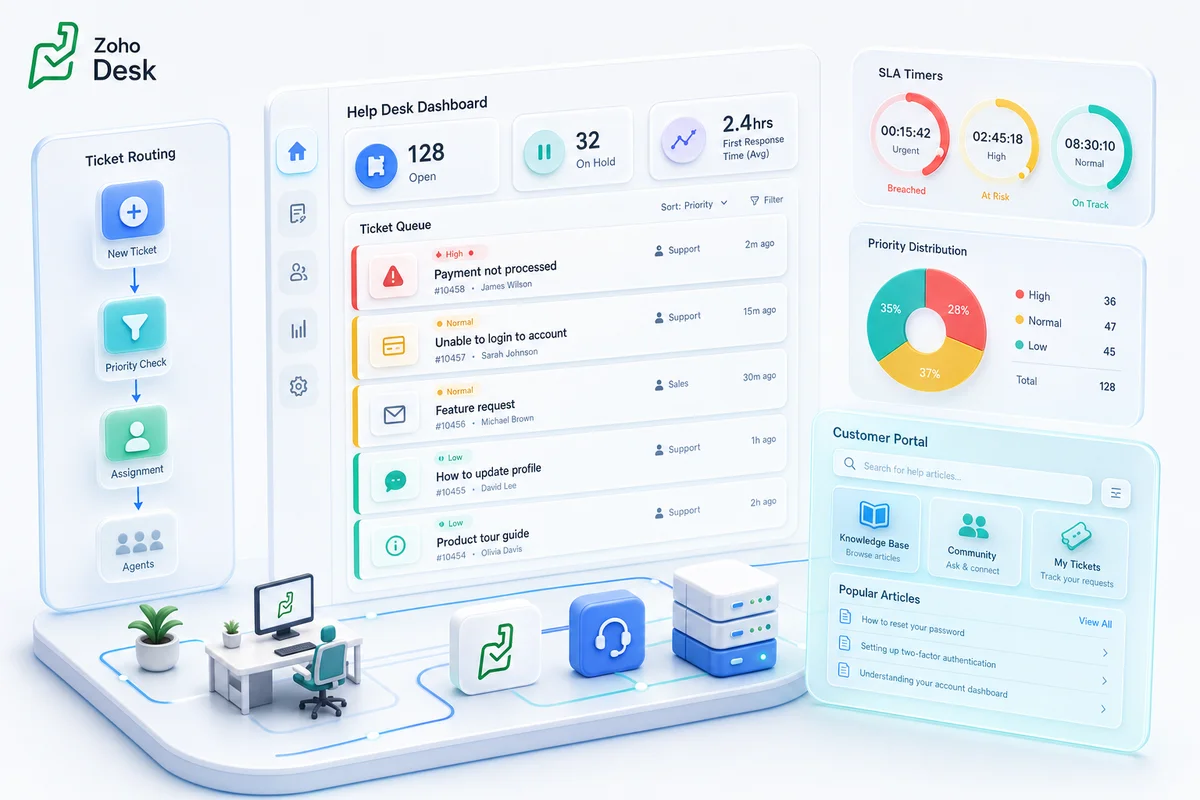
Tickets need to reach the right agent without a manager manually forwarding emails. Zoho Desk handles this with assignment rules:
Round-robin distributes tickets evenly across available agents in a department. Simple and fair, works for teams where agents have equivalent skills.
Skill-based routing assigns tickets based on the agent's expertise tags matching the ticket's category or topic. A "billing dispute" ticket goes to agents tagged with "billing" skills.
Load-based assignment considers each agent's current open ticket count. New tickets go to the agent with the lowest load. Prevents one agent from drowning while another has an empty queue.
Direct assignment routes tickets to specific agents based on rules: all tickets from VIP accounts go to the senior agent, all tickets about Product X go to the Product X specialist.
Configure the rule, then test it. Send test tickets from different channels and categories to verify they land where expected. Fixing routing after go-live is harder than getting it right upfront.
SLA policies that drive accountability
An SLA (Service Level Agreement) defines how fast you respond to and resolve tickets. Without SLAs, response time depends on who checks the queue first and how they're feeling.
Zoho Desk SLAs work on two metrics:
First response time: How quickly an agent first responds to the ticket. Not an auto-reply, an actual human response.
Resolution time: How quickly the ticket reaches "Closed" status.
Set these by priority:
| Priority | First Response | Resolution |
|---|---|---|
| Urgent | 1 hour | 4 hours |
| High | 4 hours | 8 hours |
| Medium | 8 hours | 24 hours |
| Low | 24 hours | 72 hours |
SLA escalation rules define what happens when targets are about to be missed:
- Warning (at 75% of target time): Notify the assigned agent
- Escalation Level 1 (at 100%): Notify the team lead
- Escalation Level 2 (at 150%): Notify the department manager
SLAs only work if they're realistic. Don't set a 1-hour resolution target if your average resolution actually takes 6 hours. Start with achievable targets, measure performance for a month, then tighten.
Automation rules
Zoho Desk automation eliminates repetitive agent actions:
Auto-tagging. Keywords in the ticket subject or body trigger tags. "Refund" in the subject → tag as "Refund Request" → route to Billing department.
Canned responses. Pre-written replies for common scenarios. Agent selects the template, personalizes 1-2 fields, and sends. Cuts response time from 5 minutes to 30 seconds for routine issues.
Auto-close stale tickets. If a customer doesn't respond within 7 days after the last agent reply, send a "still need help?" email. After 3 more days of silence, auto-close the ticket. This prevents the "2,000 open tickets" problem where most are actually resolved but never formally closed.
Satisfaction survey. When a ticket closes, auto-send a CSAT survey. One question: "How was your experience?" with a 1-5 rating. This is the simplest, most reliable way to measure support quality.
Ticket field updates. When a ticket moves between departments or agents, auto-update relevant fields (last transfer date, transfer count, escalation level). This data feeds your reporting.
Customer portal (Help Center)
The cheapest support ticket is the one that never gets created. Zoho Desk's Help Center gives customers:
Knowledge base. Searchable articles organized by category. Write articles for your top 20 most-asked questions. This alone can reduce ticket volume by 15-30%.
Community forums. Customers help each other. Useful for products with power users willing to share expertise.
Ticket submission. A structured form that captures the information agents need upfront (product, issue category, order number) instead of a vague "help me" email that requires 3 follow-ups.
Ticket tracking. Customers check the status of their own tickets without emailing to ask "any update?"
The portal is branded to match your website and can be hosted on a subdomain (support.yourdomain.com) or embedded via iframe.
CRM integration
The Zoho Desk → CRM integration is where support stops being isolated and becomes part of your customer operations.
What support agents see: The customer's CRM record: account tier, recent purchases, deal history, assigned sales rep. A $50,000/year account gets handled differently than a trial user, and the agent knows which one they're dealing with instantly.
What sales reps see: Open support tickets on their CRM contacts. If a customer has 3 unresolved issues, the sales rep knows not to call with an upsell pitch.
What management sees: Zoho Analytics dashboards combining CRM revenue data with Desk support data. Customer satisfaction correlated with account value. Support cost per customer segment. Churn risk indicators based on ticket patterns.
This integration is critical for customer support and CRM alignment and is one of the primary reasons to choose Zoho Desk over standalone tools.
Common mistakes
No ticket categories. Agents classify tickets as "General" because there are no better options. You can't analyze what you can't categorize. Create 8-12 specific categories based on your actual issue types.
SLAs without business hours. A 4-hour SLA target that counts weekends means Monday morning starts with a queue of "breached" tickets. Configure business hours in your SLA profiles.
Skipping the knowledge base. It takes 2-3 days to write your top 20 articles. Those articles prevent hundreds of tickets over the following year. The ROI is enormous and the effort is minimal.
No CRM integration. Running Desk without CRM integration means support agents treat a trial user and a $100,000 client identically. Connect them from day one.
Getting started
Book a free consultation and we'll map your support workflow to the right Zoho Desk configuration. Whether you're moving from email-based support, migrating from Freshdesk to Zoho Desk, or optimizing an existing Desk setup, our implementation process covers the full setup.
Frequently Asked Questions
Zoho Desk Standard costs $20/agent/month, Professional costs $35/agent/month (adds SLA dashboards, telephony, multi-department), and Enterprise costs $50/agent/month (adds AI, custom modules, multi-brand). A free tier supports 3 agents with basic ticketing. Zoho Desk is included in Zoho One at $45/user/month.
Yes, natively. When integrated, support agents see the customer's CRM record (deals, purchase history, account tier) alongside the ticket. Sales reps see open tickets on their CRM contacts. This prevents sales from reaching out to unhappy customers and gives support context about account value.
Zoho Desk costs 40-60% less than Zendesk at equivalent feature tiers. Zoho Desk integrates natively with Zoho CRM, Books, and Analytics without middleware. Zendesk has a larger third-party app marketplace and more mature enterprise features. For companies already using Zoho products, Desk is the clear choice due to native integration.
Yes. Zoho Desk's Help Center includes a customer portal where users submit tickets, track status, and browse knowledge base articles. The portal is customizable with your branding and can be embedded on your website. Customers can also respond to tickets via email without logging into the portal.
A basic Zoho Desk setup for a 5-10 agent team takes 2-3 weeks. This covers department structure, ticket categories, SLA policies, automation rules, CRM integration, and agent training. Larger deployments with multi-brand support, custom modules, and knowledge base content take 4-6 weeks.
See exactly where your Shopify, Amazon, or WooCommerce ops are leaking — free.
Get a personalised eCommerce Ops Audit: inventory gaps, accounting leaks, and order-flow bottlenecks — with a Zoho fix roadmap. Delivered in 48 hours, at no cost.