Zoho Flow for eCommerce: What It Handles Natively and Where Custom Integration Takes Over
Zoho Flow is Zoho's built-in automation platform. For eCommerce operations, it handles cross-Zoho workflows well. Financial data, direct storefront API connections, and error-sensitive accounting automations are a different story.
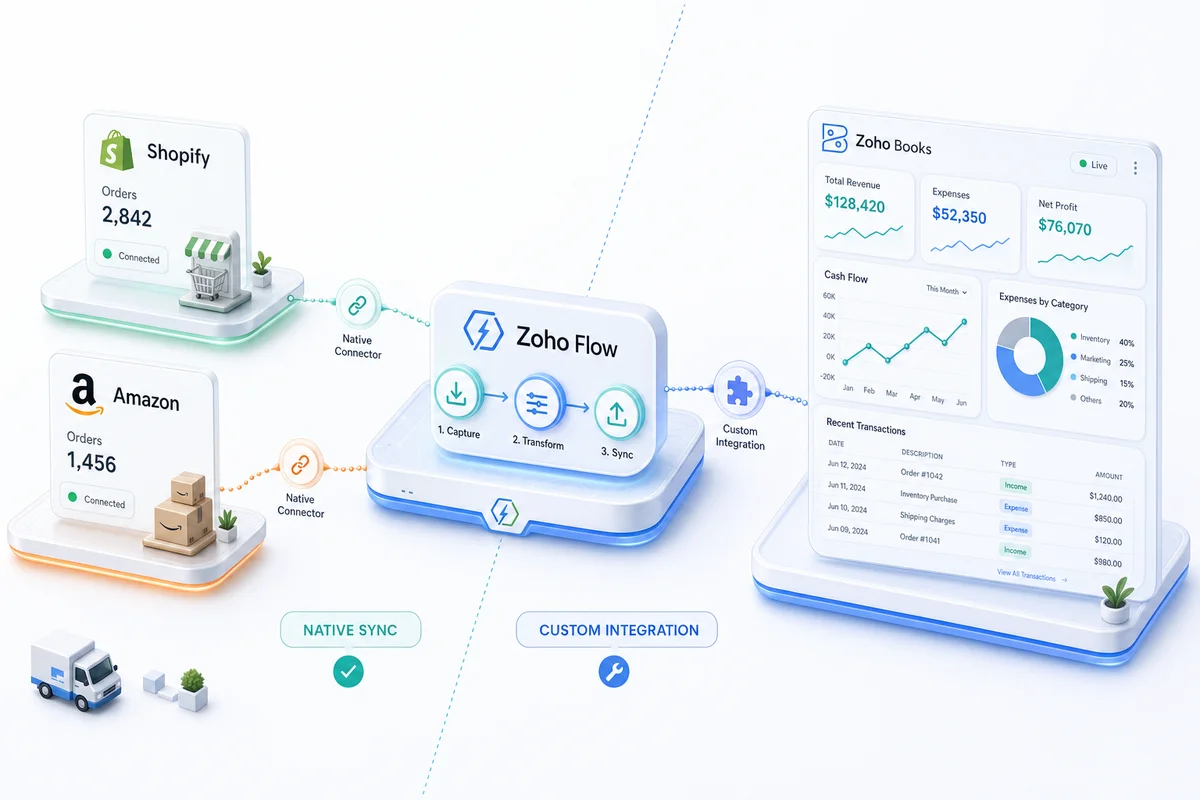
eCommerce automation operates at two levels. The first level moves data between apps: an order arrives, inventory updates, the team gets notified, the customer enters a follow-up sequence. The second level processes financial data correctly: an Amazon settlement arrives, 15 fee types split into the right accounts, the net deposit matches the Zoho Books reconciliation, nothing sits unclassified at month end. Zoho Flow handles the first level well when the apps involved are Zoho products. The second level requires something built specifically for financial data.
What Zoho Flow actually is
Zoho Flow is Zoho's native integration and automation platform. It connects apps using a trigger-condition-action model: an event in one system fires a series of steps across connected apps. Flow supports 900+ third-party app connectors alongside the full Zoho product suite.
The practical advantage over Zapier is that Zoho Flow has deeper native access to Zoho's internal data structures. It understands what a Zoho Inventory item record looks like, how a Zoho Books credit memo relates to its originating invoice, what fields are available on a Zoho CRM contact created from an eCommerce order. That native understanding removes the translation layer that Zapier requires when connecting two Zoho products.
For eCommerce sellers already running on Zoho Books, Zoho Inventory, and Zoho CRM, Flow is the natural first choice for moving data between those products without commissioning a custom build.
Where Zoho Flow adds real value for eCommerce
Cross-Zoho product automation
Zoho Flow is well suited to automations that stay entirely within the Zoho ecosystem. Common applications for eCommerce operations:
- When a Zoho Inventory backorder is created, automatically draft a purchase order in Zoho Books and send an alert to the purchasing team in Zoho Cliq
- When a customer in Zoho CRM reaches a defined purchase threshold, trigger a loyalty email sequence in Zoho Campaigns
- When a Zoho Desk ticket is tagged "defective product," initiate a credit memo workflow in Zoho Books and queue an RMA in Zoho Inventory
- When a Zoho Books invoice reaches 30 days overdue, escalate the CRM record and schedule an automated follow-up sequence
These workflows move data between Zoho products where Flow has native field access and understands how records relate to each other. They also avoid the financial complexity that breaks no-code tools: no partial payment allocation, no COGS recording, no settlement parsing.
Customer lifecycle automations within the Zoho suite
Post-purchase communication is well suited to Zoho Flow when all the apps involved are part of the Zoho suite. When a new contact is created in Zoho CRM from an eCommerce purchase, Flow triggers a welcome sequence in Zoho Campaigns, schedules a review request, flags the account for support in Zoho Desk, and updates the lifecycle stage when specified conditions are met.
These are data-routing workflows. A sync delay costs nothing here, and none of the steps produce accounting entries. For a full picture of what Zoho Campaigns offers once those triggers fire, see our Zoho Campaigns pricing and features review.
Internal operations triggers
Low-stakes, non-financial triggers belong in Zoho Flow. Stock level alerts, team notifications, task creation from order tags, form submissions routed to the correct Zoho Desk queue. For these, building in Flow is faster than commissioning a custom integration and the business impact of an occasional sync delay is negligible.
Where Zoho Flow runs into limits
Connecting directly to Shopify, Amazon, and WooCommerce
Zoho Flow's connectors for Shopify, Amazon, and WooCommerce exist but are limited to the events and actions those connectors expose. They do not give access to the full platform API, which means complex operations - partial fulfillment, bundle kit de-bundling across variants, merchant-fulfilled vs. FBA inventory separation, multi-location stock allocation - are not available through Flow's standard connector model.
Custom integrations connect directly to the Shopify Admin API, the Amazon Selling Partner API (SP-API), and the WooCommerce REST API. That direct connection provides access to every field and action those platforms expose, including the edge cases that matter at scale. For a seller managing 500 SKUs across Shopify and Amazon with separate warehouse locations per channel, the gap between what Zoho Flow's connectors can trigger and what a direct API integration can handle is significant. The full scope of what a direct Shopify-to-Zoho connection covers is detailed in the Shopify and Zoho integration guide.
Financial data requiring accounting logic
Zoho Flow is a data router. It moves values from one field to another based on triggers and conditions. It does not contain accounting logic: it cannot determine that an Amazon settlement's referral fees belong in Cost of Sales while FBA storage charges belong in Operating Expenses, or that a Shopify payout needs to be split into gross sales, processing fees, and refunds before any amount touches Zoho Books.
The no-code automation analysis for eCommerce covers this limitation in detail using Zapier as the example. Zoho Flow shares the same constraint. Moving data and creating accounting-correct financial entries from that data are two different operations. Flow handles the first. Financial workflows for eCommerce - Amazon settlement reconciliation, Shopify payout separation, multi-currency transactions with date-specific exchange rates - require custom logic that Flow's connector model does not support.
Error handling for financial workflows
Zoho Flow includes standard error handling: retry on failure, email notification when a workflow errors, execution logs available for inspection. For non-financial automations, this is adequate.
For workflows where a failed sync means a payment is not recorded in Zoho Books, an inventory count is wrong, or a settlement goes unmatched against bank deposits, standard error handling creates a gap. A missed notification about a failed Slack alert costs nothing. A missed notification about a failed invoice sync costs time to reconstruct and creates discrepancies your CPA will find at month end.
Custom financial integrations for eCommerce include retry logic with exponential backoff, error classification that distinguishes a transient API timeout from a genuine data problem, human-review queues for records that fail processing, and audit trails that satisfy CPA review. Zoho Flow was not built for financial audit requirements. That is not a flaw in Flow; it is a description of where its scope ends.
Multi-step workflows with financial conditions
Zoho Flow handles condition branches based on field values exposed by connectors: status, amount, tag, date. A condition that reads inventory cost to calculate COGS, applies a tax rate based on shipping jurisdiction and product type, and routes the entry to one of six revenue accounts based on sales channel and customer type is not a field-value condition. It is a financial logic tree. Flow's visual builder cannot express it. Custom integration code can.
When to use Zoho Flow vs. custom integration
| Automation | Zoho Flow | Custom Integration |
|---|---|---|
| Cross-Zoho app workflow (CRM to Campaigns to Desk) | Yes | Overkill |
| Non-financial trigger (order tag to Slack notification) | Yes | Overkill |
| Customer lifecycle flows within Zoho suite | Yes | Overkill |
| Shopify order sync to Zoho Books | Limited | Recommended |
| Amazon settlement reconciliation | No | Required |
| Multi-currency transactions with rate-date logic | No | Required |
| Inventory sync with multi-location allocation | Limited | Recommended |
| COGS recording at correct cost basis | No | Required |
| Shopify payout separation (gross sales, fees, refunds) | No | Required |
| Error handling with audit trail for financial data | Basic only | Recommended |
The dividing line is financial data. When an automation produces accounting entries - revenue recognition, expense classification, COGS, settlement reconciliation - custom integration is the appropriate tool. When an automation routes non-financial data between Zoho products, Zoho Flow is the right starting point and often the complete solution.
How Zolify uses both in eCommerce operations
Across 100+ eCommerce implementations, the architecture that works is a two-layer setup. The custom integration handles the storefront-to-backend financial data: Shopify orders flowing into Zoho Books invoices with correct tax and COGS, Amazon settlements reconciled to the right accounts, inventory levels synchronized between channels and Zoho Inventory with full multi-location logic. Zoho Flow handles the internal routing on top of that: post-purchase CRM sequences, support escalation rules, cross-Zoho record creation triggered by events the custom integration writes.
Zolify's CA reviews the full setup before production to confirm that what the custom integration writes to Zoho Books is accounting-correct and that Zoho Flow is not attempting to duplicate or override any of those financial entries. As an Official Zoho Finance Partner, the goal is an operations backend where each tool does the work it was built for — not a patchwork of automations that step on each other. Our eCommerce tech integration service covers the full architecture design for both layers.
For sellers evaluating which layer applies to their current situation, the eCommerce operations audit covers both the financial integration requirements and the Zoho Flow opportunities that can sit on top.
Frequently Asked Questions
Zoho Flow is Zoho's native integration and automation platform. Unlike Zapier, which is a third-party tool that connects any two apps, Zoho Flow is built into the Zoho ecosystem and has deeper access to Zoho's internal APIs. This means it understands Zoho-specific data structures - Zoho Inventory item records, Zoho Books invoices, Zoho CRM contacts - without needing the translation layer Zapier requires. For purely intra-Zoho workflows, Flow is faster to configure and more reliable. For connections to external eCommerce platforms like Shopify, Amazon, or WooCommerce, both Flow and Zapier face similar limitations because they depend on pre-built connectors rather than direct API access.
Zoho Flow has a Shopify connector and a Zoho Books connector. You can build basic trigger-action flows between them, such as creating a Zoho Books contact when a new Shopify customer registers. What Zoho Flow cannot do is handle the full financial workflow: separating a Shopify payout into gross sales, payment processing fees, and refunds; recording COGS against Zoho Inventory at the correct cost basis; applying the right tax jurisdiction; and matching the net bank deposit to the correct invoices during reconciliation. Those workflows require accounting logic that Flow's connector model does not support. A custom integration built on the Shopify Admin API and Zoho Books API handles all of them in a single automated flow.
No. Amazon settlements contain 15 or more fee line item types that must each route to a specific account in Zoho Books: gross sales to Sales Revenue, referral fees to Cost of Sales, FBA storage to Operating Expenses, reimbursements to Other Income, and so on. Zoho Flow cannot parse a settlement report, map fee types to accounts based on accounting rules, or create the compound journal entry that matches the net settlement deposit. This is accounting logic, not data routing. Amazon settlement reconciliation in Zoho Books requires custom integration code that includes the fee mapping logic and is reviewed by a Chartered Accountant before it goes into production.
Zoho Flow is the right tool when the automation stays entirely within the Zoho ecosystem and does not involve financial data. Practical examples: triggering a Zoho Campaigns sequence when a CRM contact reaches a purchase threshold; creating a Zoho Desk ticket from a Zoho Inventory backorder event; routing a form submission to the correct team in Zoho Cliq; sending an internal alert when a Zoho Books invoice reaches 30 days overdue. These are data-routing workflows where the error cost of a sync failure is low and no accounting logic is involved. When the automation involves Shopify, Amazon, or WooCommerce data, or any workflow that touches revenue recognition, COGS, or reconciliation, custom integration is the appropriate choice.
Yes, and this is the typical architecture for a well-configured eCommerce operations setup. The custom integration handles the storefront-to-backend financial data: Shopify orders into Zoho Books invoices, Amazon settlements reconciled to Zoho Books accounts, inventory levels synced between platforms and Zoho Inventory. Zoho Flow handles the internal routing: post-purchase CRM sequences, support ticket escalation, team notifications, cross-Zoho record creation triggered by events the custom integration writes. The two layers complement each other. The risk to avoid is using Flow to try to replicate what the custom integration does, which creates duplicate records and conflicting data paths.
See exactly where your Shopify, Amazon, or WooCommerce ops are leaking — free.
Get a personalised eCommerce Ops Audit: inventory gaps, accounting leaks, and order-flow bottlenecks — with a Zoho fix roadmap. Delivered in 48 hours, at no cost.