Multi-Currency eCommerce Accounting with Zoho Books: A Guide for International Sellers
Selling internationally on Shopify, Amazon, or WooCommerce creates an accounting problem most eCommerce sellers underestimate. Every order settled in a foreign currency creates an exchange rate difference between the transaction date and the payment date. Zoho Books handles this natively, but only if it is configured correctly from the start.
Selling internationally on Shopify, Amazon, or WooCommerce creates an accounting complexity most eCommerce sellers discover too late. Every order in GBP, AUD, EUR, or CAD generates two exchange rate events: one when the order is invoiced, another when the payment settles. The difference between those two rates is a foreign exchange gain or loss, and it needs to land in the right place in your books, separated from your operating revenue.
For sellers configured incorrectly, all of this collapses into a single bank account with unexplained variances that compound every month. For sellers configured correctly in Zoho Books, international accounting runs the same way as domestic accounting, with full P&L visibility per currency and per channel.
Direct answer: Zoho Books supports multi-currency accounting natively. Enable additional currencies, configure exchange rate settings, assign foreign currency bank accounts per currency, and Zoho Books calculates and posts realized FX gains and losses automatically. The configuration decisions that matter most are the ones your implementation team makes before the first transaction: chart of accounts structure, exchange rate source, and whether each currency gets its own bank account. Get them wrong and the cleanup compounds every month. Get them right and international P&L is as clean as domestic from the first settlement.
Why multi-currency gets messy without the right setup
Most eCommerce accounting problems are not software problems. They are configuration problems that show up as reconciliation nightmares three months into a new market.
The most common mistake: using a single bank account for all incoming payments, regardless of currency. The payment gateway converts everything to USD (or AUD, or GBP, depending on your base currency) and deposits one lump sum. That looks clean until you need to reconcile your Zoho Books bank statement against your Shopify Payments settlement report, which breaks out each currency separately.
The second most common mistake: recording foreign currency invoices at today's exchange rate and not tracking what rate actually applied when payment arrived. The difference between those two rates is not a rounding error. For a $50,000 GBP-denominated quarter, a 2% rate movement is $1,000 in either direction. That $1,000 needs to be accounted for as an FX gain or loss, not absorbed into operating income or left as an unexplained variance.
A developer who has not configured eCommerce accounting before will often build a technically functional integration that moves data correctly but puts it in the wrong accounts. Ask them how the multi-currency conversion uses the rate from the transaction date versus the payment date and whether partial payments are handled correctly. Those are accounting questions, not coding questions.
How Zoho Books handles multi-currency
Enabling currencies and exchange rates
Zoho Books supports 150+ currencies. Enabling a currency takes a few minutes in Settings: select the currency, set the exchange rate source, and Zoho Books handles conversion on every transaction from that point. You choose your exchange rate source:
- Manual: You enter the rate for each transaction. Practical for low-volume international sales where you want to control the rate used.
- Daily auto-update: Zoho Books pulls market rates daily. All transactions use the rate in effect on the transaction date.
- Custom rate per transaction: You override the auto-rate on a transaction-by-transaction basis. Useful when your payment gateway locks in a specific rate.
For Shopify sellers using Shopify Payments, the daily auto-update approach works well because Shopify also applies market rates on the transaction date. The rates will not be identical (Shopify uses its own rate), but the reconciliation process in Zoho Books is designed to handle those differences.
For Amazon sellers, the rate choice depends on whether you use Amazon's Currency Converter for Sellers or hold local currency accounts. This decision affects your Zoho Books setup more than the exchange rate source.
Foreign currency bank accounts
Each currency you accept needs a dedicated bank account in Zoho Books denominated in that currency. If you receive GBP and AUD settlements from Shopify, you need:
- A GBP bank account in Zoho Books (matching your GBP Shopify settlement account)
- An AUD bank account in Zoho Books (matching your AUD Shopify settlement account)
- Your USD checking account for USD settlements
When Shopify settles, the GBP settlement posts to the GBP account in Zoho Books. Zoho Books converts that balance to USD for your balance sheet at the current rate, and the conversion difference posts to the unrealized FX account. When you transfer the GBP to USD (at your bank), the conversion at the actual transfer rate creates a realized gain or loss, and Zoho Books closes the unrealized entry and posts the realized one.
This is not optional complexity. It is how foreign currency accounting works under US GAAP and IFRS. Running it through a single USD account eliminates your ability to produce accurate FX reporting.
Realized vs unrealized FX gains and losses
This distinction matters more at year-end than it does month-to-month, but it affects your P&L structure throughout the year.
Realized FX gain/loss arises when a foreign currency transaction settles. You invoiced a customer in GBP at a rate of 1.28 USD/GBP. By the time they paid, the rate was 1.24. You received fewer USD than the invoice implied. That difference is a realized FX loss, and it posts to the FX gain/loss account in your P&L the moment you apply the payment to the invoice in Zoho Books.
Unrealized FX gain/loss arises from open balances in foreign currency accounts at a reporting date. If your GBP account holds £10,000 and the rate has moved since you last recorded a transaction, the USD value of that balance has changed. Zoho Books handles this through a revaluation process, which you run at period-end. The revaluation calculates the difference and posts it as unrealized gain or loss, which reverses when the balance is settled in cash.
For eCommerce sellers with active international operations, separating these from gross revenue is not just an accounting nicety. It gives you the actual trading margin on international sales without currency fluctuation masking the real picture.
Shopify multi-currency reconciliation in practice
Shopify Payments supports local currencies in markets including the UK, Australia, Canada, the EU, and others. When a UK customer checks out in GBP, Shopify processes and settles that order in GBP. The GBP settlement deposits into a GBP bank account, separate from your USD settlements.
In Zoho Books, the reconciliation process looks like this:
- Match the GBP settlement deposit to your GBP bank account in Zoho Books
- Match each order in the settlement to the corresponding invoice in Zoho Books (already created by your Shopify-Zoho integration at the time of purchase)
- Zoho Books calculates the rate difference between the invoice date rate and the settlement date rate and posts the realized FX gain or loss automatically
- The GBP bank account balance in Zoho Books reflects the actual GBP balance at the current rate in USD terms
Shopify's settlement report breaks down each payout by currency. That breakdown maps directly to the bank account structure in Zoho Books if you set it up correctly at the start. For sellers using a Shopify-Zoho integration built by Zolify, the mapping is handled at the integration level so orders flow to the correct currency account without manual routing.
If you are setting up Shopify and Zoho Books for the first time, our Shopify to Zoho integration guide covers the full order-to-accounting flow before currency settings add complexity.
Amazon international: two approaches to currency in Zoho Books
Amazon operates marketplaces in 20+ countries. For sellers on Amazon UK, Amazon EU, Amazon Canada, or Amazon Australia, the currency question is the first Zoho Books decision to make.
Option 1: Amazon Currency Converter for Sellers (ACCS)
Amazon converts your international sales to your home currency before disbursement. You receive one USD payment regardless of which marketplace the sale came from. Amazon charges a conversion fee (typically 0.75-1.5% depending on currency).
In Zoho Books, ACCS simplifies setup: all Amazon disbursements land in your USD account. You still need to account for the conversion fee as an expense (it shows as a deduction in the settlement), but you do not need foreign currency accounts. The tradeoff is that Amazon controls the exchange rate, and you pay their fee on every conversion.
Option 2: Local currency accounts
For higher-volume international sellers, holding local currency accounts at Amazon (or connecting Amazon disbursements to local accounts at your bank or a service like Wise) gives you control over when you convert. You convert at a rate you choose, not Amazon's rate.
This requires:
- A GBP, EUR, or AUD bank account in Zoho Books
- Reconciliation of Amazon local currency settlements against those accounts
- Tracking Amazon's conversion fee as a cost line separate from FX movement
- Realized FX gain/loss entries when you convert to USD
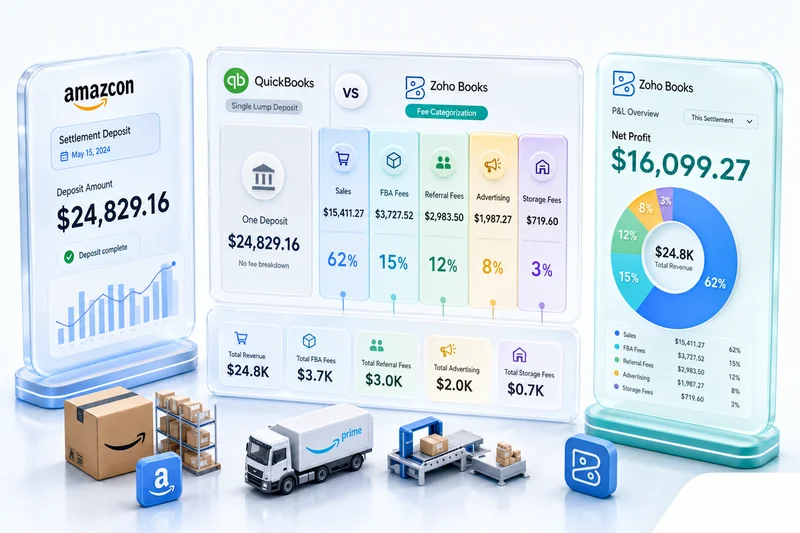
The accounting is more involved but the economics can be better for sellers with meaningful GBP or EUR volume. The Amazon seller accounting guide covers Amazon settlement reconciliation in depth, including marketplace fee handling.
VAT and GST in a multi-currency Zoho Books setup
Selling internationally does not just create FX accounting. It creates tax compliance obligations.
Zoho Books supports UK VAT, EU VAT (country-level rates), Australian GST, Canadian GST/HST/PST, and a range of other VAT/GST systems. Each tax type requires its own configuration in Zoho Books tax settings.
The interaction between multi-currency and tax creates one specific complexity: some tax authorities require you to report tax amounts in the local currency, others in your base currency. Zoho Books reports tax collected in the transaction currency by default. When generating VAT returns for HMRC (UK) or a country tax authority, check whether the reporting requirement is in local currency or converted to your home currency, as this affects how you pull reports from Zoho Books.
For sellers navigating VAT registration thresholds in multiple countries (UK's £90,000 threshold, EU's OSS €10,000 threshold, Australia's AUD $75,000 GST threshold), configuring Zoho Books to separate international revenue by country is useful beyond just tax compliance. It shows you which markets you are approaching threshold in before you cross them.
Our eCommerce sales tax guide covers multi-jurisdiction tax setup in Zoho Books, including the decision of when to add TaxJar or Avalara for volume that exceeds what Zoho Books' native tools handle comfortably.
What a correct multi-currency setup looks like after 90 days
For a Shopify seller accepting GBP and AUD in addition to USD:
Bank accounts in Zoho Books:
- USD checking (primary)
- GBP settlement account (matches Shopify GBP payouts)
- AUD settlement account (matches Shopify AUD payouts)
Chart of accounts additions:
- Realized FX Gain/Loss (income/expense, two separate accounts or one net account per accounting preference)
- Unrealized FX Gain/Loss (adjustment account for period-end revaluation)
- Shopify GBP Sales (separate revenue account if channel-currency P&L reporting is required)
- Shopify AUD Sales (same)
Monthly close steps:
- Reconcile each currency bank account against its Shopify settlement report
- Apply outstanding invoices to their corresponding settlements
- Run period-end revaluation on open foreign currency balances
- Review FX gain/loss account for reasonableness against volume in each currency
At this point, your P&L shows Shopify USD revenue, Shopify GBP revenue converted to USD, Shopify AUD revenue converted to USD, and FX gain/loss as a separate line below gross margin. You can see your actual trading margin on international sales and the FX impact separately.
Zolify's approach to multi-currency implementations
Zolify has delivered 100+ eCommerce Zoho Books implementations, many of them for sellers running Shopify and Amazon across multiple international markets. A CA reviews every financial configuration before go-live, which means the exchange rate setup, chart of accounts structure, and FX gain/loss accounts are validated against the seller's accounting policies before the first transaction flows through.
The problems we fix most often were set up wrong in the first week: a single bank account for all currencies, no separation between realized and unrealized FX accounts, or Amazon international orders syncing to a USD account at the wrong rate. Each of those mistakes is cheap to correct before transactions start and expensive to untangle after six months of them.
For sellers adding a new international market (UK, Australia, UAE), we treat the currency configuration as a pre-launch step, not an afterthought. The integration from Shopify or Amazon to Zoho Books handles the currency routing at the transaction level so each settlement hits the correct account without manual intervention.
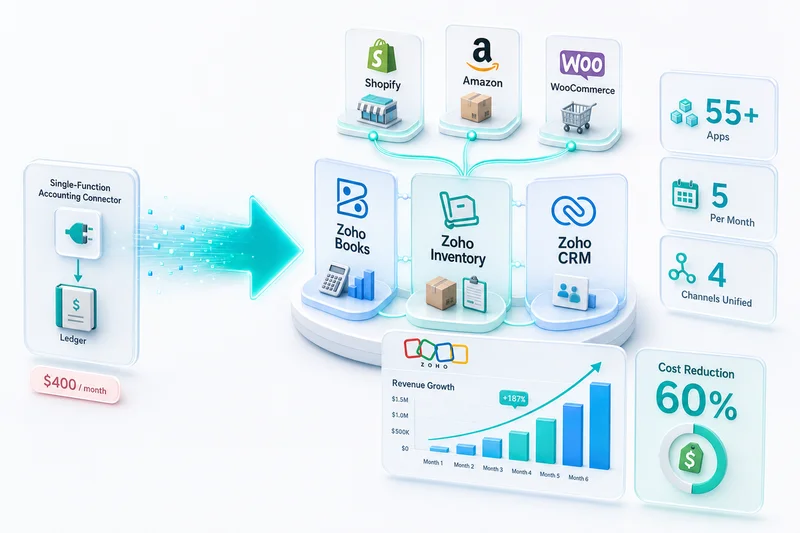
As an Official Zoho Finance Partner, Zolify connects Shopify, Amazon, WooCommerce, and other platforms to Zoho Books with implementations designed for how eCommerce accounting actually works, including multi-currency, marketplace fees, and international tax compliance.
Get your international eCommerce accounting configured correctly
Expanding to UK, Australia, UAE, or Canada? Zolify configures Zoho Books for multi-currency before the first international order ships. Book an eCommerce Ops Audit to cover your current setup, the currencies you are adding, and the exact configuration changes required.
You can also review how we connect Shopify and Amazon to Zoho Books in our multi-channel inventory and accounting guide.
Frequently Asked Questions
Yes. Zoho Books has native multi-currency support. You enable additional currencies in the Settings panel, configure exchange rate sources (manual, daily auto-update, or custom), and assign each customer or storefront account to their billing currency. Transactions in foreign currencies post to the ledger in both the transaction currency and your base currency at the exchange rate in effect on the transaction date. The difference between that rate and the rate on the payment settlement date becomes a realized foreign exchange gain or loss, which Zoho Books calculates and posts automatically.
When an order is invoiced in a foreign currency and payment arrives at a different exchange rate, the difference is a realized FX gain or loss. Zoho Books creates this entry automatically on payment application: if the GBP rate weakened between invoice and payment, the difference posts as an FX loss to a dedicated gain/loss account. For eCommerce sellers with high transaction volumes in GBP, AUD, EUR, or CAD, these FX movements accumulate quickly. Zoho Books separates them from operating income in the P&L so you can see your actual trading margin without currency noise.
Shopify Payments settles in each currency separately. If you accept GBP and AUD in addition to USD, Shopify sends three separate settlement deposits. Each needs its own bank account in Zoho Books, denominated in the currency it receives. You reconcile each account against its settlement statement individually, then Zoho Books converts the foreign currency balances to your base currency on your reporting date. Without separate accounts per currency in Zoho Books, all settlements hit a single USD account and the exchange rate calculations become unrecoverable.
Amazon offers two options: Currency Converter for Sellers (ACCS), where Amazon converts and disburses in your home currency, and local currency accounts via Amazon Currency Exchanger, where you receive foreign currency directly. If you use ACCS, Amazon handles conversion and your Zoho Books setup can treat all Amazon disbursements as USD (or your home currency). If you hold foreign currency balances in Amazon, you need matching foreign currency accounts in Zoho Books and a reconciliation workflow that accounts for Amazon's conversion fee as a separate expense line.
Multi-currency Zoho Books setup is straightforward for one or two additional currencies with simple settlement flows. Complexity increases with: more than three currencies, Amazon international marketplaces with local currency accounts, WooCommerce stores in multiple regions with separate payment gateways, unrealized FX revaluation requirements (IFRS or US GAAP year-end), or tax compliance in multiple VAT/GST jurisdictions. At that point, having a CA configure the chart of accounts, currency settings, and reconciliation workflows correctly from the start prevents months of rework. Zolify has delivered 100+ eCommerce accounting implementations with CA review on every financial configuration.
See exactly where your Shopify, Amazon, or WooCommerce ops are leaking — free.
Get a personalised eCommerce Ops Audit: inventory gaps, accounting leaks, and order-flow bottlenecks — with a Zoho fix roadmap. Delivered in 48 hours, at no cost.