Zoho Campaigns: Pricing, Features, and Review for Online Sellers (2026)
Zoho Campaigns is an email marketing platform built inside the Zoho ecosystem. This review covers everything eCommerce sellers need to evaluate it: pricing from free to enterprise, feature breakdown, honest Mailchimp comparison, and how CRM data powers segmentation across Shopify, Amazon, and WooCommerce.
Email consistently generates 20 to 30 percent of eCommerce revenue for sellers running segmented automated sequences. The platform you run those sequences on matters more than most sellers realize before they hit a contact-count pricing wall or discover that their email tool and their CRM don't share the same customer data.
Zoho Campaigns is the email marketing platform inside the Zoho ecosystem. It works differently from standalone tools: instead of maintaining its own contact database, it reads directly from Zoho CRM. That architectural choice has real consequences for how segmentation, automation, and reporting work in practice.
This Zoho Campaigns review is written for online sellers who are evaluating the platform or are already using Zoho somewhere in their stack. It covers zoho campaigns pricing across all tiers, a full feature breakdown, an honest Mailchimp comparison, and clear guidance on who benefits most from using it.
What Zoho Campaigns Actually Does
Most email marketing platforms operate as standalone tools. You import contacts, build lists, create segments from those lists, and send campaigns. Campaigns zoho builds on a different model. It operates as a module inside the Zoho ecosystem, drawing its audience data from Zoho CRM rather than maintaining a separate contact store.
For eCommerce sellers, this distinction has direct operational consequences. When your Shopify store connects to Zoho CRM, customer records sync automatically: name, email, order history, lifetime value, product categories purchased. Zoho Campaigns sees those same records. There is no parallel list to maintain. Segmenting in Campaigns means writing a query against your live CRM data, not filtering a subset of imported contacts.
The practical result is that zoho email campaigns can be grounded in actual purchase behavior without any export or import steps. A segment for "customers who purchased in the last 30 days but not in the last 90" builds from a live CRM query. When a customer's status changes in Zoho CRM, the Campaigns segment reflects that change immediately.
This is the structural difference from platforms that treat email contacts as their own data silo. Every customer interaction captured elsewhere in Zoho (a support ticket resolved in Zoho Desk, an invoice paid in Zoho Books, an Amazon order synced to CRM) can contribute to the same contact record that Campaigns reads from.
For eCommerce sellers evaluating how Campaigns fits a multi-channel operation, our detailed guide on Zoho Campaigns for eCommerce covers the full automation architecture across Shopify and Amazon.
Zoho Campaigns Features That Matter for eCommerce
Assessing zoho campaigns features from an eCommerce perspective means separating the tools that power product-based workflows from the general-purpose marketing features. Here is what to evaluate.
Email Builder and Templates
The drag-and-drop editor handles standard email layouts well: promotional, product announcement, post-purchase follow-up, and newsletter formats are all covered. The template library is functional but smaller than Mailchimp's. Most eCommerce sellers building brand-consistent templates will start from a saved custom design rather than the built-in gallery. HTML editing is available for teams with development resources.
Automation Workflows
Campaigns supports multi-step automation sequences triggered by contact field changes, list additions, date conditions, and campaign interactions. For eCommerce, the most useful triggers come from Zoho CRM field updates. When a Shopify order syncs to CRM and updates a "Last Purchase Date" field, Campaigns detects that change and can enroll the customer in a post-purchase sequence automatically. The trigger is the CRM event, not a Campaigns-native event, which is a meaningful distinction for sellers whose purchase data lives in an order management system rather than an email platform.
Segmentation
This is where Campaigns benefits most from the CRM connection. Segments pull from any field on the Zoho CRM contact record, including calculated fields like lifetime value, order count, average order value, and days since last purchase. Compare this to Mailchimp, where segmentation is limited to fields that exist inside the Mailchimp contact record. Feeding purchase data from Shopify into Mailchimp segments requires a sync step and a delay. In Campaigns, the data is already there.
A/B Testing
Subject line, sender name, and content variations are all supported. Campaigns allows split testing to a defined percentage of the list and automatically sends the winning variant to the remainder. The implementation covers standard A/B needs for eCommerce campaigns.
Reporting and Analytics
Open rates, click rates, unsubscribes, bounces, geographic performance, and device breakdown are covered in campaign reports. Reports link back to Zoho CRM records, so you can filter your CRM by campaign engagement status. Native eCommerce revenue attribution (the kind Klaviyo provides) is not available out of the box, but for sellers running zoho crm campaigns as their primary marketing workflow, engagement data combined with CRM purchase history covers most analytical needs.
SMS Campaigns
Zoho Campaigns includes SMS campaign capabilities on paid plans. For sellers running promotions across email and SMS, keeping both channels in one platform eliminates a separate SMS tool subscription. Regional availability varies; confirm support for your target markets before relying on this feature.
Zoho Campaigns Pricing and Free Plan
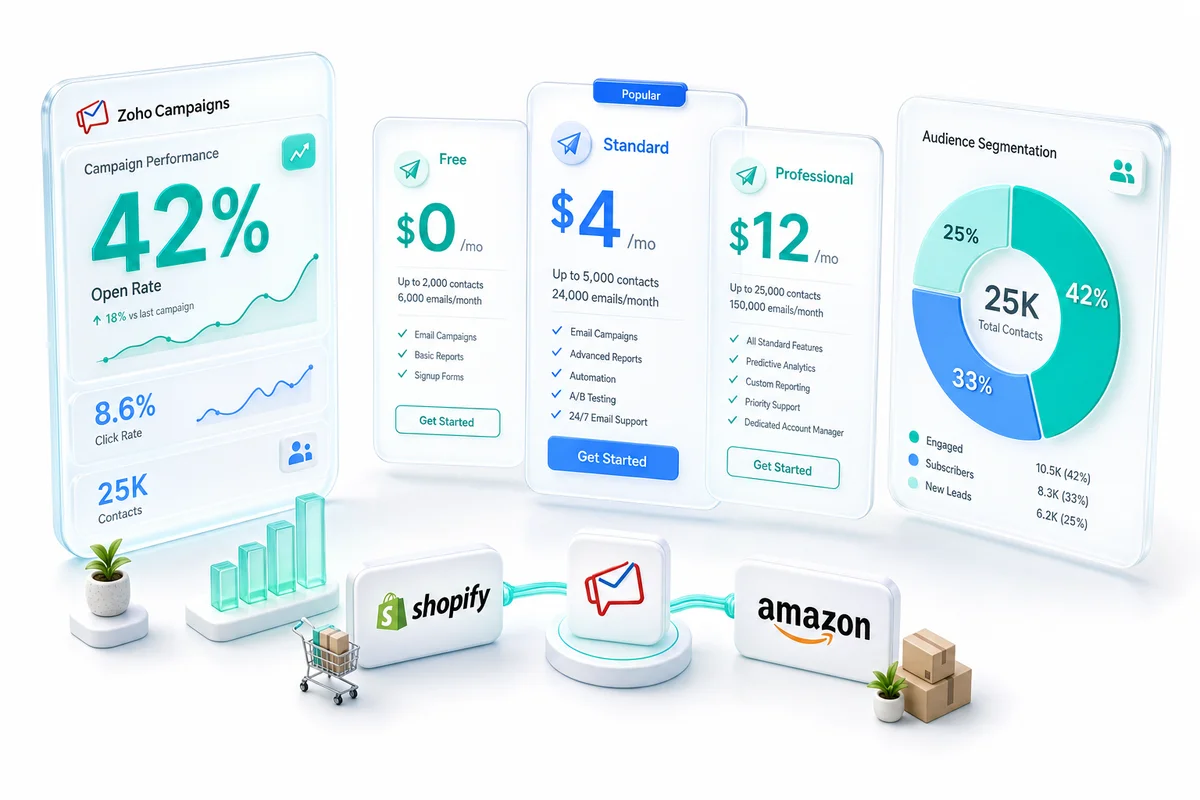
Zoho campaigns pricing is structured around contact count. Both a subscriber-based plan and a pay-per-email credits plan are available. The subscriber-based plan is the right choice for sellers sending regularly to an established list.
The Free Plan
The zoho campaigns free plan supports up to 2,000 contacts with a monthly send limit of 6,000 emails. The free tier includes the email editor, basic automation, and standard reporting. It excludes SMS campaigns, advanced segmentation, and priority support. For sellers with small lists getting started, the free plan is a usable starting point rather than a feature-limited trial designed to push upgrades.
Paid Plan Pricing
| Contacts | Standard (billed annually) | Professional (billed annually) |
|---|---|---|
| 500 | $3.50/month | $5.00/month |
| 1,000 | $6.00/month | $9.00/month |
| 5,000 | $21.00/month | $31.50/month |
| 10,000 | $43.00/month | $63.00/month |
| 25,000 | $76.00/month | $114.00/month |
| 50,000 | $122.00/month | $183.00/month |
Standard covers the core feature set: unlimited emails, A/B testing, segmentation, and automation. Professional adds send-time optimization, predictive segmentation, enhanced deliverability tools, and advanced reporting. Monthly billing is available at approximately a 20 percent premium over annual rates.
The Zoho One Case
Zoho campaigns cost effectively drops to zero for Zoho One subscribers. At $37 per user per month (billed annually), Zoho One bundles Campaigns alongside 40-plus apps: CRM, Books, Inventory, Desk, Analytics, and more. If your eCommerce operation already runs on Zoho One, Campaigns is included. For teams evaluating the full platform, the email marketing cost is not a separate line item. See our breakdown of what Zoho One includes for eCommerce sellers for the full picture.
Cost at Scale
| Platform | 10,000 contacts | 25,000 contacts | 50,000 contacts |
|---|---|---|---|
| Zoho Campaigns (Standard) | $43/month | $76/month | $122/month |
| Mailchimp (Standard) | $135/month | $310/month | $450/month |
| Klaviyo | $150/month | $400/month | $700/month |
At 25,000 contacts, the difference between Zoho Campaigns and Mailchimp is $234 per month ($2,808 per year). At 50,000 contacts, the annual difference exceeds $3,900. These are real budget savings for eCommerce sellers who reached Mailchimp's upper pricing tiers before evaluating alternatives. For sellers specifically comparing Zoho Campaigns against Klaviyo — on post-purchase sequences, Shopify stack fit, and migration timeline — see the Klaviyo vs Zoho Campaigns for eCommerce guide.
Zoho CRM and Campaigns: How They Connect
The zoho crm campaigns relationship is the feature that most separates Campaigns from standalone email platforms. It is worth understanding in concrete terms before making a platform decision.
Zoho CRM is the contact database. Campaigns reads from it. There is no separate list management inside Campaigns in the traditional sense. When you create an audience segment, you are querying CRM records directly rather than filtering a list you uploaded to an email platform.
When a Shopify customer places their third order, the "Order Count" field on their Zoho CRM contact record updates. Campaigns sees that update and can trigger a loyalty email sequence automatically, without any data export or middleware step. Purchase frequency, lifetime value, last order date, product categories purchased, and customer tier are all CRM fields available as segmentation inputs inside Campaigns.
Data flows in both directions. Campaign engagement events (opens, clicks, unsubscribes) write back to the CRM contact record. Sales teams can see which contacts are actively engaging with email marketing. When a prospect opens three product emails in a week, that activity shows on their CRM profile as a behavioral signal visible to anyone working that contact.
For multi-channel sellers operating Shopify, Amazon, and WooCommerce simultaneously, this architecture means one customer record per buyer regardless of which channel generated the purchase, with email engagement layered on top of the same record that holds order history, support tickets, and payment status.
Our Zoho CRM eCommerce guide covers how CRM data structures support a full-stack eCommerce operation beyond email marketing.
Zoho Campaigns Integrations
Zoho campaigns integration capability operates at several levels: native connections within the Zoho ecosystem, eCommerce channel bridges through Zoho CRM, and programmatic access through the API.
Native Zoho Integrations
Campaigns connects natively with Zoho CRM (the core contact source), Zoho Desk (support ticket data available for contact enrichment and suppression), Zoho Books (invoice and payment status), Zoho Inventory (product and order data), and Zoho Analytics (cross-campaign reporting and custom dashboards). For sellers on the full Zoho stack, these native connections eliminate middleware entirely.
eCommerce Channels: Shopify, WooCommerce, and Amazon
Shopify connects to Zoho CRM via the official Zoho CRM for Shopify integration, pushing customer records and order data into CRM in real time. WooCommerce integrates through Zoho CRM's WooCommerce connector. Amazon Seller Central syncs through Zoho's Amazon integration, creating customer contacts with ASIN-level purchase data. Because Campaigns reads from Zoho CRM, all three channels feed the same Campaigns audience without separate email platform integrations.
Zoho Campaigns API
The zoho campaigns api provides REST-based programmatic access to contacts, mailing lists, campaigns, and reports. Developers building on custom storefronts or headless commerce architectures use the API to sync contact data without going through the CRM first, trigger campaign enrollment from application-layer events like order completions or subscription upgrades, and pull engagement data into external BI tools or custom dashboards. Webhook support is available for real-time event delivery.
Zoho Flow for Edge Cases
Zoho Flow (Zoho's native automation platform) handles connections not covered by native integrations. Custom webhooks, conditional routing between apps, and third-party platform connectors are all available through Flow. For sellers needing a specific trigger from a platform outside the Zoho ecosystem, Flow bridges the gap without requiring custom development.
Mailchimp vs Zoho Campaigns: Honest Comparison
Mailchimp vs zoho campaigns is a genuine evaluation for eCommerce sellers who use both or are deciding between them. Both platforms are capable. They diverge significantly on price, data architecture, and ecosystem fit.
Feature Comparison
| Feature | Mailchimp | Zoho Campaigns |
|---|---|---|
| Email templates | 100+ professionally designed | Functional library, smaller selection |
| Automation | Visual journey builder | Workflow-based, CRM-triggered |
| Segmentation | List-based, imports required | CRM-native, real-time updates |
| A/B testing | Subject, content, send time, day | Subject, content, send time |
| Deliverability | Strong third-party benchmarks | Solid, fewer published benchmarks |
| Revenue attribution | Available on higher tiers | Not native; requires CRM correlation |
| SMS | Separate paid add-on | Included on paid plans |
| CRM integration | Third-party sync required | Native (shared data layer) |
Pricing Comparison
| List Size | Mailchimp Standard | Zoho Campaigns Standard |
|---|---|---|
| 5,000 contacts | $100/month | $21/month |
| 10,000 contacts | $135/month | $43/month |
| 25,000 contacts | $310/month | $76/month |
| 50,000 contacts | $450/month | $122/month |
Where Mailchimp Wins
Mailchimp has a larger template library, cleaner onboarding experience, and stronger brand recognition. For businesses with no existing Zoho infrastructure, Mailchimp's standalone setup is genuinely simpler. The visual journey builder is more intuitive than Campaigns' workflow editor for non-technical marketers. Third-party deliverability benchmarks are more widely available for Mailchimp, which helps teams that need to audit platform performance independently.
Where Zoho Campaigns Wins
The pricing difference is substantial at every list size above 5,000 contacts. At 25,000 contacts, you pay $310 per month on Mailchimp versus $76 per month on Campaigns. That is a meaningful budget recapture for sellers on established lists.
The segmentation architecture is the more durable advantage. Mailchimp segmentation is bounded by what you uploaded to Mailchimp. Campaigns segmentation is bounded by what exists in Zoho CRM, which for eCommerce sellers means purchase history, lifetime value, product categories, and customer tier from every connected channel. Segments update in real time without sync jobs.
Independent zoho campaigns reviews from eCommerce sellers who migrated from Mailchimp consistently name the CRM data connection as the reason the switch was worth the transition effort.
The Verdict for eCommerce Sellers
If you are already using Zoho CRM or Zoho One for your eCommerce operations, Zoho Campaigns is the clear choice: lower cost, native segmentation on live CRM data, and no additional vendor relationship to manage.
If you have no Zoho footprint and want a standalone email tool with minimal setup, Mailchimp's simplicity is a real advantage, particularly for smaller lists under 5,000 contacts. Once your list grows or you start integrating CRM data, the math on Mailchimp changes quickly.
For teams that have already decided to make the move, our Mailchimp to Zoho Campaigns migration guide covers the full transfer process: list export, field mapping, automation rebuilds, and domain authentication.
Zoho Campaigns Login and Getting Started
Zoho campaigns login access is through campaigns.zoho.com. Organizations on Zoho One use single sign-on (SSO), which means the same credentials that open Zoho CRM, Books, Desk, and Inventory also open Campaigns. No separate credential management.
For new accounts, three setup steps should happen before sending the first campaign:
- Domain authentication: Configure SPF, DKIM, and DMARC records for your sending domain. Campaigns provides record-by-record instructions. Skipping this step damages deliverability and can result in emails landing in spam across major providers.
- Sender verification: Verify the email addresses you will send from to confirm domain ownership.
- Contact source setup: Connect Zoho CRM as the audience source, or import contacts if starting fresh without a CRM connection in place.
The full setup from account creation to first campaign send typically takes one to three days for teams with domain access. For organizations bringing an existing Zoho CRM connection, the configuration emphasis is on CRM field mapping for segmentation rather than email-level setup.
Who Zoho Campaigns Is For (and Who Should Skip It)
Good fit:
- eCommerce sellers operating on Zoho CRM, Zoho Inventory, or Zoho One who want email marketing inside the same platform
- Sellers migrating off Mailchimp after hitting steep contact-count pricing
- Multi-channel operators (Shopify, Amazon, WooCommerce) who want unified customer segmentation from a single data layer
- Businesses with 500 to 100,000 contacts wanting CRM-powered segmentation without Klaviyo-tier pricing
- Teams that want one login across email marketing, CRM, accounting, and inventory management
Not a fit:
- Sellers with no Zoho footprint who want a standalone email tool with minimal setup (Mailchimp or ConvertKit are more intuitive for this case)
- Enterprise marketing teams that require campaign orchestration at the Marketo or Salesforce Marketing Cloud level
- Sellers whose primary need is native Shopify revenue attribution directly inside their email reporting dashboard (Klaviyo handles this out of the box; Zoho Campaigns does not)
Revenue range: Zoho Campaigns delivers the clearest value for eCommerce sellers between $500K and $20M in annual revenue. At this scale, contact lists are large enough that Mailchimp's pricing becomes a genuine operational cost, and operation complexity is high enough that CRM-native segmentation provides measurable improvement over list-based platforms.
Implementing Zoho Campaigns for Your eCommerce Operation
Zoho Campaigns is a capable email marketing platform for eCommerce sellers already operating inside the Zoho ecosystem or evaluating a move away from Mailchimp. The pricing is competitive at every list size, the zoho campaigns free plan is genuinely usable, and the CRM integration is a structural advantage over standalone platforms for sellers managing Shopify, Amazon, or WooCommerce customer data.
The area where most sellers benefit from implementation support is the initial CRM-Campaigns connection: ensuring that eCommerce purchase data flows correctly into Zoho CRM with the right field structure for segmentation, building automation workflows that trigger on the right CRM events, and validating that domain authentication is configured correctly before the first live send.
Zolify has completed 100+ eCommerce implementations on the Zoho stack. With a CA on staff and Official Zoho Finance Partner certification, our team handles the full setup from CRM data architecture through Campaigns configuration. Book an eCommerce Ops Audit to walk through how Zoho Campaigns would work for your specific channel mix and list size.
Frequently Asked Questions
Zoho Campaigns is an email marketing platform within the Zoho ecosystem that draws its contact data from Zoho CRM. Pricing starts with a free plan covering 2,000 contacts and 6,000 emails per month. Paid plans begin at $3.50 per month (billed annually) for the Standard plan at 500 subscribers. Zoho One subscribers get Campaigns included in the $37 per user per month bundle, making it effectively free for teams already on Zoho One.
Yes. The Zoho Campaigns free plan supports up to 2,000 contacts and allows 6,000 emails per month. It includes the drag-and-drop email editor, basic automation, and standard reporting. The free tier excludes SMS campaigns, advanced segmentation rules, and priority support. For small lists getting started with email marketing before scaling, the free plan is a genuine option rather than a crippled trial.
Zoho Campaigns is significantly cheaper than Mailchimp at every list size. At 25,000 contacts, Zoho Campaigns Standard costs around $76 per month versus Mailchimp Standard at around $310 per month. The deeper advantage for eCommerce is CRM integration: customer data from Shopify, Amazon, and WooCommerce flows into Zoho CRM, which Campaigns reads directly for segmentation. Mailchimp requires separate list imports and does not share a data layer with your sales and operations stack.
Yes, through Zoho CRM. Shopify and Amazon order data syncs into Zoho CRM via native integrations, creating customer records with purchase history, lifetime value, and product information. Zoho Campaigns reads from those same CRM records to build audience segments, so Shopify and Amazon customers flow into email sequences automatically based on purchase behavior, order frequency, and recency (no manual list exports required).
The Zoho Campaigns API lets developers manage contacts, mailing lists, and campaigns programmatically through a standard REST interface. Common use cases for eCommerce sellers include syncing customer records from custom storefronts or headless commerce builds, triggering campaign enrollment from external events like order status changes or loyalty tier upgrades, and pulling campaign performance data into external dashboards or BI tools.
See exactly where your Shopify, Amazon, or WooCommerce ops are leaking — free.
Get a personalised eCommerce Ops Audit: inventory gaps, accounting leaks, and order-flow bottlenecks — with a Zoho fix roadmap. Delivered in 48 hours, at no cost.