Zoho CRM, Books, and Inventory: How All Three Connect for eCommerce
Most eCommerce sellers start with one Zoho app and add the others over time. The native connections between CRM, Books, and Inventory are powerful but not automatic. Here is how the data flows and what you need to configure for the three apps to work as one system.
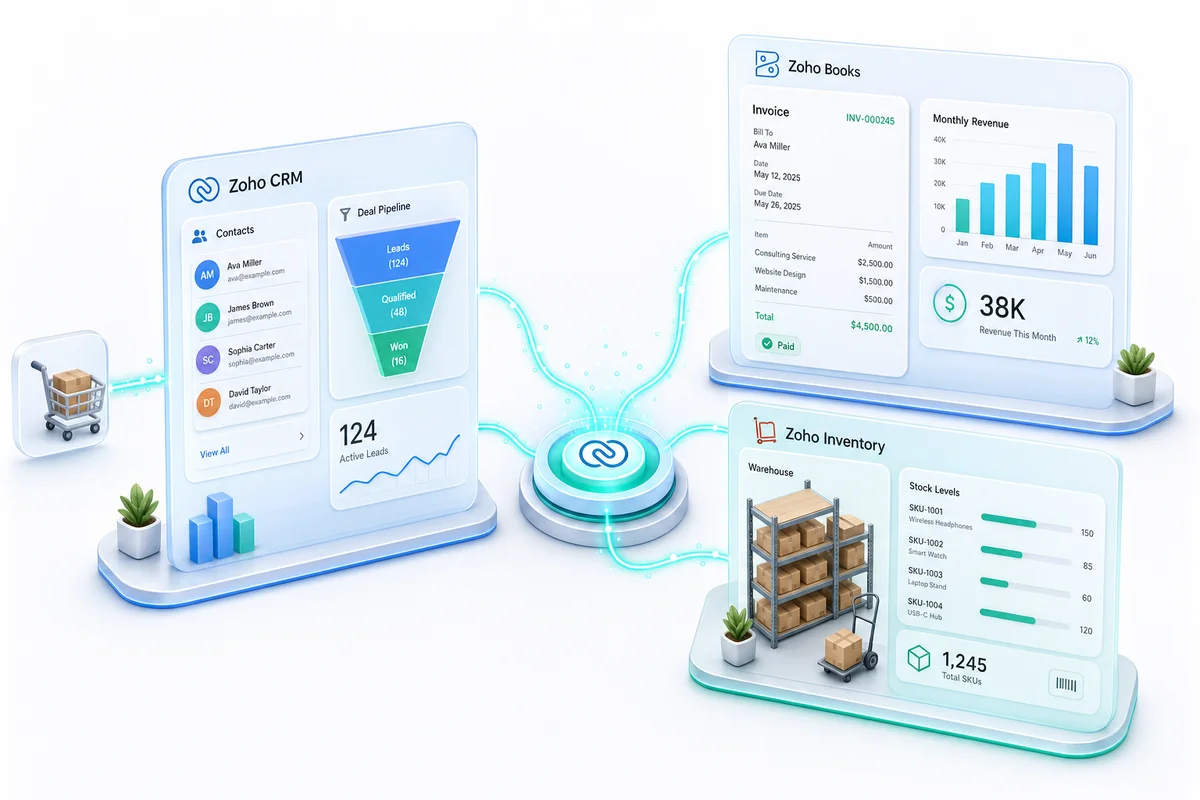
Zoho CRM, Zoho Books, and Zoho Inventory are three separate products with separate logins, separate billing, and separate feature sets. They also connect natively, without middleware, and share a common data layer for contacts, items, and transactions.
For eCommerce sellers, that connection is the entire point. When a Shopify order arrives, Inventory should pick the stock, Books should record the revenue, and CRM should capture or update the customer. Without the integrations enabled and configured, none of that happens automatically. With them properly set up, the three apps function as a single operations system.
This guide explains what each app owns, how data flows between them, what you have to configure, and where sellers most commonly get it wrong.
What each app is responsible for
Before getting into the connections, it is worth being clear about what belongs where. The three apps do not duplicate each other, and the boundaries matter for setup.
Zoho CRM: the customer layer
CRM owns everything about your customer relationships: contact records, purchase history, lifecycle stage, support tickets linked from Zoho Desk, and marketing segments. For eCommerce, it is primarily the post-purchase layer. When someone buys, CRM captures the event, classifies the customer (first-time vs. returning, high-value vs. low), and drives retention workflows through email sequences, tags, or tasks assigned to your team.
CRM is not where you record revenue or manage stock. It is where you understand who your customers are and what they have done.
Zoho Books: the financial layer
Books owns accounting: invoices, expenses, vendor bills, bank reconciliation, tax filings, P&L, and balance sheet. For eCommerce, it handles the accounting complexity of marketplace settlements, multi-currency transactions, sales tax across jurisdictions, and reconciling Shopify Payments, Amazon payouts, or PayPal deposits against actual order-level revenue.
Books is not where you manage warehouse stock or customer relationships. It is where every financial transaction gets recorded correctly.
Zoho Inventory: the operational layer
Inventory owns stock: SKU catalog, warehouse quantities, purchase orders, sales orders, fulfillment, multi-warehouse routing, and channel sync. For eCommerce, Inventory is the hub that keeps stock counts accurate across Shopify, Amazon, WooCommerce, eBay, and Etsy simultaneously.
Inventory is not where you run accounting or store customer lifecycle data. It is where physical goods are tracked from purchase order to customer doorstep.
How CRM and Books connect
The CRM-Books integration creates a bidirectional sync for contacts and exposes financial data inside CRM.
Contact sync. A customer record in Books becomes a CRM contact. A contact in CRM who has an invoice or payment becomes a Books customer. The sync key is email address. Before enabling the integration, clean both datasets to ensure each customer has a consistent email on both sides. Duplicates surface immediately on a messy dataset.
Invoice visibility in CRM. Once connected, sales reps can see outstanding invoices, payment status, and total spend directly on a CRM contact record without switching applications. For eCommerce sellers with a B2B component or a managed accounts team, this eliminates the "did they pay?" question during customer calls.
Deal-to-invoice automation. When a CRM deal reaches "Closed Won," a workflow can automatically create a draft invoice in Books for the deal amount, assigned to the CRM contact. This is most useful for service-based Zoho users but applies in eCommerce for B2B wholesale orders or custom quote-to-order flows.
What you configure:
- Enable Books integration from CRM Marketplace settings
- Choose which CRM records sync (Contacts, Accounts, or both)
- Map the Books chart of accounts to the CRM income field
- Set the sync direction (bidirectional, or CRM-to-Books only)
How Books and Inventory connect
The Books-Inventory integration is the more operationally critical connection for eCommerce sellers. It creates a real accounting record for every Inventory transaction.
Sales orders become invoices. When Inventory confirms a sales order (either from a manual order or from a channel like Shopify), Books automatically creates the corresponding invoice. Line items, quantities, unit prices, and the customer reference all transfer without manual entry. The invoice status in Books tracks the payment; once marked paid, the revenue is posted to the correct account.
Purchase orders become vendor bills. When you receive stock into Inventory against a purchase order, Books creates the vendor bill. The bill captures the supplier, the items received, quantities, and unit cost. This is how your COGS (cost of goods sold) stays accurate: the unit cost flows from the inventory item record to the Books COGS account at the moment of shipment. For the full purchase order lifecycle in Zoho Books — vendor credit terms, PO approval workflows, and goods receipt confirmation — the eCommerce purchase order management guide for Zoho Books covers the supplier AP setup that connects directly to this Books-Inventory sync.
Landed costs flow to Books. If you add freight, customs duties, or other landed costs in Inventory, Books records the adjustment and allocates it proportionally across the items in that shipment. This matters for imported goods where the true unit cost includes shipping and tariffs, not just the supplier invoice price.
Inventory adjustments post journal entries. Write-offs, adjustments for damaged goods, and transfers between warehouses in Inventory trigger accounting entries in Books automatically. Nothing falls off the books because it happened inside a warehouse.
What you configure:
- Enable Inventory integration from Books Settings under Integrations
- Map Books accounts to Inventory transaction types (sales, purchases, COGS, landed costs)
- Align the item catalog: every SKU in Inventory must have a matching item in Books
- Set the inventory valuation method (FIFO, LIFO, average cost) in Books; this determines how COGS is calculated
How CRM and Inventory connect
The CRM-Inventory link is less direct than the other two but still meaningful for eCommerce sellers with a B2B or managed-accounts component.
Item catalog access. Sales quotes created in CRM can pull products and pricing directly from the Inventory item catalog. This ensures that the price a sales rep quotes matches what Inventory will ship and what Books will invoice. Price discrepancies between a manually quoted price and the Inventory unit price are a common source of margin leakage in businesses that grew quickly.
Order confirmation to Inventory. When a CRM deal is confirmed, a sales order can be pushed to Inventory for fulfillment. Stock is reserved, the warehouse team picks and ships, and the fulfillment status flows back to CRM. For eCommerce sellers managing wholesale or B2B relationships through CRM, this closes the loop between the sales conversation and the actual shipment.
Customer shipping addresses. CRM contact addresses sync to Inventory, so shipment labels pull the correct address without re-entry. For high-volume B2B sellers, this eliminates a significant source of dispatch errors.
The complete eCommerce data flow: a Shopify order end to end
Here is how a single Shopify order moves through all three apps when the integrations are active:
- Order arrives in Shopify. Zoho Inventory receives the order via the Shopify channel sync. The customer's name, address, items, and quantities transfer automatically.
- Inventory allocates stock. Inventory checks available quantity in the assigned warehouse. If multi-warehouse routing is configured, it picks the optimal fulfillment location. Stock is reserved against the order.
- Books creates the invoice. As soon as the sales order is confirmed in Inventory, Books creates the invoice with the correct line items, prices, and the Shopify order reference. The revenue is posted to the income account.
- CRM captures or updates the customer. The Shopify customer data syncs to CRM via the Shopify-CRM integration. If the customer already exists (returning buyer), their purchase history updates. If new, a contact is created.
- Fulfillment updates the accounting. When the order ships, Inventory marks it fulfilled. Books records the COGS from the unit cost. If the customer pays on delivery or via Shopify Payments, Books reconciles the payment against the Shopify settlement deposit.
- CRM triggers a retention workflow. If this is the customer's second purchase, a CRM workflow tags them as "Repeat Buyer" and enrols them in a post-purchase email sequence through Zoho Campaigns. If a return is raised, the support ticket in Zoho Desk links back to the CRM contact and the original Books invoice.
Every step is automated once the integrations are configured. Without them, each of those steps requires manual data entry across three separate systems.
Common setup mistakes
Not enabling the Books-Inventory sync. This is the most frequent one. Sellers assume the apps talk to each other because they are all Zoho products. They do not by default. The Inventory integration must be enabled in Books Settings, and items must be mapped before the accounting sync begins.
Duplicate item catalogs. Creating items independently in Books and Inventory is a fast route to reconciliation problems. The correct flow is to build the item catalog in Inventory (where stock, unit cost, and warehouse data live) and sync it to Books. Starting with separate catalogs means each transaction requires manual matching.
Chart of accounts misalignment. If the income accounts, COGS accounts, and inventory asset accounts are not explicitly mapped between Books and Inventory during setup, transactions post to catch-all accounts. This makes your P&L meaningless until someone cleans it up.
Skipping the CRM contact merge. Enabling the CRM-Books sync on an existing dataset without first merging duplicate contacts creates multiple records for the same customer. Deduplication before enabling the sync is not optional.
Incorrect tax code mapping. Books and Inventory each have tax code settings. If they do not align, invoices created from Inventory sales orders will either apply the wrong tax or create a tax mismatch on reconciliation. For multi-jurisdiction sellers (US state sales tax, EU VAT), this requires careful pre-configuration.
When you need all three vs. just two
Not every eCommerce seller needs all three apps from day one.
| Situation | Recommended apps |
|---|---|
| Selling on one channel, under 200 SKUs, no B2B | Books + Inventory |
| Multi-channel seller needing stock sync and accounting | Books + Inventory |
| B2B with managed customer relationships | CRM + Books |
| Growing brand with retention focus and ops scale | CRM + Books + Inventory |
| Multi-channel, 500+ SKUs, B2B and DTC mixed | CRM + Books + Inventory + Analytics |
Adding CRM becomes worth it when the cost of not knowing your customer lifetime value, churn rate, or repeat purchase rate exceeds the cost of adding the product. For most eCommerce brands doing more than $1M in annual revenue across multiple channels, that threshold is already crossed.
What the setup process looks like
A clean implementation of all three apps connected together typically runs in this sequence:
- Chart of accounts in Books. Set up or import the correct accounts before any data enters the system. Changing account structure after transactions are recorded is painful.
- Item catalog in Inventory. Import SKUs, set unit costs, configure warehouses, and assign reorder points. This becomes the source of truth for both Books and CRM.
- Enable Books-Inventory integration. Map accounts, align tax codes, confirm the valuation method. Run a test transaction before going live.
- Connect sales channels to Inventory. Shopify, Amazon, WooCommerce, and other channels connect via Inventory's marketplace settings. Test with a real order before turning on automation.
- Enable CRM-Books integration. Merge and clean contacts first, then enable the sync. Verify that CRM quotes pull from the correct Inventory price list.
- Test end-to-end with real data. Run a live order through every step: channel receipt, Inventory fulfillment, Books invoice, CRM customer capture. Verify every downstream entry before declaring go-live.
The integration configuration itself usually takes a few days. Most of the six-to-twelve-week project timeline goes to data migration, account structure decisions, and training the team on the connected workflow.
Getting the implementation right
The native connections between Zoho CRM, Books, and Inventory are genuinely powerful for eCommerce operations. They eliminate the manual data re-entry that plagues sellers running separate systems for stock, accounting, and customers. But "native" does not mean "automatic" or "plug and play." Each connection requires deliberate configuration, item and account mapping, and testing with real transactions before it works reliably at scale.
Zolify has completed 100+ Zoho implementations for eCommerce sellers, with a Chartered Accountant on staff and official Zoho Finance Partner status. We set up CRM, Books, and Inventory as a connected system, migrate historical data, and train your team on the integrated workflow.
If you are running any of the three apps in isolation today, or if you are evaluating the stack for the first time, get in touch for a scoping call. We will tell you exactly what the setup involves for your channel mix and SKU count.
For background on the broader Zoho eCommerce platform, see Zoho for eCommerce: The Complete Operations Platform Guide. For marketplace-specific accounting detail, see eCommerce Marketplace Fee Reconciliation with Zoho.
Frequently Asked Questions
No. The integrations are native (no third-party middleware required) but must be enabled manually. Books and Inventory connect through the Books settings under Integrations. CRM connects to Books through the CRM Marketplace under Books Integration. Each connection requires mapping: contacts, items/products, chart of accounts, and tax codes. Without configuration, the three apps operate as silos even if you have active subscriptions for all three.
Yes. When you enable the CRM-Books integration, contacts sync bidirectionally. A customer created in Books appears in CRM as a contact, and a contact in CRM who converts becomes a Books customer. The sync is real-time for new records. Existing records require a one-time import to merge. Duplicate handling is based on email address, so consistent email fields on both sides are essential before you enable the sync.
Yes, when the Shopify channel is connected to Zoho Inventory, orders sync in real time. Inventory deducts stock from the warehouse assigned to the Shopify channel. If you run multiple warehouses, you assign a fulfillment priority and Inventory picks from the correct location. The stock count that Shopify displays reflects the figure in Inventory, so overselling from stale counts is eliminated. The same logic applies to Amazon, WooCommerce, eBay, and Etsy channels.
When Books and Inventory are connected, sales orders in Inventory generate invoices in Books automatically. Item receipts (purchase orders received) create vendor bills. COGS is recorded using the unit cost from the Inventory item record, calculated at the time of shipment. Landed costs (freight, customs, duties) entered in Inventory flow to Books as adjustments. Journal entries for inventory adjustments, write-offs, and transfers are also posted automatically to the relevant Books accounts.
Setting up CRM, Books, and Inventory as a connected system takes 6 to 12 weeks for a typical eCommerce seller, depending on SKU count, number of sales channels, and whether a data migration is involved. The integration configuration itself (enabling the native connections, mapping accounts and items) takes 2 to 5 days. Most of the time goes to data cleanup, chart of accounts setup, historical data import, and testing with real transactions before go-live. Sellers with 500+ SKUs or 3+ sales channels are at the longer end of that range.
See exactly where your Shopify, Amazon, or WooCommerce ops are leaking — free.
Get a personalised eCommerce Ops Audit: inventory gaps, accounting leaks, and order-flow bottlenecks — with a Zoho fix roadmap. Delivered in 48 hours, at no cost.