SAP to Zoho ERP Migration: Complete Guide for Mid-Market Companies
SAP Business One delivers more ERP than most mid-market eCommerce sellers need, at a cost structure that doesn't match the business. This guide covers the full SAP to Zoho migration: what data moves, what gets rebuilt, how long it takes, and where migrations go wrong.
SAP Business One costs what it costs because it delivers what it delivers: a full ERP for mid-size manufacturers and distributors, with production planning, quality control, and multi-entity consolidation. If you're running an eCommerce operation on Shopify, Amazon, or WooCommerce, you're paying for most of that without using it. An SAP to Zoho migration puts you on a platform built for the workflows you actually have: inventory across fulfillment channels, marketplace fee reconciliation, multi-channel P&L, and a CRM that knows about every order.
This guide covers the full SAP to Zoho migration: which data transfers, what gets rebuilt, what a realistic timeline looks like, and where the process typically goes wrong. Everything here comes from Zolify's experience completing 100+ migrations to Zoho Books from SAP, QuickBooks, Xero, and Tally. For the full picture of what Zoho delivers for eCommerce operations before you decide, see our Zoho for eCommerce guide.
On SAP Business ByDesign: If you're running SAP Business ByDesign rather than Business One, see the dedicated SAP Business ByDesign to Zoho migration guide — ByDesign reaches end of mainstream maintenance in December 2027 and the migration path differs in several key areas.
Why Mid-Market eCommerce Companies Move From SAP Business One to Zoho
The Cost Problem
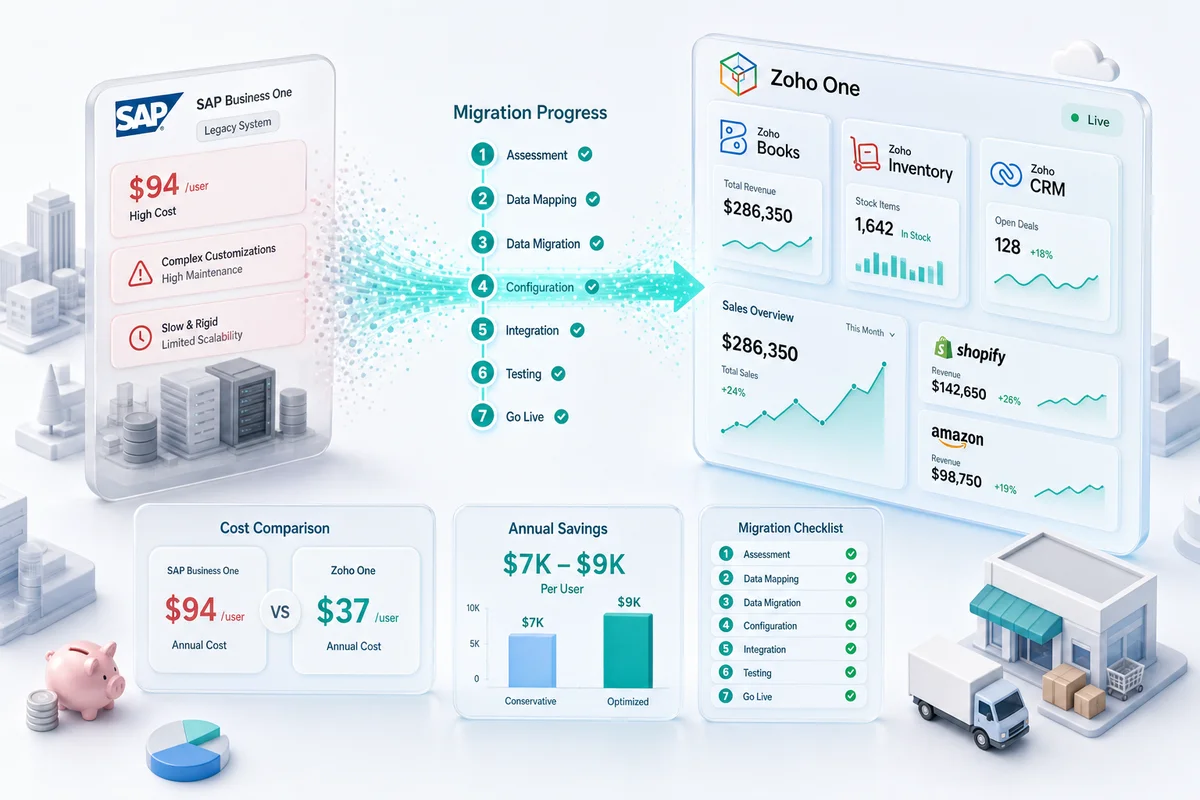
SAP Business One's cloud subscription runs approximately $94 to $108 per user per month at list price, before implementation, annual support contracts, and the customization required to handle eCommerce workflows. Most mid-market SAP installations also carry ongoing partner fees; the ecosystem keeps the platform running, but someone's billing you every time something needs adjusting.
Zoho One consolidates accounting (Zoho Books), inventory (Zoho Inventory), CRM (Zoho CRM), analytics (Zoho Analytics), project management, and marketing automation into a single subscription at $37 per user per month billed annually (Zoho One pricing). For a ten-user eCommerce operation, that's roughly $4,400 per year in Zoho One licensing versus $11,000 to $13,000 per year in SAP Business One cloud subscriptions, before support and maintenance. The gap widens further once you factor in lower implementation costs and the fact that Zoho doesn't need a specialist partner to handle routine configuration changes.
The eCommerce Fit Problem
SAP Business One handles multi-entity consolidation, production orders, and bill-of-materials workflows well. Shopify settlement reconciliation, Amazon FBA reserve inventory, and eBay channel P&L are where it falls short, unless you pay for expensive add-ons or custom development.
Zoho Inventory connects to Shopify, Amazon, WooCommerce, eBay, and Etsy natively. Orders sync automatically, inventory updates across channels in real time, and marketplace payouts reconcile at the line-item level: referral fees, FBA fulfillment fees, FBA storage fees, and reimbursements each in their own account. That's built into the platform, not held together by a third-party connector that breaks on every SAP update.
The Maintenance Overhead Problem
SAP Business One's customization layers accumulate. Each workflow, report, and third-party integration becomes a maintenance obligation. SAP releases updates on its own schedule; those customizations need testing and often reworking each time, and someone has to manage all of that.
Zoho's SaaS model handles platform updates and infrastructure. Customizations use Deluge scripting and Zoho Flow, which operational teams can manage without specialist help. They also survive platform updates cleanly, which SAP customizations rarely do.
SAP Business One vs. Zoho One: Feature Comparison for eCommerce
For a detailed cost breakdown by team size, see our SAP Business One vs Zoho One comparison for mid-market eCommerce sellers.
| Function | SAP Business One | Zoho One |
|---|---|---|
| Core accounting | Yes | Zoho Books |
| Inventory management | Yes (complex setup required) | Zoho Inventory (eCommerce-native) |
| Shopify integration | Third-party connector | Native (Zoho Inventory) |
| Amazon integration | Third-party connector | Native (Zoho Inventory) |
| WooCommerce integration | Third-party connector | Native (Zoho Inventory) |
| eBay and Etsy integration | Third-party connector | Native (Zoho Inventory) |
| CRM | SAP CRM (add-on) | Zoho CRM (included in Zoho One) |
| Analytics and reporting | SAP Crystal Reports (add-on) | Zoho Analytics (included) |
| Marketing automation | Not included | Zoho Campaigns (included) |
| Project management | Not included | Zoho Projects (included) |
| Cloud subscription (per user/month) | ~$94–$108 | $37 (Zoho One, annual billing) |
| eCommerce channel P&L by storefront | Requires customization | Built-in |
| Multi-warehouse FBA inventory tracking | Limited; requires customization | Yes (Zoho Inventory) |
| Amazon settlement line-item reconciliation | Not available natively | Yes (Zoho Inventory) |
What Migrates in an SAP to Zoho Migration
Chart of Accounts
Your SAP chart of accounts does not import directly into Zoho Books. SAP Business One's account structure uses a number-coded hierarchy built for manufacturing cost centers and multi-entity consolidation. For an eCommerce migration, this is actually an opportunity: rebuild the chart of accounts in Zoho from scratch to match your actual channel mix.
The eCommerce-specific chart of accounts structure for Zoho Books:
- Separate income accounts per channel: Amazon Sales, Shopify Sales, WooCommerce Sales, eBay Sales
- Expense accounts by marketplace fee type: Amazon Referral Fees, FBA Fulfillment Fees, FBA Storage Fees, Shopify Payment Processing Fees
- COGS accounts by fulfillment method if you split FBA and self-fulfilled
- Inventory asset account linked to Zoho Inventory for per-item COGS tracking
Building this structure correctly at migration eliminates the manual channel P&L reconciliation that most SAP eCommerce setups require.
Customers, Vendors, and Contacts
Customer and vendor master data exports cleanly from SAP Business One via CSV and imports into Zoho Books through the standard contact import template. Before exporting, clean up duplicates and outdated records. SAP Business One business partner lists accumulate inactive records over years of use, and you don't want to carry those across. Check that email addresses, billing addresses, and payment terms are current. In Zoho, customer email is what drives invoice delivery, so stale contacts cause real problems from day one.
Inventory Items and Opening Stock
Inventory items export from SAP Business One with item codes, descriptions, units of measure, and current stock levels. These import into Zoho Inventory via CSV. Before import, map your SAP item groups to Zoho Inventory item categories and confirm per-unit costs; Zoho Inventory needs accurate opening costs to calculate COGS correctly from day one. A lump-sum inventory balance produces incorrect gross margin on every sale from migration day forward.
For eCommerce businesses with FBA inventory, FBA reserve inventory should be tracked as a separate warehouse or fulfillment center location in Zoho Inventory. Set this up in the configuration phase before importing items.
Open Invoices and Bills
Open receivables and payables as of your migration date carry across as individual open documents in Zoho Books. Do not enter these as lump-sum opening balances - individual entry preserves aging, payment terms, and the ability to match payments to specific invoices after migration. This step is time-consuming for businesses with hundreds of open transactions, but shortcutting it creates months of reconciliation problems.
What Does NOT Migrate
Custom reports and dashboards. SAP Crystal Reports configurations, custom dashboards, and saved report formats do not transfer. Rebuild key reports in Zoho Analytics, which connects to Zoho Books, Zoho Inventory, and Zoho CRM in a single view, typically producing better cross-functional visibility than the SAP reporting stack being replaced.
Workflow and approval configurations. Every approval rule, workflow automation, and document routing configuration in SAP needs to be recreated in Zoho's workflow builder. Document them in the audit phase so nothing gets missed after cutover.
Historical transaction detail. Most SAP to Zoho migrations use an opening balance cutover rather than importing full transaction history. Keep SAP accessible in read-only mode for historical lookups. A full historical import is labor-intensive and rarely worth the operational benefit for day-to-day running of the business.
Third-party SAP connectors. Any third-party system feeding data into SAP needs a separate evaluation before migration starts: warehouse management, shipping platforms, 3PL integrations, EDI. Some will have direct Zoho connections. Others need replacement or custom integration work before go-live.
SAP to Zoho Migration: The 7-Step Process
Step 1: Audit Your SAP Business One Setup
Before anything moves, document what you have: full chart of accounts with account codes, open customer and vendor balances, inventory item list with stock quantities and costs, active workflow configurations, and every third-party integration connected to SAP. Flag accounts that are no longer active, items without per-unit costs, and integrations that need replacement decisions. This audit is the migration's foundation. Businesses that skip it or rush it spend the rest of the project fixing problems that should have been identified upfront.
Step 2: Map the Chart of Accounts
Build the mapping from SAP account codes to Zoho account names and types. Every SAP account code needs a corresponding Zoho account - not just a structural equivalent, but an account built for how your eCommerce business actually reports. Have a CA review the mapping before building in Zoho. Wrong account types at this stage produce wrong reports for as long as the system runs.
Step 3: Configure Zoho Books and Zoho Inventory
Set up your Zoho Books organisation: fiscal year start, base currency, tax rates (including marketplace facilitator rules), invoice numbering, and payment terms. Configure Zoho Inventory with your warehouse structure, fulfillment channels, and item category hierarchy that reflects your SAP item group mapping. Get the structure right before any data goes in.
Step 4: Export Master Data and Import to Zoho
Export customers, vendors, and items from SAP Business One as CSVs. Clean duplicates, update contact details, and verify per-unit item costs before importing. Import in sequence: chart of accounts first, then contacts, then items. Run import validation reports and resolve errors before moving to opening balances - errors caught here are easy to fix; errors found after opening balances are entered take significantly longer to untangle.
Step 5: Enter Opening Balances
Run a trial balance in SAP Business One as of your planned cutover date. Enter each account balance in Zoho Books under Settings > Opening Balances. Debits must equal credits. Zoho flags imbalances automatically. Enter open invoices and bills individually, not as account-level totals, to preserve aging and payment matching. Set opening stock at per-unit cost in Zoho Inventory for correct COGS from day one.
Reconcile the Zoho trial balance against your SAP trial balance for the same date before proceeding. They should match exactly. If they don't, Find the discrepancy now. It won't resolve itself after go-live.
Step 6: Reconnect Your eCommerce Channels
Connect Shopify, Amazon, WooCommerce, eBay, and any other active channels through Zoho Inventory. Map each channel's revenue and fee categories to the chart of accounts built in Step 2. Run a test order batch on each channel before going live. Connect channels one at a time, starting with your highest-volume storefront. For Shopify-specific setup, see our Shopify Zoho integration guide. For Amazon, including FBA reserve inventory tracking and settlement reconciliation, see the Amazon Zoho integration service.
Step 7: Run Parallel Period and Cut Over
Keep SAP running alongside Zoho Books for a full accounting period, at minimum four weeks. Enter all transactions in both systems. Run a P&L and balance sheet comparison at month end. Do not cut over until the numbers match. For eCommerce operations with multiple active channels, channel integration mismatches typically surface during the parallel run, not before. The parallel run is not optional padding; it's where problems get caught before they become permanent.
Realistic SAP to Zoho Migration Timeline
| Phase | Duration | What Happens |
|---|---|---|
| Audit and account mapping | 2–3 weeks | Document SAP setup, build chart of accounts mapping, identify integration dependencies |
| Zoho configuration | 1 week | Organisation setup, chart of accounts, Inventory configuration |
| Data export and import | 1–2 weeks | Export from SAP, clean data, reformat for Zoho templates, import |
| Opening balance entry | 3–5 days | Enter all balances, verify trial balance match against SAP |
| eCommerce channel reconnection | 1–2 weeks | Connect Shopify, Amazon, WooCommerce, eBay; test order batches |
| Parallel run | 4–6 weeks | Dual entry, compare reports, verify channel reconciliation |
Total for a mid-market eCommerce operation: 10–16 weeks from audit to go-live.
Implementations with multiple entities, heavy inventory volume, many active eCommerce channels, or complex third-party integration replacements should plan 4–6 months.
What Makes SAP to Zoho Harder Than Other Migrations
SAP Business One migrations have a few specific challenges that QuickBooks or Xero migrations don't.
Account codes don't transfer as names. SAP uses numeric codes as primary account identifiers. Zoho uses account names. You can't do a find-and-replace. Every SAP code needs a deliberate Zoho account decision, which is why the chart of accounts mapping step takes longer here than in other migrations.
More third-party integrations to untangle. SAP Business One implementations typically carry more connectors than QuickBooks or Xero setups: warehouse management, shipping platforms, EDI, 3PL. Each one needs an evaluation before migration starts. Some have direct Zoho equivalents. Others need replacement or custom integration work, and that work takes time.
Undocumented workflows. SAP's authorization rules and approval workflows need to be written down before anything moves. Recreating them in Zoho's workflow builder is straightforward. Doing it from memory because nobody ever documented them is not.
Data volume. Larger SAP implementations carry years of master data. The cleanup and reformatting effort scales with it.
All of this is manageable when the audit phase gets the time it needs. It becomes a problem when teams compress it and try to move from SAP to Zoho in six weeks.
How Zolify Manages SAP to Zoho Migrations
Zolify has completed 100+ migrations to Zoho Books from SAP Business One, QuickBooks, Xero, and Tally. Every SAP migration follows the same structure: a full discovery audit before data moves, a CA review of the chart of accounts mapping, CA-supervised opening balance reconciliation, and a signed-off parallel period before cutover.
What that looks like in practice: the chart of accounts coming out of SAP gets rebuilt for how an eCommerce business actually reports, not translated account code by account code. Opening balances are reconciled by a CA before you go live, not imported and assumed correct. Reconnecting your eCommerce channels in Zoho Inventory (Shopify, Amazon, WooCommerce, eBay) is part of the migration scope, not a separate project you sort out afterwards.
Zolify is an Official Zoho Authorized Partner with a CA on staff. See our SAP to Zoho migration service for scope, pricing, and a fixed timeline.
For more on the Zoho eCommerce operations stack, see our Zoho One for eCommerce guide and the eCommerce industry page.
DIY vs. Getting Help
DIY is viable when:
- Fewer than 100 inventory items with clean per-unit costs
- Chart of accounts has under 60 accounts
- You're running a single eCommerce channel
- SAP has no meaningful third-party integrations to untangle
- Your team has 3 months to run the project alongside normal operations
A partner makes sense when:
- You're running multiple channels (Shopify, Amazon, WooCommerce) that all need fee mapping rebuilt
- The SAP account hierarchy needs a proper CA-reviewed rebuild, not just a copy-across
- You have third-party integrations that need evaluating and possibly replacing
- There are hundreds of open invoices and bills to enter individually
- Your team can't sustain dual-entry through a 4 to 6-week parallel run
- There's a hard deadline the migration needs to hit
Unlike a QuickBooks or Xero migration where DIY is viable for single-channel sellers with clean books, SAP to Zoho migrations almost always benefit from expert involvement. The audit phase alone typically surfaces integration dependencies and accounting structure issues that nobody knew were there. Finding those after the migration has started is expensive. Finding them at the start is just part of the job.
Get a Free SAP to Zoho Migration Assessment
Start with a free migration assessment. We review your SAP Business One setup, scope the data migration, identify integration dependencies, and give you a fixed timeline and quote before you commit to anything.
Book your free migration assessment. If it's simpler than you expect, we'll tell you. If it's more involved, we'll show you exactly why.
Frequently Asked Questions
A mid-market eCommerce company with standard data volume should plan 10 to 16 weeks from audit to go-live. The audit and account mapping phase takes 2 to 3 weeks, Zoho configuration 1 week, data export and import 1 to 2 weeks, eCommerce channel reconnection 1 to 2 weeks, and the parallel run 4 to 6 weeks. Complex implementations with multiple entities, heavy inventory, or many active channels should budget 4 to 6 months.
Master data transfers via CSV export and import: chart of accounts (rebuilt for Zoho's structure), customer and vendor contacts, inventory items with opening stock quantities and per-unit costs, and open invoices and bills entered individually as open documents. Historical transaction detail does not migrate in most cases. The standard approach is an opening balance cutover - you set Zoho's starting position as of a clean date and keep SAP accessible in read-only mode for historical lookups.
For eCommerce companies whose core needs are multi-channel inventory, marketplace accounting, CRM, and reporting, yes. Zoho One covers all of these with native integrations to Shopify, Amazon, WooCommerce, eBay, and Etsy. Zoho does not replace SAP for businesses that need production planning, quality management, or complex multi-entity manufacturing consolidation. If your SAP usage is primarily financial, inventory, and CRM, Zoho is a direct replacement at significantly lower cost.
SAP Business One cloud subscriptions run approximately $94 to $108 per user per month at list price, before implementation, support contracts, and customization fees. Zoho One is $37 per user per month billed annually, which includes Zoho Books, Zoho Inventory, Zoho CRM, Zoho Analytics, and 40+ additional applications. For a ten-user eCommerce operation, the annual licensing difference is roughly $7,000 to $9,000 before accounting for lower implementation and ongoing maintenance costs on Zoho.
SAP to Zoho migrations almost always benefit from partner involvement. The audit phase - documenting what SAP is doing for your business, mapping account codes to Zoho account names, and evaluating integration dependencies - is more complex than a QuickBooks or Xero migration. A CA on the migration team is particularly valuable for opening balance reconciliation and chart of accounts review. Zolify provides a CA-supervised migration process with fixed pricing from SAP Business One to Zoho Books.
See exactly where your Shopify, Amazon, or WooCommerce ops are leaking — free.
Get a personalised eCommerce Ops Audit: inventory gaps, accounting leaks, and order-flow bottlenecks — with a Zoho fix roadmap. Delivered in 48 hours, at no cost.