Zoho for Subscription eCommerce: Recurring Orders, Subscription Boxes, and Billing Automation
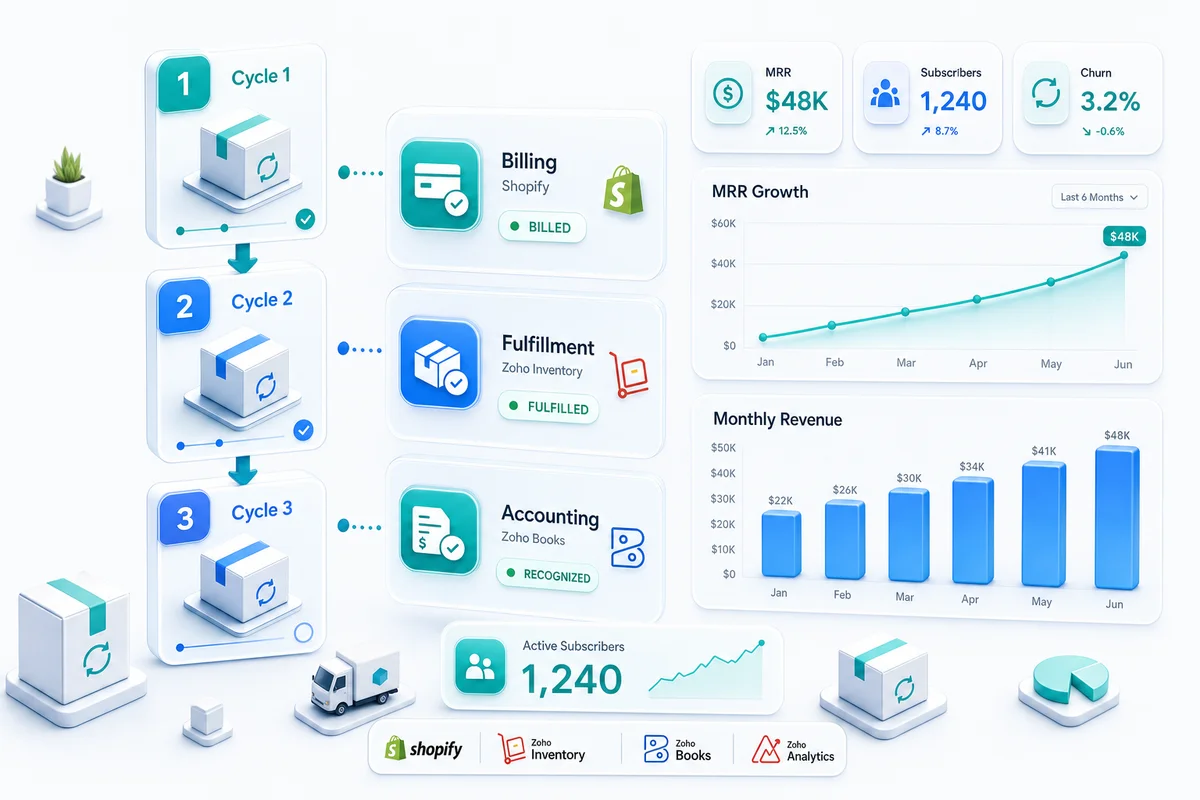
A subscription box at 500 active subscribers means 500 recurring billing events, 500 fulfillment runs per cycle, and monthly revenue recognition that needs to match what physically shipped. Zoho Billing handles the recurring charge and dunning side; Zoho Inventory handles per-cycle fulfillment; Zoho Books handles the accounting. The three connect, but only when the integration is set up for subscription workflows specifically.
Subscription eCommerce looks simple until the operations behind it need to scale. A subscription box at 500 active subscribers means 500 recurring billing events per cycle, 500 fulfillment runs that need to align with the billing schedule, and monthly revenue recognition that has to match what physically shipped - not what customers paid upfront. Managing that with spreadsheets and manual billing triggers breaks around the time the business actually starts growing.
Zoho has three products that handle subscription eCommerce operations when connected correctly: Zoho Billing for recurring charges and failed-payment recovery, Zoho Inventory for per-cycle fulfillment, and Zoho Books for the accounting. This guide covers how the three work together and where configuration decisions matter for subscription-specific workflows.
For context on how subscription operations fit alongside on-demand eCommerce, see our eCommerce accounting software guide.
Recurring Billing with Zoho Billing
What Zoho Billing Handles
Zoho Billing (previously called Zoho Subscriptions) is Zoho's dedicated subscription billing product. For subscription eCommerce, it manages:
- Plan setup: Monthly, quarterly, and annual subscription plans with different pricing
- Trial periods: Free trials, paid trials, and trial-to-paid conversions
- Recurring charge cycles: Automated billing on schedule, charge to stored payment method
- Proration: When a subscriber upgrades mid-cycle, Zoho Billing calculates the prorated charge
- Dunning: Automatic failed payment retries with configurable retry intervals and customer communication
- Cancellations and pauses: Subscription pause workflows and end-of-term cancellations
Each of these has downstream effects on Zoho Books. When Zoho Billing processes a successful charge, Zoho Books records the invoice and payment. When a charge fails and eventually the subscription cancels, Zoho Books closes out the open invoice correctly. The two products sync natively without custom integration.
Dunning and Failed Payment Recovery
Failed payments are one of the highest sources of involuntary churn for subscription eCommerce businesses. A card declines, the business does nothing, and the subscription lapses before anyone noticed.
Zoho Billing's dunning settings let you configure how many retry attempts occur after a failed charge, at what intervals, and what email communication goes to the subscriber at each stage. A typical configuration: retry on day 1, retry on day 3, retry on day 7, final notice on day 10, cancel on day 14. Subscribers who update their card before the final retry retain their subscription; those who do not cancel automatically.
The dunning sequence runs without manual intervention. For a subscription business with 500 active subscribers, expecting 3–5% of cards to fail in any given month, automated dunning recovers most of those before they become cancellations.
Subscription Box Fulfillment with Zoho Inventory
Per-Cycle Sales Orders
The connection between Zoho Billing and Zoho Inventory for physical subscription boxes requires a trigger that creates fulfillment work in Zoho Inventory when the billing cycle fires. The standard approach: each successful billing event in Zoho Billing triggers a sales order in Zoho Inventory for that subscriber's box.
The sales order contains the items included in that cycle's box. For fixed-content subscription boxes, the item set is the same every cycle. For curated or theme-based boxes where contents change monthly, the sales order template updates at the start of each cycle to reflect the new box contents.
Once the sales order is in Zoho Inventory, it moves through the standard fulfillment workflow: pick, pack, ship, update the tracking number. The tracking number syncs back to Zoho Billing and out to the subscriber in their shipping notification.
Inventory Planning for Subscription Demand
Subscription boxes create predictable but concentrated demand. Every cycle, you need a specific number of units of each item in the box - equal to the number of active subscribers. That demand hits all at once rather than spreading across the month.
Zoho Inventory's reorder points and purchase order automation work differently for subscription demand than for on-demand sales. For on-demand, you reorder when stock dips below a rolling threshold. For subscription boxes, you need to ensure stock is on hand before the fulfillment run starts, not after it depletes.
The practical approach: calculate the next cycle's box contents × subscriber count, create purchase orders for any shortfall 3–4 weeks before the cycle date, and reserve that stock in Zoho Inventory so it is not available for on-demand orders that might arrive in the same period. Zoho Inventory's committed stock tracking makes this visible - reserved units appear as committed and do not count toward available-to-sell.
Kitting and Bill of Materials
Some subscription boxes are assembled from multiple components into a single shipped unit - a kit or bundle. Zoho Inventory's composite items (bill of materials) feature handles this: the subscription box is a parent item; the component items are its ingredients. When a pick order generates for 500 subscription boxes, Zoho Inventory automatically calculates the component quantities needed and draws them from stock.
If one component is short, Zoho Inventory flags the shortfall before the fulfillment run starts rather than during pack. You have time to expedite the missing component or substitute it, rather than discovering the shortage mid-production.
Revenue Recognition for Subscription eCommerce
Cash Received vs Revenue Earned
For subscription eCommerce, cash and revenue recognition are not the same thing when customers pay upfront. A subscriber who pays $120 for an annual box subscription on January 1 has paid $120 in cash, but your business has earned only $10 of that in January (one month of the twelve-month commitment).
Recording the full $120 as January revenue overstates income and makes month-to-month revenue comparison meaningless. It also produces an incorrect picture of financial performance: revenue appears front-loaded rather than earned evenly across the subscription period.
Deferred Revenue in Zoho Books
Zoho Books handles deferred revenue through liability accounts. When the $120 upfront payment arrives, Zoho Books records $120 to a deferred revenue liability account rather than to revenue. Each month, a journal entry moves $10 from deferred revenue to earned revenue. After 12 months, the deferred revenue balance for that subscriber is zero and the full $120 has been recognized correctly.
For subscription businesses at scale, these monthly recognition entries add up. Zoho Books supports journal entry automation through its recurring journal feature: the monthly recognition entry can run automatically on a defined schedule, covering all active prepaid subscribers in a single batch entry.
Monthly and annual prepaid subscribers have different deferred revenue amortization schedules. Zoho Books tracks them separately if your chart of accounts distinguishes between monthly and annual plan revenue - which is worth doing if your product mix includes both, since the unit economics of annual subscribers differ from monthly subscribers.
For a detailed walkthrough of eCommerce accounting setup in Zoho Books, see our Zoho Books setup guide. For the full ASC 606 deferred revenue treatment, per-box COGS tracking with composite items, and the exact journal entries that post each subscription cycle, see the subscription box accounting guide for Zoho Books.
Subscriber Metrics and Churn Management
Zoho CRM for the Subscriber Lifecycle
Zoho CRM tracks the subscriber relationship beyond the transaction. Each subscriber is a contact in Zoho CRM with a full history: acquisition channel, plan history, support tickets, cancellation requests, and reactivation attempts. This data is what makes churn analysis useful - you can see not just that subscribers cancel, but which acquisition channels produce high-churn subscribers, which plan types have the longest retention, and whether subscriber support interactions correlate with cancellation timing.
For subscription eCommerce, Zoho CRM's workflow automation handles re-engagement: when a subscriber cancels, a re-engagement sequence triggers automatically (email on day 1, follow-up on day 7, win-back offer on day 14). If the subscriber reactivates, the workflow closes and the re-engagement sequence stops.
MRR and ARR in Zoho Analytics
Zoho Analytics connects to Zoho Billing, Zoho CRM, and Zoho Books to produce the subscription metrics eCommerce operators need:
| Metric | Source in Zoho |
|---|---|
| Monthly Recurring Revenue (MRR) | Zoho Billing (active subscriptions × plan price) |
| Annual Recurring Revenue (ARR) | Zoho Billing (MRR × 12 or annual plan total) |
| Churn Rate | Zoho Billing (cancelled this period / subscribers at start) |
| Average Revenue Per User (ARPU) | Zoho Billing (total MRR / subscriber count) |
| Customer Lifetime Value (LTV) | Zoho CRM + Zoho Books (ARPU / churn rate) |
| Net Revenue Retention | Zoho Billing (expansion minus churn and contraction) |
These metrics update in Zoho Analytics as Zoho Billing processes charges and cancellations. You do not need to build a separate dashboard or export to spreadsheets to see the health of your subscription business.
What Zolify Configures for Subscription eCommerce
Subscription eCommerce on Zoho requires connecting three products - Zoho Billing, Zoho Inventory, and Zoho Books - in a sequence that fires reliably on every billing cycle. The most common failure points in self-implemented setups: billing events that do not trigger fulfillment, deferred revenue that is never set up so all subscription revenue lands in the wrong period, and dunning sequences that are not configured so failed payments fall through without recovery.
Zolify has implemented subscription eCommerce workflows for operators on Shopify, WooCommerce, and multi-channel subscription models. Our CA validates the revenue recognition setup and deferred revenue accounts before go-live - not because the accounting is optional, but because subscription revenue recognition mistakes compound month over month. Across 100+ eCommerce implementations as an Official Zoho Authorized Partner, subscription box setups are among the most technically specific, and the configuration decisions made at the start determine whether the business can trust its financials at scale.
For the full scope of what a subscription eCommerce build covers - from platform connection through billing automation and accounting validation - see our eCommerce operations implementations.
If your subscription eCommerce operation runs on any manual coordination between billing, fulfillment, and accounting, an eCommerce Ops Audit identifies exactly where the automation gaps are and what it takes to close them.
Subscription eCommerce is one model within the broader Zoho eCommerce platform. For how recurring billing and fulfillment connect alongside on-demand channels including Shopify, Amazon, WooCommerce, eBay, and Etsy, see Zoho for eCommerce: The Complete Operations Platform Guide.
Frequently Asked Questions
Zoho Billing is the Zoho product for subscription billing and recurring payments. It manages plan creation, recurring charge cycles, trial periods, free trials, proration when customers upgrade or downgrade, and dunning (failed payment retries with automated follow-up). For subscription eCommerce, Zoho Billing connects to Zoho Books for revenue recording and to Zoho Inventory for per-cycle fulfillment triggers.
Subscription box fulfillment in Zoho Inventory is driven by recurring sales orders. Each billing cycle, a sales order generates for active subscribers, triggering the pick-and-pack workflow for that cycle's box contents. If the box contents change month to month (curated subscription boxes), the sales order items update per cycle. If the box is fixed, the same item set generates automatically. Zoho Inventory tracks per-cycle inventory consumption, so your stock forecasting accounts for subscription demand separately from on-demand orders.
Yes. When a subscriber pays upfront for a quarterly or annual subscription, that payment is not fully earned at the moment of receipt - it is earned over the subscription period as each cycle is fulfilled. Zoho Books supports deferred revenue accounts where upfront payments are recorded as a liability and recognized as revenue on a per-cycle or per-month basis. The recognition entries can be created manually or automated through journal entry rules, depending on the volume of prepaid subscribers.
Zoho Analytics connects to Zoho Billing and Zoho CRM to produce subscription KPI dashboards: monthly recurring revenue (MRR), annual recurring revenue (ARR), churn rate by cohort, subscriber lifetime value, and plan mix. Zoho CRM tracks the subscriber relationship - acquisition channel, plan history, support interactions, and cancellation reasons - so your churn analysis has behavioral context, not just revenue numbers.
Shopify's native subscription capabilities (via Shopify Subscriptions or apps like Recharge) can integrate with Zoho through a custom API connection that syncs subscriber data, billing events, and fulfillment triggers into Zoho. The integration approach depends on whether you want Shopify to remain the billing system of record with Zoho as the fulfillment and accounting back-end, or whether you want to migrate billing management fully into Zoho Billing. Both architectures are viable; the right choice depends on your storefront complexity and how much billing customization you need.
See exactly where your Shopify, Amazon, or WooCommerce ops are leaking — free.
Get a personalised eCommerce Ops Audit: inventory gaps, accounting leaks, and order-flow bottlenecks — with a Zoho fix roadmap. Delivered in 48 hours, at no cost.