Amazon FBA Accounting in Zoho Books: How to Stop Drowning in Settlement Reports
Most FBA sellers record their net settlement deposit as revenue. That's wrong, and it means your gross margin, COGS, and tax position are all off. Here's how proper Amazon FBA accounting works.
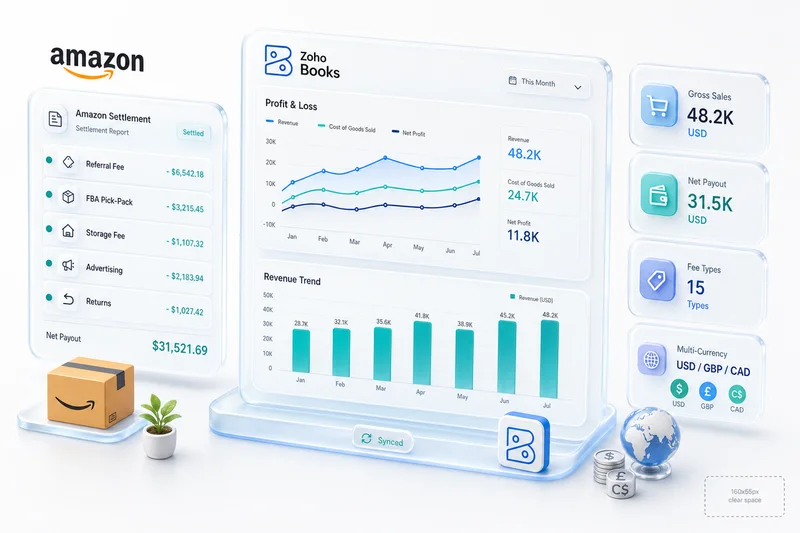
Every two weeks, Amazon drops money into your bank account and sends you a settlement report. That report isn't a payment summary. It's a dense document with 15 or more distinct fee line items: referral fees, FBA fulfillment fees, storage charges, reimbursements, refund adjustments, advertising deductions. Each one needs its own account in your books. But most FBA sellers, and most accountants who don't specialize in Amazon FBA accounting, just record the net deposit as revenue and move on. That single mistake throws off your gross margin, your COGS, and your tax position. Every single period.
Here's how FBA accounting actually works, where sellers consistently go wrong, and how Zolify's CA-backed approach sets it up correctly in Zoho Books.
TL;DR: Amazon FBA sellers pay 30–35% of revenue in combined platform fees across 15+ categories (Jungle Scout, 2025). Recording the net settlement deposit as revenue inflates gross margin, understates expenses, and creates a false picture of unit economics. Accurate FBA accounting requires separate account mapping for each fee type, order-date revenue recognition, and COGS that includes fulfillment cost. In Q4, this matters even more: storage fees triple from October 1 and BFCM settlements span multiple periods, so books that weren't built for it will misrepresent your most important selling months.
Why Amazon FBA accounting is different from every other business accounting
Most businesses have a simple revenue cycle: sell something, get paid, record the income. FBA breaks every part of that. According to Jungle Scout's 2025 State of the Amazon Seller Report, the average FBA seller pays 30–35% of revenue in combined Amazon fees, and those fees don't show up as a separate invoice. They're baked into a settlement report that deducts everything before you see a deposit.
For context on how this compares to standard eCommerce accounting setups, see our eCommerce accounting software guide. And if you're still evaluating which software to use, our Amazon accounting software comparison covers what to look for and where QuickBooks, Xero, and Zoho Books each fall short.
Settlement reports that arrive every 2 weeks (not monthly)
Standard accounting runs on a monthly cycle. Amazon doesn't care. Settlements arrive every 14 days, or daily if you're on Amazon's accelerated disbursement program. Each settlement covers a rolling two-week period, so one settlement can overlap two calendar months. If your books close on the 30th and your settlement period runs from the 25th to the 8th, you've got revenue and fees spanning two reporting periods inside a single report.
That timing mismatch is one reason generic accountants struggle with FBA. They're used to monthly invoices and monthly bank reconciliation. FBA just doesn't work that way.
15+ fee types hidden inside every settlement
Each Amazon settlement contains multiple distinct fee categories. According to Amazon Seller Central's fee schedule, fee structures vary by product category, fulfillment type, size tier, and marketplace. A single settlement typically includes:
- Revenue: product sales, shipping credits, gift wrap credits, promotional rebates (negative)
- Fulfillment: FBA pick and pack fees, weight handling fees, closing fees, high-volume listing fees, refund administration fees, removal and disposal fees
- Storage: monthly storage fees, aged inventory surcharge (items stored 181+ days)
- Advertising: Sponsored Products, Sponsored Brands, Sponsored Display
- Other adjustments: inventory reimbursements, A-to-Z guarantee claims, chargeback fees
Each of these belongs in a different account. Collapse them into one "Amazon Fees" expense line and you lose the granularity you need for margin analysis, tax filing, and cost optimization.
We've processed settlement reports for FBA clients with over 20 line item types in a single settlement period. Every time a previous accountant had combined them, the gross margin calculation was off by 15–25 percentage points. That's not a rounding error. It's a fundamentally different picture of whether the business is working.
FBA storage fees that change monthly (and spike in Q4)
FBA storage fees are billed monthly, but they're not fixed. Amazon charges per cubic foot based on how much space your inventory occupies in their fulfillment centers. According to Amazon's FBA fee schedule, standard-size storage runs $0.78/cubic foot from January through September and jumps to $2.40/cubic foot from October through December — a 208% increase for Q4.
Aged inventory fees add another layer. Inventory stored more than 181 days gets a surcharge assessed on the 15th of each month. If you've loaded up FBA warehouses with slow-moving SKUs, these fees can erase margin on an entire product line without anyone noticing, because they're buried in a settlement report recorded as a single net deposit.
Reimbursements that aren't revenue (but look like it)
When Amazon loses or damages your FBA inventory, they owe you a reimbursement. According to GETIDA (2025), the average FBA seller is owed 1–3% of annual revenue in unclaimed reimbursements. When Amazon does pay them, the reimbursement appears as a positive line item in your settlement.
It looks like revenue. It's not. A reimbursement is inventory recovery, compensation for a lost asset. Classifying it as product sales inflates your revenue, misrepresents your sales volume, and skews your cost-per-unit calculation. In properly structured books, reimbursements go to a dedicated "FBA Inventory Reimbursements" account under Other Income, visible in reporting but separate from operational revenue.
Refunds that reduce revenue after the settlement period
A customer buys from you in one settlement period and returns the product in the next. The refund hits your books in a different period than the original sale. If your revenue recognition runs on settlement date rather than order date, the sale and the refund land in different periods, distorting both months.
That's the core difference between amazon seller accounting done right and amazon seller accounting done fast. Fast books record settlement deposits. Right books recognize revenue at the order date and match refunds back to the original transaction period.
The 3 ways FBA sellers mess up their accounting
We've reviewed the books of FBA clients at every volume level, from $100K to $5M in annual Amazon revenue. The same three mistakes appear regardless of scale. The difference is how expensive they get as volume grows.
Recording the net settlement as revenue (wrong)
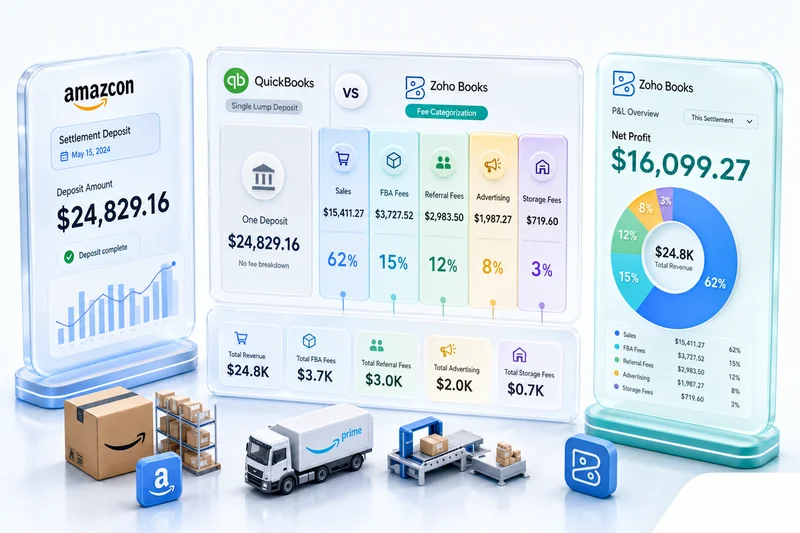
This is the most common FBA accounting mistake, and it's exactly what happens when an accountant who doesn't understand Amazon settlements handles the books. Amazon deposits $7,400 into your bank account. The accountant records $7,400 as sales revenue. Done.
But here's what actually happened: you generated $10,200 in gross sales. Amazon deducted $2,800 in referral fees, FBA fees, storage charges, and advertising, then deposited the remainder. Your revenue is $10,200. Your fees are $2,800. Recording $7,400 as revenue understates both, and produces a gross margin that's meaningless for any business decision.
Ignoring FBA fees until tax time (painful)
Some sellers track revenue but treat fees as something to sort out at year-end. Settlement reports pile up uncategorized. Every month, the books are incomplete. Then tax time arrives and someone has to process 26 settlements retroactively, map every fee type to the correct account, and reconstruct the actual P&L.
That's expensive to fix, both in accountant hours and in the decisions you made during the year based on wrong numbers. If you didn't know your Q4 storage fees were running $3,000/month, you didn't make the inventory decisions that would've reduced them. For more on how bookkeeping errors compound, see our eCommerce bookkeeping guide.
Using an accountant who doesn't understand Amazon settlements
This isn't a knock on general accountants. Amazon's settlement structure is genuinely specialized knowledge. A qualified CPA who's never worked with FBA settlement reports will default to what they know: treat the deposit as revenue, create a catch-all expense account for fees, move on.
The result? Technically filed tax returns with structurally wrong financial statements. Your P&L doesn't reflect your actual unit economics. Your COGS is incomplete. Your gross margin is inflated. And you're making pricing, inventory, and advertising decisions based on numbers that don't represent your business.
What accurate Amazon FBA accounting looks like
The account structure and workflow below is what our CA has built and refined across 100+ FBA seller implementations. It's designed around how Amazon's fee taxonomy actually works, and what your P&L needs to show for SKU-level decisions to be reliable.
Revenue recognition by order date, not settlement date
Accurate Amazon FBA accounting recognizes revenue when the sale occurs, not when Amazon settles. This matters for two reasons: it keeps your monthly revenue aligned with the period when you earned it, and it lets refunds be matched to the original sale period so you get accurate net revenue per month.
In practice, that means pulling order-level data from Amazon Seller Central separately from settlement data. Revenue entries are based on orders placed. Settlement reconciliation matches the cash receipt against revenue you've already recognized. The two-week settlement cycle becomes a cash reconciliation step, not the trigger for revenue recording.
Fee categorization: each line item maps to a specific account
Amazon referral fees run 8–15% of the sale price depending on your product category, per Amazon's referral fee schedule. FBA fulfillment fees are per-unit charges based on size and weight. Both are variable costs directly tied to each unit sold. They belong in Cost of Sales, not Operating Expenses.
Put referral fees in Operating Expenses and you inflate gross margin by that same percentage, making products look more profitable than they are. Advertising spend (Sponsored Products, Sponsored Brands, Sponsored Display) goes in Operating Expenses under Sales and Marketing because it's a discretionary marketing investment, not a per-unit fulfillment cost. Reimbursements go to Other Income. A-to-Z claims and chargebacks go to Other Expenses.
COGS calculation that accounts for FBA fulfillment cost
Most FBA sellers calculate COGS as cost of goods purchased. That's incomplete. Your true COGS for an FBA unit includes the landed product cost plus FBA fulfillment fees for each unit shipped. If your product costs $8 to source and $4.50 in FBA fees to fulfill, your unit COGS is $12.50, not $8.
Getting this right means tracking FBA fees at the line-item level and allocating them against units sold. It's the difference between thinking your gross margin is 40% and actually knowing whether that margin covers your overhead.
Inventory valuation that matches your FBA stock levels
Your inventory sitting in Amazon's warehouses is a real asset on your balance sheet. Proper inventory valuation means recording the cost of goods sent to FBA as an asset when you ship to the warehouse, then moving that cost to COGS when Amazon ships to the customer.
When Amazon reimburses you for lost inventory, that reimbursement offsets the asset reduction — it's not new revenue. When you pay for removal orders, the disposal cost reduces the inventory asset and any remaining book value becomes a write-off. Most FBA accounting setups skip all of this.
Amazon FBA accounting with Zoho Books: how Zolify sets it up
For how Zoho Books handles the full Amazon seller setup, including connecting your chart of accounts to Amazon Seller Central, see our Amazon seller Zoho Books guide.
Zoho Books is what Zolify uses for every FBA accounting implementation. It supports 18 standard account types with unlimited sub-accounts, the structural depth you need to map FBA's full fee taxonomy without compromise.
Chart of accounts built for FBA revenue streams
The chart of accounts gets designed before anything connects. Our CA maps the client's specific FBA operation (which product categories, which referral fee rates, FBA-only or mixed FBA and FBM, international marketplaces with currency considerations) and builds the account structure from those answers, not from Zoho's defaults.
A properly built FBA chart of accounts in Zoho Books includes 20+ accounts for what most setups handle in two or three. Gross product sales by fulfillment type. Promotional rebates as a contra-revenue account. FBA referral fees and fulfillment fees under Cost of Sales. Monthly and aged inventory storage in separate accounts so Q4 spikes are obvious. Each advertising type in its own account. Reimbursements in Other Income. A-to-Z claims and chargebacks in Other Expenses.
That granularity isn't cosmetic. It's what makes the P&L useful for pricing and inventory decisions. For the operational side of managing Q4 storage costs — sizing FBA inbound quantities to actual demand so inventory isn't sitting in FBA at $2.40 per cubic foot longer than necessary — see the Zoho Inventory reorder points guide, which covers demand-based reorder thresholds that help keep Q4 storage fees predictable.
Automated settlement import and categorization
Manual settlement processing doesn't scale. Once you're processing more than one settlement per week, the volume of line items makes manual entry the single biggest risk in your books. According to Amazon's 2025 SMB Impact Report, the average US-based Amazon seller processes over 4,500 orders annually. At that volume, automated settlement processing isn't a nice-to-have. It's a requirement for accurate books.
Zolify builds this automation using Zoho Flow for triggering and Deluge scripting for the fee-mapping logic. Settlement files get pulled from Seller Central, each line item maps to the correct Zoho Books account, and compound journal entries are created without human data entry. The bookkeeper's job shifts from entering data to reviewing automated output and handling exceptions.
Monthly close process for FBA sellers
A structured monthly close for FBA accounts covers five steps: confirm all settlement reports are imported and categorized, reconcile bank deposits against journal entries, review storage fee accounts for unusual spikes, verify reimbursements are in Other Income rather than Product Sales, and run the P&L to confirm gross margin is consistent with expected fee structures.
With properly configured automation, this takes 2–4 hours per month. Without it, it takes days and produces worse results. For the complete 7-step monthly close workflow covering settlement download, gross sales recording, fee separation, bank reconciliation, COGS, and P&L review, see Monthly Bookkeeping for Amazon Sellers in Zoho Books. For sellers who want this handled entirely, our managed accounting service covers the full monthly close, settlement reconciliation, and CA oversight.
Profit and loss that reflects your FBA business
When FBA fees are properly separated into Cost of Sales, your gross margin shows what you're actually keeping after Amazon takes its cut on fulfillment and referrals. When advertising spend sits in Operating Expenses, you can see contribution margin before marketing investment. When reimbursements are in Other Income, your revenue line reflects actual product sales.
From there, you can calculate gross margin per SKU, advertising cost as a percentage of contribution margin, storage cost per unit month, and net margin after all Amazon costs. None of those numbers exist when your books record a net deposit as revenue.
Preparing your FBA books for Q4 and BFCM
Q4 is when FBA accounting errors get most expensive. Storage fees triple, BFCM order volume spikes, advertising spend runs 3–5x normal, and year-end tax prep looms — all at the same time. A books setup that was "good enough" in July tends to fall apart in November. Here's what changes from October onward and what to get right before it does.
Storage fees triple from October 1
Amazon's Q4 storage rate kicks in on October 1. Standard-size storage goes from $0.78 to $2.40 per cubic foot; oversize from $0.56 to $1.40. That's not a marginal increase — for a seller carrying 500 cubic feet of standard inventory, it's the difference between $390/month and $1,200/month in storage costs for the same stock.
If storage in your Zoho Books chart of accounts isn't split into separate Q4 sub-accounts, those spikes are invisible in your P&L. You see a margin decline in November but the books don't tell you where it came from. The fix is separating standard and oversize storage and creating Q4-specific sub-accounts before October 1, so October and November costs are legible the moment they post.
For inventory planning — sizing your FBA inbound quantities so you're not paying the Q4 rate on stock that won't move before December — see the BFCM inventory planning guide for Shopify and Amazon sellers, which covers the October configuration window for reorder points and seasonal stock allocation in Zoho Inventory.
BFCM settlements span multiple reporting periods
Black Friday and Cyber Monday generate the highest order volume week of the year for most FBA sellers. Amazon's 14-day settlement cycle means those orders land across two or three settlements. If you're on Amazon's accelerated disbursement program, you can receive daily deposits during peak week — seven settlements in a single week instead of the usual one every two weeks, with each one containing a fraction of the BFCM revenue.
This creates a specific problem if your revenue recognition runs on settlement date rather than order date. Black Friday revenue gets split across multiple settlements and multiple calendar weeks. November looks artificially lean; December picks up revenue that was actually earned in November. For a seller doing $200K in BFCM revenue, that's a material misstatement of your two best months.
Order-date revenue recognition is the fix. It needs to be in place before BFCM, not after. Correcting it retroactively across multiple peak-season settlements takes significantly more time than getting it right from the start.
Post-BFCM return volumes also compound this. Holiday return rates run 25-30% for apparel and electronics categories. If a customer buys on Black Friday and returns in January, order-date recognition matches the refund back to November. Settlement-date books show a mysterious negative deposit in January with no corresponding sale.
What to check in Zoho Books before Q4 kicks in
The window is the first two weeks of October, before BFCM inventory starts arriving at FBA warehouses. Walk through these before November:
- Q4 storage sub-accounts exist and are active (standard-size and oversize, separately)
- Aged inventory surcharge account is set up (items stored 181+ days get a monthly surcharge on the 15th)
- Settlement automation is tested under higher transaction volumes — BFCM can run 8–10x your normal weekly order count
- Advertising account mapping is confirmed (Sponsored Products spend spikes 300-400% during BFCM; if it's hitting a catch-all expense account, that cost is invisible until close)
- Gift wrap credits account is mapped correctly — these spike in November-December and behave differently from standard product revenue
- Reimbursements are confirmed in Other Income, not Product Sales
If any of these are missing, finding out in October costs a few hours to fix. Finding out in mid-December reconciliation costs days.
Settlement reconciliation during peak season
BFCM brings more exceptions than any other period: returns on high-value gift items, A-to-Z claims from holiday buyers, chargeback spikes, and reimbursement claims from Q4 inventory losses. Each needs manual review in Zoho Books even if your automation handles standard settlements without issues.
For sellers processing 5,000+ BFCM orders, automated settlement import with exception flagging is the only way to get through December reconciliation without a backlog. Manual processing at that volume creates a pile that doesn't clear until February — and by then, those numbers are feeding decisions about next year's Q4 with incomplete data.
For the complete monthly close workflow, including how to handle settlement backlog and exception reconciliation, see the Amazon monthly bookkeeping guide in Zoho Books. For the year-end inventory reconciliation step — confirming FBA and own-warehouse stock counts against your Zoho Books balance sheet before December close — see Year-End Inventory Count in Zoho Inventory: A Step-by-Step Guide for eCommerce Sellers.
The FBA accounting tools question: do you need a sync tool?
The FBA accounting software market includes a category of Amazon accounting sync tools, products that connect Seller Central to accounting software and import transaction data automatically. They're widely used, and they solve a real problem. But it's a different problem than the one most FBA sellers think they're solving.
What Amazon accounting sync tools do (and don't do)
Sync tools pull settlement data from Seller Central and push it into accounting software. Good ones include some fee categorization logic. They eliminate the manual CSV download-and-import step, which saves real time.
What they don't do: apply accounting judgment. They map data based on rules configured at setup. If those rules are wrong, the automation faithfully replicates wrong categorization at scale. Referral fees mapped to a catch-all "Amazon Fees" expense instead of Cost of Sales? The tool imports thousands of transactions into the wrong account. The data is in the software. The books are still wrong.
According to Jungle Scout's 2025 State of the Amazon Seller Report, over 60% of Amazon sellers say accounting and financial management is one of their top business challenges. A data import tool solves the entry portion of that challenge. It doesn't touch the categorization and accounting-judgment portions.
Why Zolify's approach goes further
The sync tool question misframes the real problem. The question isn't "which tool should I use to import my settlement data?" It's "are my books actually correct, and are they giving me the information I need to run my FBA business?"
Zolify's approach combines settlement automation with CA-level accounting judgment. Our chartered accountant reviews the fee mapping before go-live. The chart of accounts is designed for FBA's specific fee taxonomy. The categorization rules are correct from day one, not configured from a generic guide written for standard retail. The result is books that are both automated and accurate, not just populated.
Get an Amazon FBA accounting assessment
If you're recording net settlement deposits as revenue, your books are wrong. The question is how wrong, and what it's costing you in bad decisions, missed deductions, and misunderstood margins.
Zolify offers an Amazon FBA accounting assessment that reviews your current setup across chart of accounts, settlement categorization, COGS calculation, and inventory valuation. We pinpoint exactly where your books diverge from accurate FBA accounting and map out what fixing it looks like. We've completed 100+ eCommerce implementations as an Official Zoho Authorized Partner, and every FBA setup includes a chartered accountant reviewing the fee mapping before a single transaction gets recorded.
The assessment covers five areas:
- Settlement categorization audit: Are your 15+ fee types in the right accounts, or collapsed into a catch-all?
- Revenue recognition review: Is revenue recognized at order date or settlement date?
- COGS completeness check: Does your COGS include FBA fulfillment fees at the unit level?
- Inventory valuation: Is your FBA warehouse stock on your balance sheet?
- P&L accuracy review: Does your gross margin reflect actual unit economics?
After the assessment, you'll know exactly what needs to change and what it'll take to fix it. Some clients need a full rebuild. Others need targeted corrections to a mostly-working setup.
See our eCommerce operations and accounting services and our multi-channel eCommerce solutions for the full scope of what Zolify handles for Amazon FBA sellers.
Ready to get your FBA accounting right? Book a free consultation and we'll review your current setup.
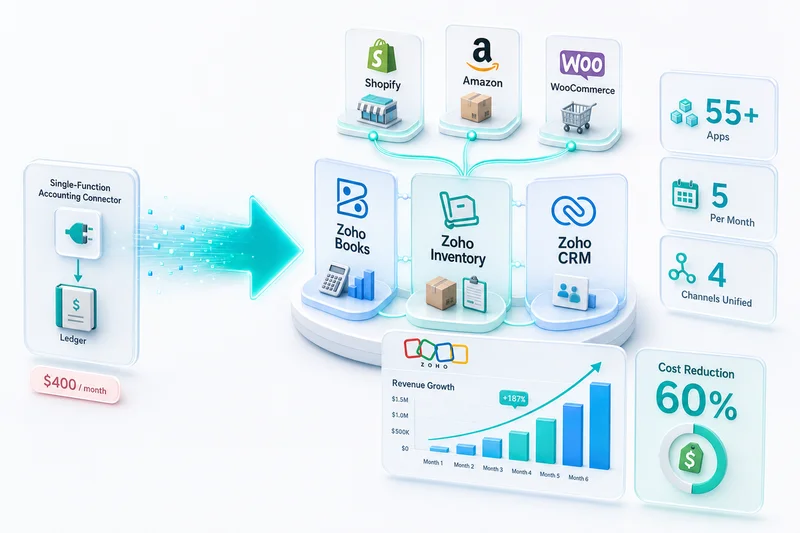
FBA accounting sits within the broader context of Amazon as one channel in a multi-platform eCommerce operation. For the complete technical architecture — how Seller Central connects to Zoho Inventory, Zoho Books, Zoho CRM, and Zoho Analytics — see Amazon Zoho integration: Connect Seller Central to Zoho. For how Amazon connects alongside Shopify, WooCommerce, eBay, and Etsy in a single Zoho backend, see Zoho for eCommerce: The Complete Operations Platform Guide.
If you also supply Amazon as a Vendor Central 1P wholesaler — where Amazon issues POs, pays net-30 to net-90, and deducts chargebacks before remitting — the accounting is a different model from FBA settlement-based accounting. The Amazon Vendor Central accounting guide for Zoho Books covers the 1P chart of accounts structure, how to track deduction types (shortage claims, compliance chargebacks, co-op fees), and the reconciliation workflow for remittances that arrive net of unexplained deductions. For the FBA monthly close workflow specifically, see the Amazon monthly bookkeeping guide in Zoho Books.
Ready to switch accounting platforms? See our QuickBooks to Zoho Books Migration Guide or Xero to Zoho Books Migration Guide. For a comparison of how QuickBooks, Xero, and Zoho Books each handle Amazon settlement accounting, see Amazon accounting software for FBA sellers.
Frequently Asked Questions
FBA accounting has two structural differences from standard small business accounting. Revenue arrives as a net settlement deposit every two weeks (not as individual invoices), so you have to reconstruct gross revenue and fees from the settlement report. Amazon also deducts 15+ distinct fee types before you see a deposit, each of which needs its own account mapping for accurate gross margin. Standard accounting software and generic accountants aren't built for either of these.
FBA reimbursements (paid when Amazon loses or damages your inventory) should go to an Other Income account, not Product Sales. According to GETIDA (2025), the average FBA seller is owed 1-3% of annual revenue in unclaimed reimbursements, so this can be a material amount. Recording reimbursements as sales revenue inflates your gross revenue, misrepresents your sales volume, and skews your unit cost calculations. A dedicated 'FBA Inventory Reimbursements' account keeps them visible but separate from operational revenue.
Referral fees belong in Cost of Sales. Amazon's referral fee is typically 8-15% of the sale price depending on your product category, and it's a direct variable cost on every unit you sell through Amazon. Putting it in operating expenses inflates your gross margin by that range, making products look more profitable than they are. FBA fulfillment fees belong in COGS for the same reason. They're per-unit costs, not overhead.
Yes, and this matters more than most sellers realize. Amazon's Q4 storage rate ($2.40/cubic foot, October through December) is 208% higher than the standard rate ($0.78/cubic foot, January through September). If you combine all storage in one account, Q4 spikes are invisible in your P&L. That problem compounds during BFCM: if you pre-loaded inventory for Black Friday and it moved slower than expected, you pay $2.40/cubic foot through December on that unsold stock. Separate Q4 storage accounts make the spike visible so you can tie margin declines to storage costs rather than guessing.
Three things that matter most: your gross margin shows what you're actually keeping after Amazon's fees, not a net deposit figure that hides the fee load; your COGS is complete, so pricing and reorder decisions rest on real unit economics; and your books are clean at tax time, which means your CPA closes faster with defensible records for every deduction you claim. In Q4 specifically, accurate books let you track in real time how BFCM storage costs and advertising spend are affecting margin — instead of discovering it in February when it's too late to act. For broader context on how bookkeeping errors compound, see our eCommerce bookkeeping guide.
See exactly where your Shopify, Amazon, or WooCommerce ops are leaking — free.
Get a personalised eCommerce Ops Audit: inventory gaps, accounting leaks, and order-flow bottlenecks — with a Zoho fix roadmap. Delivered in 48 hours, at no cost.