B2B eCommerce with Zoho: Price Books, Net Terms, and Wholesale Order Management
B2B eCommerce sellers face requirements retail sellers do not: customer-specific pricing tiers, net 30/60/90 payment terms, trade credit accounts, and bulk orders that need different handling than a consumer checkout. Zoho CRM, Zoho Inventory, and Zoho Books together cover the full B2B workflow when configured for wholesale operations.
B2B eCommerce on Zoho works when three platforms are configured for wholesale from the start: price books in Zoho Inventory, net terms in Zoho Books, and trade account hierarchy in Zoho CRM. The default retail configuration handles none of these correctly. That gap is where most self-configured B2B setups break: trade accounts receive retail pricing, invoices go out without PO numbers, and AR aging runs blind until a distributor calls to dispute an invoice.
TL;DR: Zoho handles B2B eCommerce through price books (Inventory), net payment terms and credit limits (Books), and trade account management (CRM). Shopify B2B and WooCommerce both sync into this stack. The configuration is different from retail at every layer. For context on multi-channel setup alongside B2B, see our multi-channel inventory management guide.
B2B vs. Retail: What Zoho Needs to Configure Differently
Most Zoho implementations start from retail defaults. B2B adds an entirely different configuration layer on top. Here is what changes:
| Requirement | Retail Default | B2B Configuration Needed |
|---|---|---|
| Pricing | Single storefront price | Price books per customer tier |
| Payment | Card at checkout | Net 30/60/90 invoicing |
| Credit | Not applicable | Per-account credit limits |
| PO numbers | Not captured | Required on every invoice |
| Customer structure | Individual contact | Company account with multiple buyers |
| Tax | Standard rate | Tax exemption for resellers |
| Fulfillment | Single-unit picking | High-quantity batch picking |
None of these require custom development. All of them require deliberate configuration. A retail-default Zoho setup that processes B2B orders will invoice at the wrong price, omit the buyer's PO number, and have no visibility into which accounts are approaching their credit limit.
The B2B Storefront: Shopify B2B and WooCommerce
Shopify B2B (Shopify Plus)
Shopify B2B on Shopify Plus gives you company accounts with multiple buyer contacts, customer-specific pricing lists, and net terms at checkout. A trade customer logs in, sees their negotiated prices, and can check out on Net 30 without card entry. The 2025-2026 Shopify B2B updates added draft order workflows and company-level spending limits, which map cleanly to the credit limit configuration in Zoho Books.
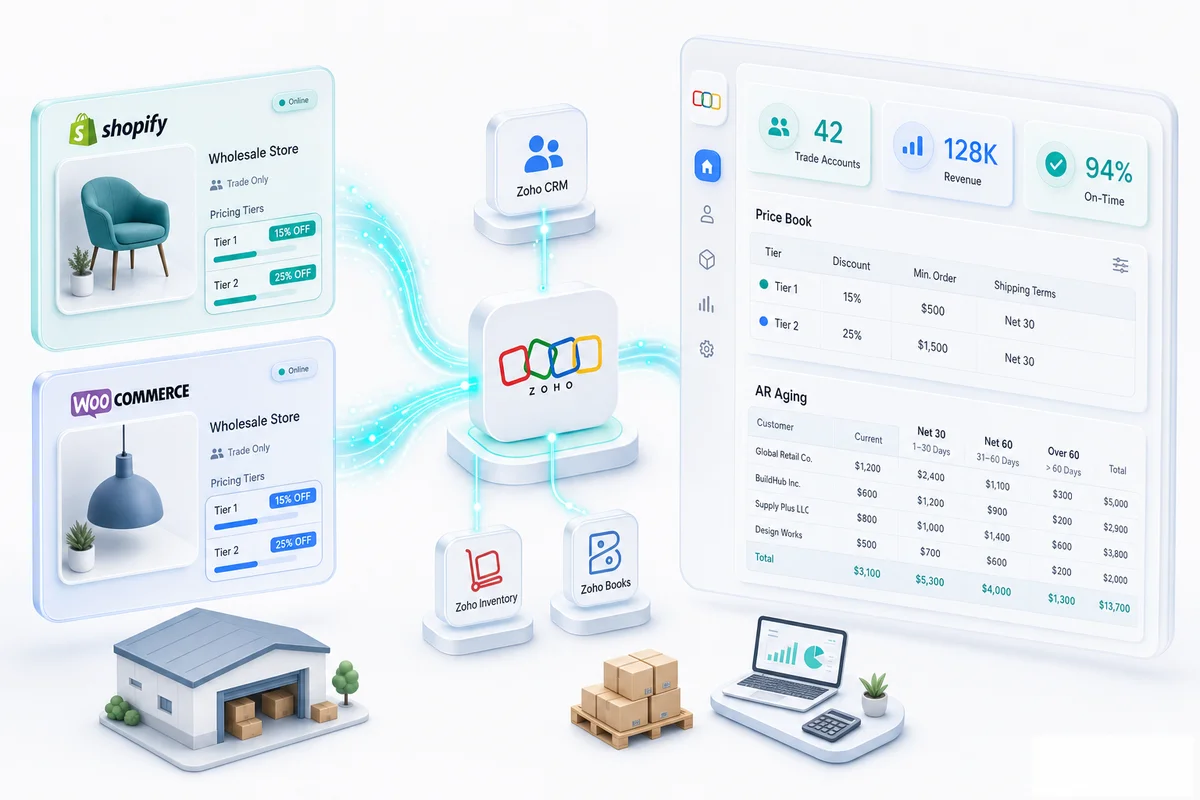
B2B orders from Shopify sync into Zoho Inventory with the company account identifier, the agreed price book, and the payment term from the Shopify B2B configuration. The integration maps Shopify's company account to the corresponding account in Zoho CRM, so the sales order in Zoho Inventory is automatically tied to the right CRM account and account manager without manual linking.
For a full walkthrough of the Shopify Plus and Zoho setup for high-volume B2B merchants, see our Shopify Plus and Zoho integration guide. For the Shopify-Zoho connection setup across B2B and retail channels, see our Shopify-Zoho integration service.
WooCommerce B2B
WooCommerce handles B2B pricing through role-based pricing plugins that show different prices to customers assigned to wholesale roles. A verified wholesale buyer sees their tier pricing; a retail visitor sees standard prices.
WooCommerce B2B orders sync into Zoho Inventory the same way retail orders do. The configuration work is in the mapping layer: WooCommerce customer roles need to map to Zoho price book assignments so pricing consistency between the storefront and the Zoho back end holds automatically. Get this mapping wrong and you will spend time manually reconciling orders where the WooCommerce invoice price and the Zoho Books invoice price do not match.
Price Books for Wholesale Pricing
How Price Books Work in Zoho
Zoho Inventory and Zoho Books both support price books: named pricing sets that apply different rates for the same item across different customer groups. When a B2B customer's account is assigned to a price book, every sales order for that customer applies the price book rates without manual price entry.
A typical B2B pricing structure in Zoho:
| Price Book | Who It Applies To | Widget A Price |
|---|---|---|
| Retail | Standard customers | $19.99 |
| Small Wholesale | Resellers, <$5,000/year | $14.50 |
| Distributor | Volume buyers, $5,000+/year | $11.00 |
| Key Account | Strategic accounts, negotiated | Custom per item |
Price books are managed centrally. When you renegotiate a rate with a distributor, you update the price book once. Every future order for accounts on that price book picks up the updated price automatically. The alternative is updating prices across dozens of individual draft orders manually, which is where invoicing errors start.
Customer-Specific Pricing
For strategic accounts with individually negotiated rates, Zoho Books supports customer-specific item prices set directly on the customer record. These override both the retail price and any assigned price book. When that customer places an order, Zoho applies their specific rate on every invoice without manual price entry per order, so the wrong price cannot slip through.
Net Terms and Trade Credit Accounts
Configuring Net Terms in Zoho Books
Payment terms in Zoho Books are assigned at the customer contact level. A B2B customer set to Net 30 receives invoices automatically due 30 days from invoice date. Net 60 and Net 90 work the same way.
Zoho Books generates automatic payment reminders at configurable intervals before and after the due date. The AR aging report shows all open invoices by customer, aging bucket (current, 1-30, 31-60, 61-90, 90+), and total outstanding balance. Account managers can track payment performance for their trade accounts without pulling manual reports.
For the full AR setup (reminder sequences, late-fee rules, customer payment portal, and CRM escalation), the Zoho Books AR automation guide covers each configuration step in detail.
Credit Limits
Zoho Books supports credit limits per customer. When a new sales order would push a customer over their approved credit limit, Zoho displays a warning. The account manager is notified before the order ships, not after.
An account on Net 60 terms that places a new large order before paying the previous invoice can tie up a substantial share of your receivables. Seeing the credit utilization in Zoho Books before approving the order is the control that keeps AR manageable at scale.
For sellers managing large numbers of trade accounts, the AR aging report in Zoho Books combined with Zoho Analytics provides a dashboard view of credit exposure by tier, payment performance trends, and overdue balance concentration.
Supplier Payments on the Other Side
B2B sellers have both receivables and payables. Trade accounts with net payment terms mean money comes in slowly; supplier invoices with their own net terms mean money goes out on a schedule. Managing both sides in Zoho Books keeps cash flow visible. For the payables side, the eCommerce accounts payable automation guide covers how to automate the supplier bill-to-payment cycle inside Zoho Books.
Bulk Order Management
High-Volume Line Items
B2B orders typically contain fewer SKUs than retail orders but at much higher quantities. A retail order: 3 items at 1 unit each. A B2B order: 5 items at 200 units each. Zoho Inventory handles both, but high-quantity B2B fulfillment benefits from specific configurations.
Zoho Inventory's warehouse settings for B2B: batch picking (pick all units of item A from the warehouse, then all of item B, rather than picking order by order), multi-location warehouse routing for large order fulfillment, and packing slip generation that matches the buyer's purchase order format.
For B2B customers who send their own purchase order numbers, Zoho Inventory records the customer's PO number on the sales order. That PO number carries through to the invoice generated in Zoho Books. B2B buyers' accounts payable departments require the PO number on every supplier invoice before they process payment. Missing it means a delayed payment. The buyer's AP team will hold the invoice until it is resubmitted correctly, and you will not know why it is overdue.
Tax-Exempt B2B Customers
Many B2B buyers are resellers holding a sales tax exemption certificate. They should not be charged sales tax on purchases they intend to resell.
In Zoho Books, tax exemption is set at the customer contact level. When a reseller's account is marked as tax-exempt with a recorded certificate number, Zoho Books generates all invoices for that account without sales tax automatically. The certificate details are stored against the contact record for audit purposes.
Managing reseller exemptions manually creates compliance risk. Remembering to remove tax from every order for every exempt customer is the kind of thing that gets missed. Setting the exemption in Zoho Books once means every future invoice is automatically correct. See the eCommerce sales tax guide for how Zoho Books handles the broader sales tax compliance picture.
Zoho CRM for Trade Account Management
Account Hierarchy and Buyer Contacts
B2B eCommerce accounts are companies, not individuals. A single trade account might have three buyers who all place orders, a finance contact who handles invoice queries, and a regional manager who needs account performance data. Zoho CRM models this as one Account with multiple Contacts, each with their role and access.
Account managers in Zoho CRM see the full picture for each trade account: active deals, order history (from Zoho Inventory), outstanding invoices (from Zoho Books), recent support tickets (from Zoho Desk), and all communication history. One view instead of three systems to check reduces the work of account management and means account managers know about payment issues or support problems before the next sales conversation. For a detailed look at how Zoho CRM, Books, and Inventory share data across an eCommerce operation, see our guide on how all three Zoho products connect.
Trade Account Onboarding Workflow
For new trade accounts, Zoho CRM automation handles the onboarding sequence: application received, credit check step, credit terms assigned in Zoho Books, price book assigned in Zoho Inventory, login credentials sent for the B2B portal. Each step moves the deal to the next stage. The final step creates the customer record in Zoho Books and Zoho Inventory with the correct price book and payment terms already in place.
Without this automation, trade account setup is manual and error-prone. Wrong price book on an account means every order invoices at the wrong price. Missing payment terms means invoices generate with cash-on-delivery terms for a Net 60 account. These errors create disputes with trade customers and damage the relationship before it has properly started.
For the broader picture of how Zoho CRM supports eCommerce operations, see our Zoho CRM for eCommerce guide. For a detailed walkthrough of designing the B2B pipeline stages, deal fields, and credit approval routing, see the guide to building a B2B wholesale sales pipeline in Zoho CRM.
What Zolify Configures for B2B eCommerce
A B2B eCommerce setup on Zoho requires deliberate configuration at the intersection of CRM, Inventory, and Books: price books that match what the storefront shows, payment terms that apply correctly to each trade account, credit limits that give account managers real visibility, and PO number handling that satisfies buyer requirements for invoice matching.
The common self-implementation failures: price books configured in Zoho Books but not in Zoho Inventory so storefront and invoice prices diverge; payment terms set on orders but not on the customer record so they reset to cash with each new order; and no credit limit setup so AR exposure to large trade accounts is invisible until a review.
Zolify has implemented B2B eCommerce operations for wholesale sellers on Shopify, WooCommerce, and multi-channel setups across more than 100 eCommerce implementations. Our CA on staff validates the AR configuration, credit terms, and tax exemption setup (the accounting layer that most Zoho implementation consultants do not scope). India-based Zoho partners can configure the software; getting the credit terms, AR aging, and tax exemption right requires a CA who understands the financial controls behind the configuration.
As an Official Zoho Authorized Partner, we build B2B Zoho implementations that connect storefront pricing, order management, and financial accounting into a single consistent operation rather than three systems that need to be manually reconciled. For the full scope of what a B2B Zoho build involves, see our eCommerce operations implementations.
If you are setting up B2B eCommerce on Zoho for the first time, or fixing a B2B setup where pricing or payment terms are inconsistent, an eCommerce Ops Audit is the right starting point.
B2B wholesale is one model within the broader Zoho eCommerce platform. For how wholesale order management connects alongside retail channels including Shopify, Amazon, WooCommerce, eBay, and Etsy in a unified Zoho back end, see Zoho for eCommerce: The Complete Operations Platform Guide.
Frequently Asked Questions
Yes. Zoho Inventory and Zoho Books both support price books, which let you define different selling prices for the same item by customer group. A wholesale price book might price Widget A at $8.50 (cost plus margin for trade customers), while the retail price book prices it at $19.99. When a B2B customer places an order, Zoho applies the correct price book automatically based on the customer account assignment. You can create as many price books as you need: distributor tier, reseller tier, VIP wholesale, and so on.
Payment terms in Zoho Books are configured at the contact level for each customer. A trade customer set to Net 30 will have every invoice automatically due 30 days from the invoice date. Zoho Books generates payment reminders before the due date, tracks overdue invoices on your AR aging report, and can apply late payment charges if configured. For large trade accounts, you can also set credit limits; Zoho Books will warn you when a new invoice would push the customer over their approved credit.
Yes. Shopify's B2B features (on Shopify Plus) include customer-specific pricing, company accounts with multiple buyers, and net terms at checkout. These Shopify B2B orders sync into Zoho Inventory with the customer account and pricing intact. Zoho then applies the matching price book and payment terms for that account on the sales order, so the Shopify-side pricing and the Zoho-side financial records stay aligned. For WooCommerce, role-based pricing plugins handle the B2B storefront side before orders sync into Zoho.
In Zoho CRM, each B2B customer is an Account with associated contacts (buyers at that business), deals (initial trade account setup or renewal), and a full activity history. When a trade customer places an order, the Zoho Inventory sales order links to the Zoho CRM account, so account managers see order history, revenue, and payment behavior alongside CRM data. For B2B customers with specific SLAs, credit terms, or pricing agreements, those details live in the CRM account record and are referenced during order processing.
Retail eCommerce in Zoho assumes cash or card payment at time of order, standard retail pricing, and individual consumer accounts. B2B eCommerce requires additional configuration: price books per customer group, net payment terms with credit limits, trade account hierarchy (company plus individual buyers), purchase order numbers from customers (which need to appear on your invoices), bulk order handling for high-quantity line items, and sometimes tax exemption for resellers. None of these are default retail settings in Zoho; they require deliberate setup at the customer, item, and account level.
See exactly where your Shopify, Amazon, or WooCommerce ops are leaking — free.
Get a personalised eCommerce Ops Audit: inventory gaps, accounting leaks, and order-flow bottlenecks — with a Zoho fix roadmap. Delivered in 48 hours, at no cost.