eBay Monthly Bookkeeping in Zoho Books: A 7-Step Month-End Close for Sellers
eBay Managed Payments deposits are net figures after six distinct fee categories are deducted before the payout lands. This 7-step monthly close workflow covers Managed Payments reconciliation in Zoho Books, correct account mapping for all six fee types, COGS posting from Zoho Inventory, returns and chargeback handling, marketplace facilitator tax pass-throughs, and clearing account bank reconciliation.
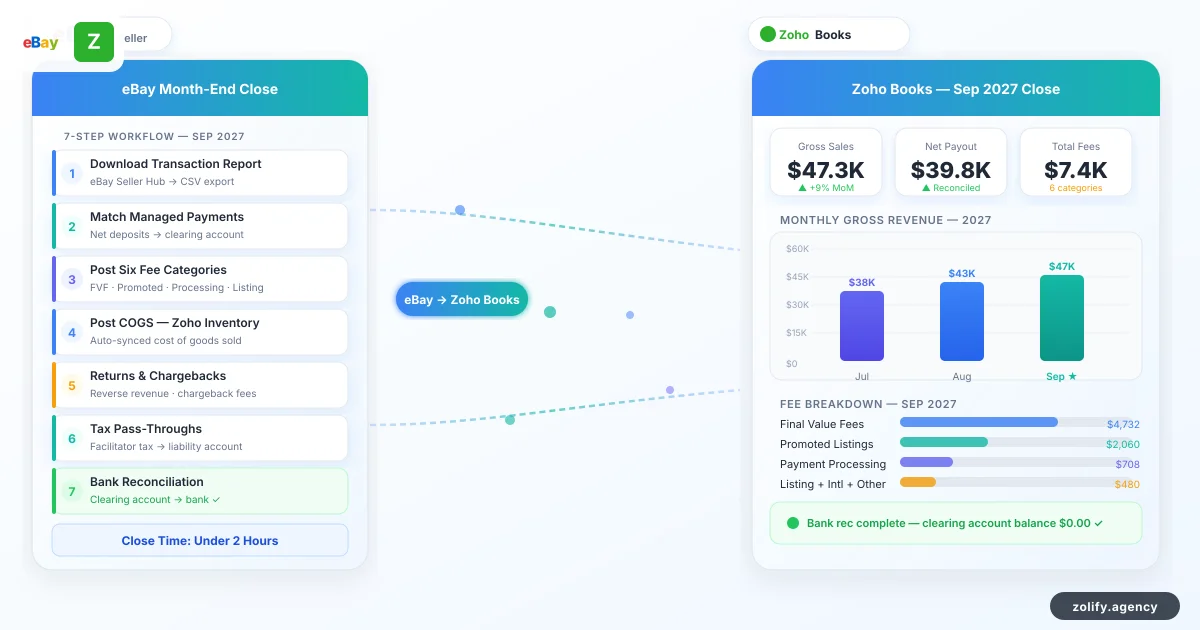
eBay bookkeeping trips most sellers the same way: the Managed Payments deposit lands in the bank and nothing in the books explains where it came from. eBay deducts six fee categories before sending the payout, but without a workflow, none of those deductions show up in the books as separate expense lines. This 7-step monthly close fixes that. Once the accounts are set up correctly, the whole thing takes under two hours.
TL;DR: Seven tasks every month: pull the eBay transaction report, match gross sales against all six fee types, post COGS, clear returns and chargebacks, handle marketplace facilitator tax pass-throughs, reconcile through a dedicated clearing account, close on a channel P&L.
Why eBay monthly bookkeeping breaks without a defined workflow
eBay Managed Payments replaced PayPal for most sellers by 2023, and with it came a payout structure that trips up sellers who treat the net deposit as their revenue figure.
An eBay seller with $8,400 in gross sales for the month might receive a payout of $6,890. That $1,510 gap is listing fees, final value fees, Promoted Listings Standard charges, Promoted Listings Advanced clicks, international transaction fees, and payment processing fees (none of them visible if you record the $6,890 deposit as revenue). Recording it that way understates gross sales by $1,510 and removes every one of those fee categories from the books as deductible expenses.
At tax time, your 1099-K will show gross eBay sales well above what your Zoho Books revenue account recorded. That discrepancy requires explanation. The right account structure avoids it.
The eBay seller Zoho Books setup guide covers the initial account configuration in detail. If you're still evaluating platforms, see our eBay seller accounting software comparison first. This post covers what to do each month once that setup is in place.
Step 1: Download and validate the eBay transaction report
Every month-end close entry starts with the eBay transaction report, not the bank statement.
In your eBay Seller Hub, navigate to Payments > Transaction. Filter by the calendar month you are closing, then download the full transaction CSV. That file has everything for the period: orders, fee line items, refunds, chargebacks.
Before entering anything in Zoho Books, verify three totals from the report:
| Line item | What to check |
|---|---|
| Gross sales | Total across all order lines, excluding returns |
| Total fees | Sum of all six fee categories for the month |
| Net payout | Should equal gross sales minus total fees; confirm against bank |
If the net payout in the transaction report does not match the actual bank deposit, investigate before proceeding. Timing differences between payout periods can cause small variances; material discrepancies require a line-by-line review.
Step 2: Reconcile gross sales and the six eBay fee categories
Record gross sales as a credit to your Sales Revenue (eBay) account. Then post each fee category to its designated account:
| Fee type | Zoho Books account | Notes |
|---|---|---|
| Listing fees | Platform Fees — eBay (Operating Expense) | Charged per listing, regardless of sale |
| Final value fees | Cost of Sales — eBay Transaction Fees | 10–15.55% of sale price + $0.30 |
| Promoted Listings Standard | Advertising — eBay PLS | Pay-per-sale; ad rate × sale price |
| Promoted Listings Advanced | Advertising — eBay PLA | Pay-per-click; charged on click, not sale |
| International transaction fees | Cost of Sales — International Fees | 1.65% on cross-border sales |
| Payment processing fees | Cost of Sales — Payment Processing | 2.35% + $0.30 per transaction |
Promoted Listings Standard and Advanced need separate accounts because their cost behavior is different. Standard charges only when a sale occurs; Advanced charges on every click. Combining them makes it impossible to separate CPC spend from pay-per-sale performance; you can't tell whether either is actually working. For current rates on each fee category, see eBay's seller fees documentation.
The marketplace fee reconciliation guide for Zoho Books covers account mapping across Amazon, Shopify, eBay, and Etsy if you run multiple channels.
Step 3: Post COGS from Zoho Inventory
If you use Zoho Inventory alongside Zoho Books, COGS posts automatically. You do not need manual cost entries at month end.
When an eBay order fulfills in Zoho Inventory, the system calculates COGS at that moment using your chosen valuation method (FIFO or weighted average) and the current cost for the SKU. Zoho Books picks it up as a journal entry at fulfillment. At month end, run the Inventory Summary report in Zoho Inventory and confirm total COGS for the period matches what posted to Zoho Books.
If you manage inventory outside Zoho Inventory, create a manual journal entry at month end: debit COGS (eBay), credit Inventory, for the total cost of goods sold across all fulfilled eBay orders. The eBay Zoho integration guide explains how the Zoho Inventory native eBay connector handles this flow end to end.
Step 4: Process returns, refunds, and chargebacks
eBay returns and chargebacks are not the same accounting event and require different treatment in Zoho Books.
When a buyer returns an item and you issue a refund, reverse the original sale: debit Sales Revenue (eBay) for the refund amount, credit the eBay clearing account, and debit Platform Fees (eBay) if eBay credits back the final value fee.
Chargebacks include an additional eBay dispute fee (currently $20 per chargeback). Post three lines: debit Sales Revenue (eBay) for the original sale amount, debit Chargeback Expense (eBay) for the dispute fee, and credit the eBay clearing account for the combined total.
At month end, pull the Returns and Disputes section from the transaction report. Every item in that section needs a corresponding Zoho Books entry before you close the month.
Step 5: Clear marketplace facilitator tax pass-throughs
eBay collects and remits sales tax for sellers in virtually every US state with a sales tax.
That tax never becomes your income or liability. Configure US marketplace-collected tax as a pass-through tax type in your Zoho Books tax settings. When applied to an eBay order, the tax amount appears in the transaction but nets to zero: the inflow (buyer pays tax) and the pass-through (eBay remits it) offset exactly.
At month end, review the tax column in your transaction report. Each taxable order should show a pass-through amount. Confirm the total marketplace-collected tax for the month does not appear as a balance in your Tax Payable account in Zoho Books. If it does, your tax type configuration needs correction before you close.
If you sell in states where your obligations go beyond marketplace facilitator rules, check with a CA before closing.
Step 6: Bank reconciliation via the eBay clearing account
The eBay clearing account is a Current Asset account in Zoho Books that holds all eBay activity until the payout settles.
Every eBay transaction posts to this account during the month: gross sales as credits, fees and returns as debits. By the time the payout arrives, the clearing account balance equals the bank deposit amount. Reconcile against the clearing account, not directly against a revenue account.
The reconciliation sequence:
- Confirm the clearing account balance in Zoho Books equals the expected payout amount from the transaction report
- Match the bank deposit to the clearing account in Zoho Books under the Reconcile module
- The clearing account balance should return to zero (or near zero if a payout spans month boundaries)
- Any variance requires investigation at the transaction level before you close
A clearing account that does not zero out after reconciliation means something in the month's entries did not get posted. Find it before moving on.
Sellers running eBay alongside Amazon or Shopify can apply the same clearing account pattern to each channel. Zolify's finance reconciliation service sets up the full multi-channel structure, including automated payout parsing and account mapping across all fee types.
Step 7: Close the month and run the channel P&L
In Zoho Books, generate a Profit and Loss report filtered to the eBay channel for the month. When the month is closed correctly, the P&L shows:
| P&L line | What it should show |
|---|---|
| Revenue | Gross eBay sales (not the net payout amount) |
| Cost of Sales | Final value fees, international fees, payment processing fees, and COGS each on separate lines |
| Advertising | Promoted Listings Standard and Advanced as distinct line items |
| Operating Expenses | Listing fees |
| Net Income | Actual eBay channel contribution for the period |
If your P&L shows revenue matching your bank deposit rather than your gross sales, the clearing account setup or fee entry workflow needs correction before next month.
Lock the period in Zoho Books once the P&L checks out. This prevents back-dated entries from altering a closed month's figures.
Zolify's eBay bookkeeping implementation
The account structure is where most of this breaks down. Zolify has set up eBay bookkeeping in Zoho Books for sellers running Shopify, Amazon, and eBay together. Our CA validates fee classification across all six eBay expense types. We're an Official Zoho Finance Partner with 100+ eCommerce implementations. Most sellers who come to us are spending most of a Saturday on eBay close. After the setup, that drops to under two hours.
Run eBay month-end close the right way
If your eBay books show the net payout as revenue, the fee categories are missing, or month-end takes longer than a few hours, the account structure needs fixing before next close.
Book an eCommerce Ops Audit. Zolify reviews your eBay Zoho Books setup, identifies the gaps, and delivers a corrected chart of accounts and close workflow within one week.
Frequently Asked Questions
With the correct setup (separate accounts for all six eBay fee types, Zoho Inventory posting COGS automatically, and a dedicated eBay clearing account), a monthly close should take under two hours. The bulk of that time goes to downloading and reviewing the eBay transaction report, verifying that each fee category totals match, and confirming the clearing account net matches the actual bank deposit. Sellers who go in without this structure typically spend four to eight hours figuring out what the individual fee lines were.
Record each eBay sale as gross revenue when the order completes, not when the payout arrives. Post each of the six fee categories (listing fees, final value fees, Promoted Listings Standard, Promoted Listings Advanced, international transaction fees, and payment processing fees) to their designated expense accounts in Zoho Books as they are incurred. The net payout that arrives in your bank account should match gross sales minus all six fee category totals, and reconciles against the eBay clearing account in Zoho Books, not directly against a revenue account.
Issued refunds reverse the original revenue entry: debit Sales Revenue for the refund amount, credit Accounts Receivable or the clearing account, and debit the return-specific fee reimbursement from eBay if applicable. Chargebacks follow the same debit-Sales Revenue, credit-clearing account pattern, with an additional debit to a Chargeback Expense account to record the penalty fee eBay charges per dispute. At month end, review the Returns and Disputes section of the eBay transaction report and post any outstanding items before closing.
eBay is a marketplace facilitator for virtually all US states and collects sales tax directly from buyers on your behalf. That tax does not flow through your Zoho Books at all: eBay collects it, remits it to the state, and it never appears as your income or liability. In your Zoho Books chart of accounts, configure US marketplace-collected tax as a pass-through so it does not create a tax payable entry. The eBay transaction report confirms the tax amount for each order; it should net to zero in your books because the inflow and the pass-through offset exactly.
The eBay clearing account is a Current Asset account in Zoho Books that bridges the gap between order-date revenue entries and the actual bank deposit from eBay Managed Payments. When an eBay order completes, the gross sale posts to Sales Revenue and credits the clearing account. When fees are deducted, they debit the clearing account. The net balance of the clearing account at payout time equals the bank deposit. Reconciling the deposit against the clearing account, not directly against the bank and a revenue account, is what makes eBay month-end close accurate and fast.
See exactly where your Shopify, Amazon, or WooCommerce ops are leaking — free.
Get a personalised eCommerce Ops Audit: inventory gaps, accounting leaks, and order-flow bottlenecks — with a Zoho fix roadmap. Delivered in 48 hours, at no cost.