Shopify Order to Cash in Zoho: From Order Placed to Payment Reconciled
Shopify shows you revenue. It does not show you margin. The gap between an order placed and cash in your account, minus Shopify Payments fees, COGS, refunds, and chargebacks, requires a backend system that Shopify was not built to provide. Connecting Shopify to Zoho Books and Zoho Inventory closes that gap with automated order-to-cash accounting.
# Shopify Order to Cash in Zoho: From Order Placed to Payment Reconciled
Shopify shows you revenue. It does not show you margin.
When a Shopify order comes in, you see the sale amount. By the time money hits your bank account, Shopify Payments has deducted a processing fee, the inventory cost has been expensed somewhere, and if the customer was in a state with sales tax nexus, a liability has been created. None of those events appear in Shopify's dashboard in a way that ties back to your bank statement without a backend accounting system.
The gap between order placed and cash in the bank, net of all fees, costs, and adjustments, is what order to cash covers. For Shopify sellers, that cycle is where the real financial operations live. Connecting Shopify to Zoho Books and Zoho Inventory automates it end to end.
TL;DR: Black Friday is today. For most Shopify sellers, order volumes are running 5–10x their daily average right now. The Shopify-Zoho integration handles this by moving the full order-to-cash cycle — invoices, payment fees, COGS, partial fulfillments, bank reconciliation — into Zoho Books and Zoho Inventory in real time. If your setup is already live, skip to the BFCM section below: it covers automated payout reconciliation at peak volume, partial fulfillment when inventory runs out mid-day, and multi-currency clearing account management during a high-velocity sale event. If your setup is not yet live, the sections on integration architecture and implementation give you the foundation.
For context on the full Shopify-Zoho integration architecture, see our Shopify Zoho integration guide.
What Order to Cash Means for a Shopify Seller
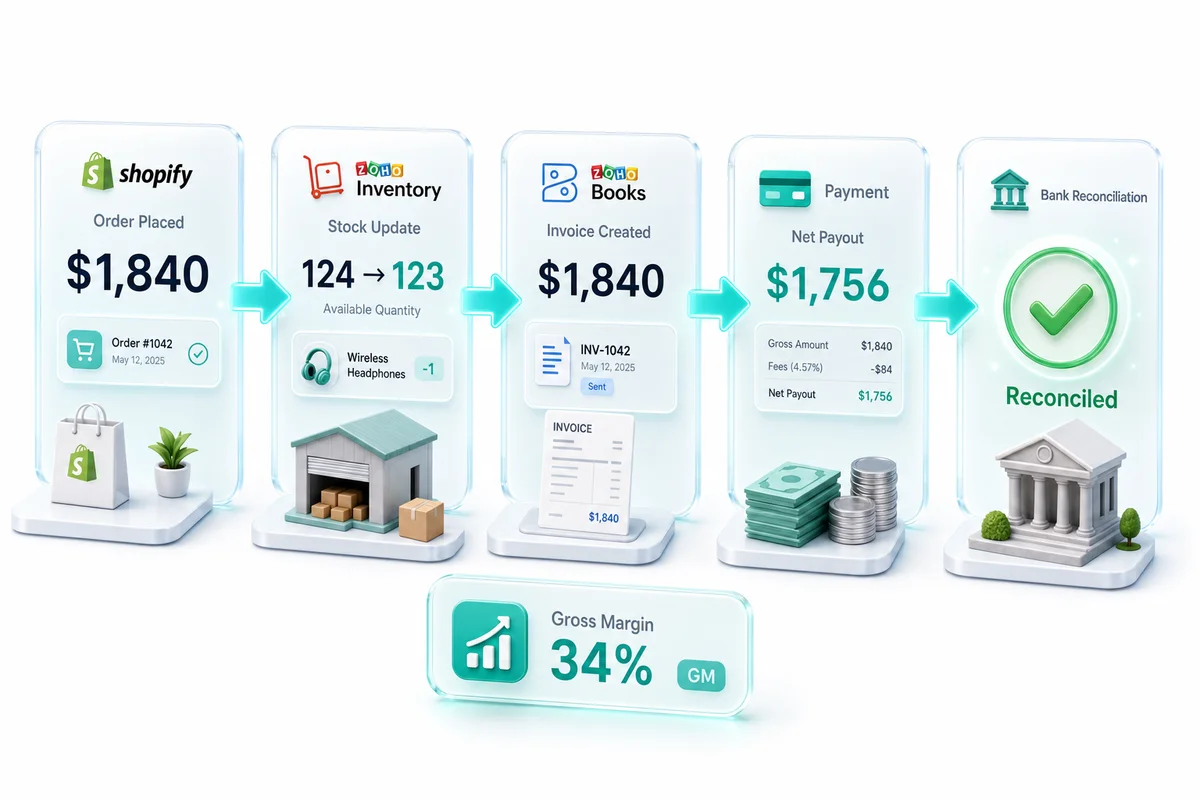
The full cycle has six steps, and most Shopify sellers only see the first and last:
- Order placed: Shopify captures the order and payment method
- Inventory update: Shopify decrements stock; your backend should reflect this in real time
- Invoice or revenue recognition: Your accounting system records the sale with correct line items
- Payment processing: Shopify Payments deducts a fee and batches payouts
- Payout deposit: Net amount (after fees) lands in your bank account
- Reconciliation: Bank transaction matches against recorded invoices, fees, and tax liabilities
Steps 2 through 5 happen inside Shopify with limited accounting visibility. Without a connected backend, you reconstruct this manually at month end using Shopify's export reports. At 500 orders per month, that is a full day of work. At 5,000 orders per month, it is a part-time job. During BFCM, with order volumes 5–10x higher than a typical day, manual reconciliation is not a viable option.
The Shopify-Zoho integration moves all of those steps into Zoho Books and Zoho Inventory in real time.
Step 1: Order Capture in Zoho Inventory
When a Shopify order comes through, the integration creates a corresponding sales order in Zoho Inventory. The order records:
- Items sold, quantities, and SKUs mapped to your Zoho Inventory catalog
- Shipping address and customer details
- Order status (pending, confirmed, fulfilled)
When the order ships, Zoho Inventory updates the inventory count and creates the shipment record. The inventory decrement happens at fulfillment, not at some later reconciliation point.
For sellers using Shopify's fulfillment network or a third-party 3PL, the integration handles shipment confirmation from those systems and passes it through to Zoho Inventory. Available stock counts stay accurate without manual adjustments. This matters when you are selling across multiple channels: a Shopify order and an Amazon order drawing from the same warehouse need to see the same live inventory count, not a batch-updated one. For how Zoho keeps inventory in sync across Shopify, Amazon, and WooCommerce simultaneously, see our multi-channel inventory management guide (2026).
One thing worth noting on the integration architecture: Zapier-based connections handle simple field-mapping well but break on financial data complexity — partial payments, refunds, and COGS tracking in particular. Our Shopify-Zoho integration overview covers exactly where those failure modes show up and why native integration handles them differently.
Step 2: Invoice Creation in Zoho Books
Revenue recognition happens when Zoho Inventory creates the invoice in Zoho Books. The trigger point is configurable: some sellers recognize revenue at order placement, most at fulfillment.
The invoice in Zoho Books records:
- Gross revenue per line item: the full Shopify order amount before fees
- Sales tax in a liability account, not a revenue account
- Discounts and promotional credits as a separate line, not a revenue reduction
- Customer record linked to Zoho CRM when CRM is connected
The gross revenue amount matters. A common shortcut is posting the net payout amount (after Shopify Payments fees) as revenue. That understates your revenue figure and hides your actual processing cost. It also makes comparing performance across payment methods impossible: orders through Shopify Payments and orders through PayPal produce different net amounts for reasons unrelated to the sale itself.
For the full breakdown of Shopify accounting logic in Zoho Books, see our Shopify accounting software guide.
Step 3: Payment Fee Recording and Payout Reconciliation
Shopify Payments Fees
Shopify Payments charges per-transaction fees that vary by plan tier; check Shopify's current pricing page for exact rates, as they update periodically. Shopify Plus accounts negotiate custom rates. For sellers using third-party processors, Shopify adds an additional fee on top of the processor's rate.
In Zoho Books, the payment fee records as:
- Debit: Payment processing fees (expense account)
- Credit: Accounts receivable or cash (reducing the payout amount)
The payout deposit that lands in your bank is the gross order total minus Shopify Payments fees, minus any refunds processed in the payout period. When you reconcile your bank statement in Zoho Books, the deposit matches against the net payout amount, not the gross invoiced amount.
A payout clearing account is the setup that makes reconciliation work: an intermediate account in Zoho Books that holds the gross receivable until the payout settles. Without it, the reconciliation never balances cleanly. It is also the most common gap in self-implemented Shopify-Zoho integrations.
For a complete walkthrough of how Shopify Payments payouts map to Zoho Books entries, see our Shopify Payments and Zoho Books guide.
Multi-Currency Orders
For Shopify stores selling internationally, each order records in the transaction currency. Zoho Books converts to your base currency at the exchange rate on the transaction date.
Payment fees in foreign currencies post to the fee expense account in the same transaction currency. At month end, Zoho Books calculates foreign exchange gains or losses on any open receivables. For sellers with significant international volume (UK, EU, or Australia), this is not optional. VAT and GST compliance both require correct currency handling at the transaction level. For a complete walkthrough of international order accounting setup, see our multi-currency eCommerce accounting guide for Zoho Books.
Bank Reconciliation in Zoho Books
The final step in payout reconciliation is matching each Shopify payout to the corresponding bank deposit in Zoho Books. Shopify batches payouts on a daily schedule; each batch covers multiple orders, refunds, and adjustments. Zoho Books matches the net deposit amount against the clearing account balance for that payout period.
For a detailed walkthrough of how eCommerce bank reconciliation works in Zoho Books, including Shopify payout matching and handling outstanding balances, see our Zoho Books bank reconciliation for eCommerce guide.
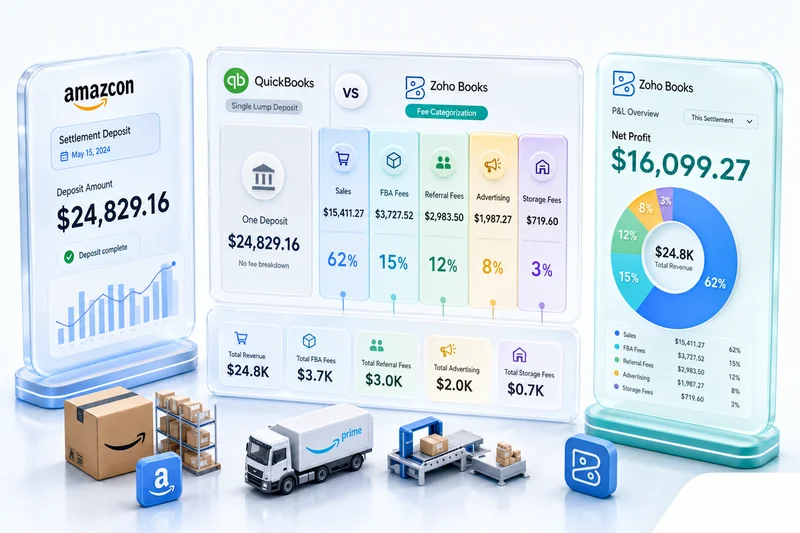
For sellers running Amazon Seller Central alongside Shopify, the reconciliation logic differs: Amazon settlement deposits bundle fees, returns, and multiple orders into a single bi-weekly or weekly deposit, not per-order payouts. Our Amazon seller accounting guide for Zoho Books covers how to map those deposits correctly so both channels reconcile cleanly without double-counting.
Step 4: COGS Recording
COGS should record when inventory ships, not at month end. When Zoho Inventory processes a fulfillment, the cost of the shipped items flows automatically into Zoho Books as a COGS entry.
The cost that flows is the average cost or FIFO cost of the inventory in Zoho Inventory, depending on your chosen cost method. Your gross margin per order is calculable in real time: revenue minus COGS at the invoice level, not an estimated margin based on last month's cost data.
For sellers with bundled products (kits, subscription boxes, customized bundles), COGS tracking requires mapping bundle components to individual inventory items in Zoho Inventory. The bundle sells as one SKU; the COGS should reflect all component costs. This is a configuration step that self-implementations frequently skip, leading to understated COGS and overstated margin on bundled products.
For sellers who want to automate more of the operational workflow beyond accounting, Zoho Flow handles native cross-app automation between Zoho products without custom code. Our Zoho Flow eCommerce guide covers what it handles natively and where a custom integration becomes necessary.
Step 5: Returns, Refunds, and Credit Notes
Returns are a structural part of the Shopify order-to-cash cycle, not an exception to it. Every return reverses part of the original transaction: the revenue decreases, inventory comes back into stock, and if a Shopify Payments refund was issued, the payout adjustment appears in the next settlement.
In the Zoho integration, a Shopify refund triggers:
- A credit note in Zoho Books against the original invoice
- An inventory adjustment in Zoho Inventory to restock the returned item
- A payout reconciliation adjustment to account for the refund deduction from the next Shopify payout
The complexity comes from partial refunds. A customer who returns two items from a four-item order triggers a partial credit note. If the original order had a bundle discount, the per-item refund amount may not equal the per-item price on the original invoice. Getting this right requires that your credit note logic mirrors your original discount accounting.
Return rates spike in January as Q4 holiday purchases come back. Sellers who set up their return flow correctly in Zoho see January close in days rather than weeks.
One more edge case worth setting up before Q4: exchanges. A customer who returns a medium and orders a large creates two transactions, a refund and a new order, that need to link to the same customer record in Zoho CRM and reconcile cleanly in Zoho Books. Setting up the exchange logic before peak season prevents a class of customer-record duplicates that require manual cleanup later.
Integration Method Comparison: Native Zoho vs Zapier vs Manual
How you connect Shopify to Zoho matters. The three common approaches diverge on financial data reliability once order volumes climb.
| Method | Order sync | Fee mapping | COGS recording | Partial refunds | Reliability at scale |
|---|---|---|---|---|---|
| Native Zoho integration | Real-time | Per transaction | Automatic at fulfillment | Supported | High |
| Zapier | Near real-time | Requires custom mapping | Manual workaround needed | Breaks on partial amounts | Degrades with complexity |
| Manual (CSV export) | Batch (manual trigger) | Calculated post-export | Month-end estimate | Requires manual calculation | Does not scale past 500 orders/month |
Zapier works for simple field-mapping at low order volumes. When financial data gets complex, including partial payments, refund handling, and COGS flows, it hits structural limits. Native integration handles these at the data layer where Zoho Books and Zoho Inventory share a ledger, not through an event-trigger middleware that cannot natively understand accounting relationships.
Black Friday Is Live: Managing Order-to-Cash at 10x Volume
BFCM is running now. Cyber Monday is 72 hours out.
Order-to-cash gaps that were invisible in September show up today. Volume is running 5–10x normal. The clearing account carries more float than it has at any other point in the year. A payout discrepancy that took 20 minutes to find in August takes two hours on a day when you have 400 orders in the payout instead of 80.
Here is where to focus attention right now.
Zoho Books Automated Payment Reconciliation During BFCM
A mid-sized Shopify seller processing 800–2,000 orders today will see each of those orders run through Shopify Payments as a separate transaction. Shopify batches them into a daily payout. That payout arrives in your Zoho Books clearing account as one lump-sum deposit covering hundreds of line items.
Manual matching at that volume is not a plan.
Zoho Books' automated batch reconciliation matches each payout to its clearing account entries by payout ID — not by amount (which breaks when orders include partial refunds) and not by date alone (which breaks when multiple payouts land the same day). The setup has three requirements: (1) your clearing account mapped to your Shopify Payments bank feed, (2) payout IDs flowing through the integration as a reference field on each transaction, and (3) an auto-matching rule in Zoho Books configured to match by payout reference field.
With those three things in place, each day's Shopify Payments deposit clears automatically. You wake up on November 29 with Day 1 already reconciled. Without them, you start December 1 with three days of clearing account float to unwind by hand — during the highest-volume week of the year.
For the full setup walkthrough, see our Shopify Payments and Zoho Books guide.
Partial Fulfillment Handling When Inventory Runs Out
BFCM oversells are not accidents — they are predictable consequences of running limited inventory against compressed demand. A popular SKU runs out mid-afternoon. A customer who ordered three items gets two fulfilled immediately and one backordered. What that looks like in your Zoho setup determines whether your books are accurate.
In Zoho Inventory, partial fulfillment creates a split shipment: the available items ship, the backordered item stays on an open sales order. Zoho Books should receive a partial invoice for the shipped items only — not the full order amount. Revenue recognition happens at fulfillment; invoicing the full order before the third item ships records revenue that has not been earned.
The configuration point most implementations miss: the invoice trigger must be set to "per fulfillment," not "per order." With "per order" triggering, the full invoice generates when the sales order is created in Zoho Inventory, regardless of what actually ships. The result is revenue recognized and COGS recorded against inventory that has not moved.
The correct flow:
- Order placed: sales order created in Zoho Inventory; no invoice yet
- Partial fulfillment: invoice created in Zoho Books for shipped items only; COGS records for those items
- Backorder fulfilled: second invoice for the remaining items; COGS records then
During BFCM, this happens at scale. Every oversell that hits a "per order" trigger creates a revenue recognition error — small individually, material in aggregate across a high-volume day.
For BFCM inventory planning that reduces oversell exposure in the first place, see our BFCM inventory planning guide for Shopify, Amazon, and Zoho.
Multi-Currency Clearing Accounts During BFCM
International orders spike during BFCM for stores running global Shopify storefronts. GBP orders from the UK, EUR from the EU, CAD from Canada — each currency flows through a separate clearing account entry. The challenge: exchange rates move intraday on a high-volume event day, and Shopify Payments settles multi-currency orders in the customer's local currency before converting to your base currency.
In Zoho Books, each order records in the transaction currency at the rate in effect when the order was placed. The clearing account holds that foreign-currency receivable until the Shopify payout settles. When the payout arrives (in your base currency, after Shopify's conversion), a foreign exchange gain or loss entry closes the difference between the recorded rate and the settlement rate.
Three things to verify now:
- Each currency you accept (GBP, EUR, CAD, AUD) has a sub-account or tagged account in your Zoho Books clearing setup — not all flowing into a single undifferentiated clearing account
- Your Zoho Books exchange rate source is set to auto-update — stale manual rates against a high-volume day create reconciliation gaps that are annoying to find and tedious to correct
- Shopify Payments international card fee rates are mapped separately — Shopify charges different rates for domestic and cross-border card processing; the international rate should hit a distinct fee sub-account, not blend with your domestic processing costs
See also our eCommerce accounts payable automation guide for Zoho Books for how AP automation integrates with multi-currency clearing during peak periods.
Switch to Daily Reconciliation Through BFCM Week
Your weekly reconciliation rhythm does not work this week. Shopify batches payouts daily, and at 5–10x average order volume each payout covers far more transactions than normal. Clearing account mismatches compound faster than in a quiet month.
From today through December 2, reconcile daily in Zoho Books. If your setup is configured correctly, that is a 15-minute job. If it is not, you will find out now — which is better than finding out on December 1 with three days of unreconciled volume stacked up.
BFCM Promotions — Check Accounting Entries Are Live
BFCM promotions — percentage discounts, flash sale pricing, bundle deals, free shipping thresholds — create accounting entries that differ from standard orders. Discount amounts record as separate line items in Zoho Books, not revenue reductions. Bundle pricing requires that each component's cost maps correctly to COGS in Zoho Inventory.
If you are running promotion types you did not use last year, verify their accounting entries are configured and processing correctly. A bundle deal that works correctly in Shopify can still create COGS tracking gaps if the bundle-to-component mapping was not set up in Zoho Inventory. Check a few sample orders now, not on the evening of Cyber Monday.
Watch Nexus Thresholds in Real Time
A strong BFCM can push a Shopify store past economic nexus limits in states where it was previously compliant. With Zoho Books recording every sale at the transaction level throughout the quarter, you can run a state-by-state revenue query at any point. Set that query up now so you can check your nexus exposure during Q4, not at year-end when it is too late to act.
Build Your January Return Queue Now
Return rates after BFCM and holiday gifting run 15–30% for soft goods and electronics. Every return creates a credit note in Zoho Books, a restock in Zoho Inventory, and a payout reconciliation entry. If your return workflow runs manually, the Q4 return volume arriving in January can take weeks to clear.
The automated return flow — Shopify refund → Zoho Books credit note → Zoho Inventory restock → payout adjustment — takes a few hours to configure. Not having it configured costs significantly more time in January recovery.
What Breaks at Scale (and Why Automation Prevents It)
BFCM and the December holiday period run 5–10x higher than monthly average for most sellers. At those volumes, manual steps that were merely inconvenient in September become genuine operational risks: delayed close, inventory discrepancies, missed payout adjustments.
Zoho Analytics adds the visibility layer: real-time margin at the SKU level, pulled from live Zoho Books and Zoho Inventory data. That visibility only exists when the order-to-cash data flows correctly at every step. If you are checking it for the first time in December, you are reconstructing October and November.
Shopify Payments typically deposits within two to three business days. Sellers who know their clearing account float going into peak season plan working capital accurately. Sellers who do not end up guessing.
For managing inventory across Shopify, Amazon, and WooCommerce simultaneously during BFCM — including preventing oversells when all three channels draw from the same warehouse — see our multi-channel inventory management guide (2026).
Full Shopify Order-to-Cash Flow in Zoho
| Step | System | What Records |
|---|---|---|
| Order placed | Shopify to Zoho Inventory | Sales order created, customer record synced |
| Order fulfilled | Zoho Inventory | Inventory decremented, shipment recorded |
| Partial fulfillment | Zoho Inventory + Zoho Books | Split shipment created; partial invoice for shipped items only |
| Revenue recognized | Zoho Books | Invoice created, gross revenue and tax recorded |
| Payment processed | Zoho Books | Shopify Payments fee expensed to clearing account |
| Payout deposited | Zoho Books | Bank deposit matched to invoice net of fees via payout ID |
| Return processed | Zoho Books + Zoho Inventory | Credit note issued, inventory restocked, payout adjusted |
| Reconciliation | Zoho Books | Bank account balanced; COGS, fees, tax liabilities confirmed |
Implementing Shopify Order-to-Cash with Zolify
The order-to-cash flow sounds straightforward on paper. Implementation is where the complexity lives: clearing account setup, fee account mapping, multi-currency handling, bundle COGS, returns reversals, and tax liability accounts all need to be correct before go-live.
Getting one step wrong creates reconciliation errors that compound month over month. A clearing account that does not flush correctly leaves an unreconciled balance that grows. Misaligned COGS timing and fee accounts that net against revenue instead of recording separately compound the problem in the same direction: numbers you cannot trust.
We have implemented Shopify order-to-cash workflows for 100+ eCommerce businesses. Our Chartered Accountant designs the chart of accounts for every engagement; the accounting logic is validated before a single order flows through the integration. As an Official Zoho Finance Partner, we bring partner-level access to Zoho's technical resources, which reduces implementation friction on complex configurations.
Our eCommerce Ops Audit ($500–$700) covers your current Shopify setup, identifies the gaps in your order-to-cash flow, and gives you a complete integration architecture before any implementation work begins. Teams that start Q4 with a clean order-to-cash setup close October, November, and December in days. Teams that do not spend January doing it.
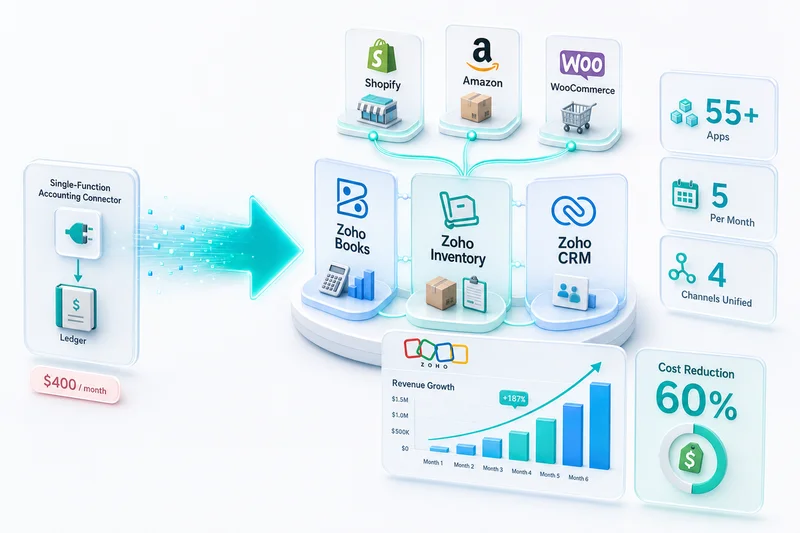
The Shopify order-to-cash flow is one part of the broader Zoho eCommerce platform. For how Shopify connects alongside Amazon, WooCommerce, eBay, and Etsy into a single operations backend, see Zoho for eCommerce: The Complete Operations Platform Guide.
Frequently Asked Questions
Order to cash describes the full financial cycle from when a customer places an order to when the payment clears in your bank account, net of all fees. For a Shopify seller, the cycle includes: order captured in Shopify, inventory decremented, invoice created in Zoho Books, Shopify Payments fee deducted, payout batched and deposited, COGS recorded against inventory cost, and transaction reconciled against the bank statement. Most Shopify sellers see only the first and last steps; the middle is invisible until month end.
Shopify Payments deducts a transaction fee from each order before batching the payout. In Zoho Books, the gross order amount records as revenue, and the Shopify Payments fee records as a separate expense line, typically in a payment processing fees account. The payout deposit matches the net amount after fees. Setting up this mapping correctly at the start means your Zoho Books reconciliation matches your Shopify payout reports automatically. Posting the net amount as revenue, the common shortcut, understates revenue and hides your actual processing costs.
With a Shopify-Zoho integration, yes. When a Shopify order is placed or fulfilled (depending on when you recognize revenue), the integration creates the corresponding invoice or sales order in Zoho Books and decrements inventory in Zoho Inventory. The trigger point, order placed vs order fulfilled, is a configuration decision that depends on your revenue recognition policy. For physical goods, most sellers trigger on fulfillment. For digital goods or services, they trigger on order placement.
For a single-channel Shopify seller with a straightforward product catalog, setup takes three to six weeks. That includes discovery, chart of accounts configuration by a Chartered Accountant, integration build and testing against real transaction data, and go-live support. Sellers with multi-currency orders, complex bundles, or high return rates take longer because edge case handling adds weeks of testing. Getting the accounting logic right on partial refunds, multi-item orders, and bundle COGS is where most implementation time goes.
Yes. Zoho Books handles multi-currency transactions natively. For Shopify stores with international customers, each order records in the transaction currency, with Zoho Books converting to your base currency at the exchange rate on the transaction date. Payment gateway fees in foreign currencies post to the fee expense account in the same transaction currency. Month-end reconciliation accounts for foreign exchange gains or losses on open receivables. This requires correct setup, specifically configuring each currency and exchange rate source in Zoho Books before orders start flowing.
Full implementation takes three to six weeks — so a complete setup before BFCM (November 28) is not realistic if you're starting in early November. But a partial setup covering the highest-risk areas is possible in one to two weeks: get the clearing account configured correctly, get basic invoice creation running, and get payout matching automated. Those three steps cover the majority of the reconciliation work that piles up during peak season. Everything else — bundle COGS mapping, exchange workflow automation, advanced reporting — can be cleaned up in Q1 when order volumes are lower.
The native Shopify–Zoho connector updated in 2026 with improved payout matching logic and better handling for Shopify Markets multi-currency orders. Zoho Books now supports automated batch matching for clearing account reconciliation, which reduces manual work during high-volume periods. Shop Pay Installments — Shopify's buy-now-pay-later product — now has a dedicated fee mapping in Zoho Books, previously requiring a manual workaround. For sellers running international storefronts, the updated connector handles Shopify Markets currency conversions and tax reporting more reliably than the 2025 version.
See exactly where your Shopify, Amazon, or WooCommerce ops are leaking — free.
Get a personalised eCommerce Ops Audit: inventory gaps, accounting leaks, and order-flow bottlenecks — with a Zoho fix roadmap. Delivered in 48 hours, at no cost.