Shopify Payments and Zoho Books: Complete Fee Reconciliation Setup Guide
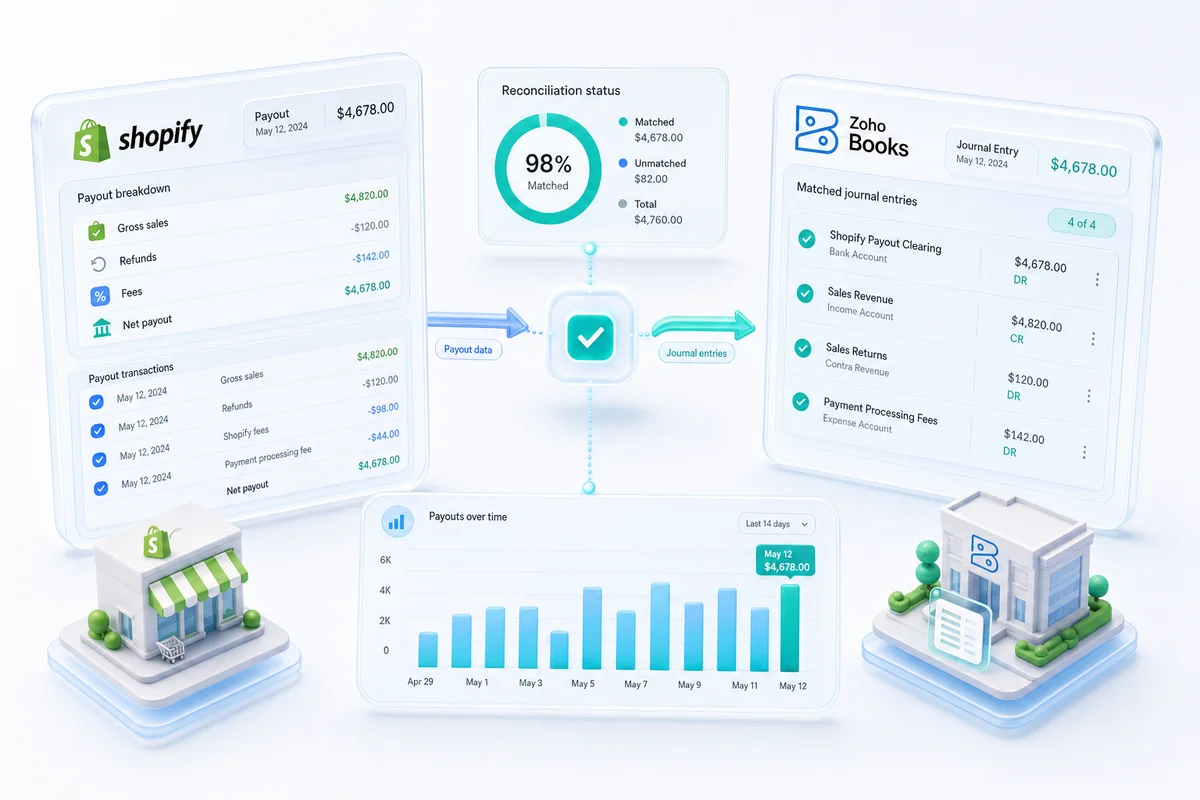
Shopify Payments sends one daily payout: gross sales minus processing fees, minus transaction fees, minus refunds processed in the period. Recording that deposit as revenue is the most common Shopify accounting error. This guide covers the correct Zoho Books setup for Shopify Payments reconciliation.
Shopify sellers who connect Zoho Books without the right configuration end up with a system that processes transactions and still produces wrong financial statements. The core problem: your Shopify Payments payout is not revenue. Shopify Payments deposits your gross sales minus credit card processing fees, minus any chargebacks resolved against you in the period, minus refunds issued. Record that net deposit as revenue and every gross margin figure in your books is wrong from day one.
This guide covers the complete Zoho Books setup for Shopify Payments: the payout structure, chart of accounts for correct fee separation, bank rules for automated reconciliation, chargeback handling, and multi-currency payouts for sellers with UK, AU, and CA Shopify stores.
TL;DR: Shopify Payments deposits are net after credit card fees are deducted. Correct Zoho Books setup requires separate expense accounts for processing fees, a clearing account for gross sales, revenue recognition at order date (not payout date), and bank rules that match payout components to the correct accounts automatically.
How Shopify Payments Payouts Work
Your Shopify Payout Is Not Your Revenue
Shopify Payments batches all card sales from a rolling period and initiates a single payout to your bank account, typically within 1–3 business days. The amount that hits your account equals gross sales minus three categories of deductions: credit card processing fees charged per transaction, any refunds issued during the period, and any chargebacks resolved against you.
A store with $10,000 in gross Shopify sales that pays $300 in processing fees and issues $400 in refunds receives a payout of approximately $9,300. Recording $9,300 as revenue understates gross sales by $700 in refunds (which are revenue reversals, not expenses) and hides $300 in processing fees as legitimate deductible expenses. Both errors compound across every payout period and surface as unexplainable margin shortfalls at year end.
The correct approach: record gross sales when each order is placed, post processing fees as separate expense entries, and issue credit memos for refunds against the original invoices. The payout amount then confirms the arithmetic.
Shopify Payments Fee Structure
| Fee type | Rate | Account classification |
|---|---|---|
| Credit card processing - Basic plan | 2.9% + $0.30 per transaction | Cost of Sales |
| Credit card processing - Shopify plan | 2.6% + $0.30 per transaction | Cost of Sales |
| Credit card processing - Advanced plan | 2.4% + $0.30 per transaction | Cost of Sales |
| Shopify transaction fee (non-SP gateways) | 2.0% Basic / 1.0% Shopify / 0.5% Advanced | Payment Processing Expense |
| Chargeback fee | $15 per dispute | Chargeback Expense |
| Currency conversion | 1.5% on non-store-currency transactions | FX / Currency Conversion Expense |
Credit card processing fees are a direct cost of each transaction and belong in Cost of Sales. Chargeback fees belong in a separate account so you can track dispute frequency and cost independently. Currency conversion applies when a seller accepts orders in GBP, AUD, or EUR on a USD-primary store.
Shopify does not charge transaction fees when you use Shopify Payments as your gateway. The transaction fee line only appears when a store uses a third-party payment gateway (Stripe, PayPal, Braintree) alongside Shopify Payments, or when Shopify Payments is not available in the seller's market. Shopify's full payment fee schedule covers the current rates by plan.
When Shopify Payments Holds a Payout
Shopify Payments may place reserves on payouts during high-risk periods: rapid sales growth, high chargeback rates, or product category changes. During a hold, your Shopify Payments balance accumulates in your clearing account in Zoho Books as an outstanding balance rather than settling to your bank. The held balance is still your revenue. It sits in the clearing account until Shopify releases the payout.
Q4 and BFCM: Shopify Payments Reconciliation at Peak Volume
BFCM runs at 4–8x normal transaction volume for most Shopify sellers. Three reconciliation issues converge in the same week.
Payout frequency. Shopify switches to daily payouts automatically during high-volume periods. If your bank rules expect weekly batches, a daily payout triggers a rule mismatch. Verify your rules handle multiple payout credits per day before Black Friday — one setup error at 8x volume creates eight times the cleanup.
Hold exposure. Rapid sales acceleration in the 10 days before BFCM is one of the most common triggers for a Shopify Payments reserve. If Shopify holds a payout, the balance sits in your Shopify Payments Clearing Account in Zoho Books. It is still your revenue, just not yet in your bank. Track the aging balance separately so it does not inflate your open receivables or distort your cash position heading into December.
Chargeback lag. BFCM chargebacks arrive 30–90 days after the sale, landing in January or February. Your Q4 P&L looks cleaner than it actually is until that batch posts. Build a chargeback provision based on your historical dispute rate, scaled to BFCM volume, so the January shock does not catch your accountant off guard.
For the purchase order and supplier invoice side of BFCM prep — how to place and track inventory orders before volume hits — see the BFCM inventory planning guide for Shopify and Amazon sellers using Zoho. For automating the vendor payments that follow those purchase orders, AP automation in Zoho Books covers 3-way PO matching and approval workflows so supplier payments run without manual intervention during your busiest month.
Setting Up Zoho Books for Shopify Payments
Chart of Accounts: Shopify Revenue and Fee Expense Accounts
For Shopify Payments, build the following accounts in Zoho Books before processing any transactions:
Revenue accounts:
- Shopify Product Sales (gross product revenue per order)
- Shopify Shipping Revenue (shipping charges collected, if you want to track separately)
- Shopify Sales Discounts (contra-revenue account for discount amounts applied at checkout)
- Shopify Returns and Allowances (contra-revenue for credit memos and refunds)
Current Asset:
- Shopify Payments Clearing Account (holds gross sales between order date and payout settlement; reconciles to $0 at end of each payout cycle)
Expense accounts:
- Shopify Processing Fees (credit card rate per transaction, from payout report)
- Shopify Chargeback Expense (the $15 fee and any revenue reversed from lost disputes)
- Shopify Currency Conversion (FX costs on non-primary-currency transactions)
Setting Up Bank Rules for Automated Reconciliation
With the chart of accounts in place, bank rules in Zoho Books automate categorization of each payout component.
Primary rule: When a transaction description contains "Shopify" and is a credit to your bank account, classify it as a transfer from the Shopify Payments Clearing Account to your bank. This tells Zoho Books the payout is settling the clearing balance, not creating new revenue. The clearing account balance drops to $0 after each payout cycle.
Fee rule: When a transaction appears on the Shopify payout report as a deduction, route it to the corresponding expense account based on the fee type. Shopify's payout CSV report (downloadable from Shopify admin under Finances) provides the itemized breakdown that you match against the bank rule routing.
The bank feed alone is not sufficient for full Shopify Payments reconciliation. The payout report provides the fee-level detail that the bank deposit line does not include.
Order-Date vs Payout-Date Revenue Recognition
The correct method: recognize revenue when each Shopify order is placed, not when Shopify Payments settles to your bank account.
In practice: each Shopify order creates an invoice in Zoho Books (via Zoho Inventory or a direct Shopify integration). The invoice records gross sale price as revenue and payment of that invoice goes to the Shopify Payments Clearing Account, not directly to your bank. When Shopify initiates a payout, the clearing account balance transfers to your bank account and the bank rule matches the payout to the accumulated clearing balance. The clearing account ends each payout cycle at or near $0.
This method produces accurate gross revenue for each period regardless of payout timing and makes it possible to reconcile your Shopify Payments statement line-by-line against Zoho Books invoices.
Handling Shopify Chargebacks in Zoho Books
When a customer initiates a chargeback, Shopify Payments reverses the original transaction and deducts a $15 dispute fee from your next payout. In Zoho Books:
- Issue a credit memo against the original invoice for the disputed transaction amount (this reverses the revenue entry)
- Record the $15 chargeback fee to the Shopify Chargeback Expense account
- If you win the dispute, Shopify credits your payout and you reverse the credit memo
Tracking chargebacks in a dedicated account separates them from voluntary refunds. A refund is a customer service decision; a chargeback signals a fulfilment or fraud risk. Keeping the two separate lets you monitor dispute rate as its own metric rather than burying it inside the general refund line.
Multi-Currency: UK, AU, CA, and EU Shopify Stores
Shopify Payments operates in USD (US), GBP (UK), AUD (Australia), CAD (Canada), EUR (EU), and select other markets. Sellers running separate Shopify stores for different regions receive separate payouts in each currency.
In Zoho Books, enable multi-currency and create a dedicated bank account for each currency payout. Each GBP payout from the UK Shopify store settles to the GBP bank account. Revenue recognition and conversion to your reporting currency (typically USD) happens at the order-date exchange rate. FX gains and losses on the difference between order-date rate and settlement rate are tracked automatically by Zoho Books in the FX Gains/Losses account.
Shopify Payments vs Third-Party Gateways: Accounting Differences
Stores using Stripe, PayPal, or Braintree alongside Shopify Payments (common for stores offering PayPal checkout as an option) have a different payout structure and fee model per gateway. Stripe separates fee deductions from payouts in its dashboard. PayPal nets fees within each transaction before settlement.
Each gateway requires its own clearing account and bank rules in Zoho Books. The principle is the same as Shopify Payments: gross revenue recorded at order date, gateway fees as separate expenses, bank deposit matched to the clearing account balance.
For multi-gateway Shopify stores, you can see gross sales and fee cost by payment method with this structure. That matters when you are evaluating whether offering PayPal checkout on a WooCommerce-migrated store is worth the higher processing rate.
Shopify Payments and Zoho Inventory: COGS Automation
Zoho Inventory connects to Shopify and updates stock levels in real time as orders fulfil. Each fulfilment event calculates COGS based on FIFO or weighted average cost and posts to Zoho Books automatically. With Shopify Payments reconciliation in place, the full picture looks like this:
- Gross sales recorded at order date, net of discounts
- COGS posted at fulfilment based on actual inventory cost
- Processing fees categorized when Shopify Payments settles
- Gross margin calculated correctly, no manual COGS entries or period-end adjustments
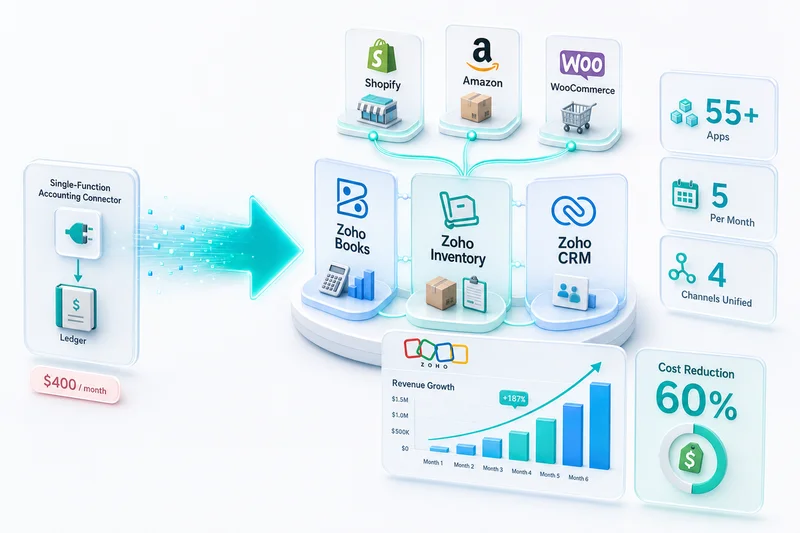
The multi-channel inventory setup that feeds COGS to Zoho Books works the same whether you are on Shopify alone or across Shopify, Amazon, and WooCommerce simultaneously.
If you are migrating from QuickBooks, the eCommerce chart of accounts setup guide covers the full account structure for Shopify and multi-channel sellers before you configure the Shopify Payments layer.
Zolify's Shopify Payments Setup Track Record
Across 100+ eCommerce implementations, Shopify Payments misconfiguration is one of the two most common errors Zolify's Chartered Accountant identifies when onboarding a new Shopify seller. The other is incorrect multi-channel COGS. The clearing account approach in this guide is the standard setup Zolify deploys on every Shopify implementation. Sellers switching from QuickBooks or spreadsheets typically see their first clean payout reconciliation within one payout cycle of go-live.
As an Official Zoho Authorized Partner with a CA on staff, Zolify has mapped every Shopify Payments fee type to the correct Zoho Books account across stores processing $10K to $5M+ per month. Setup takes 2–3 days as part of a full Shopify-Zoho integration.
Next Step: Audit Your Shopify Payments Setup
If your current Zoho Books setup records Shopify Payments deposits as direct revenue, your gross sales, fee visibility, and margin data are incorrect. The fix is a chart of accounts restructure and bank rule configuration, not a full system rebuild.
Get an eCommerce Ops Audit to review your Shopify Payments setup. Zolify's CA identifies the specific misconfigurations, maps the correction to your existing accounts, and reconfigures without disrupting your existing transaction history.
Shopify Payments reconciliation is one piece of the broader Zoho eCommerce stack. For the complete month-end close process that builds on this Shopify Payments configuration, see the monthly Shopify bookkeeping workflow for Zoho Books. For Shopify Plus merchants handling multi-storefront P&L, Shopify Markets multi-currency payouts, gift card liabilities, and deferred revenue for subscriptions, see the Shopify Plus enterprise accounting guide for Zoho Books for the full configuration. For how Shopify connects alongside Amazon, WooCommerce, eBay, and Etsy in a unified operations and accounting backend, see Zoho for eCommerce: The Complete Operations Platform Guide.
Frequently Asked Questions
Shopify Payments batches all card sales from a rolling period and sends a single net deposit to your bank account, typically within 1–3 business days. That deposit equals gross sales minus credit card processing fees (2.4–2.9% + $0.30 per transaction depending on your Shopify plan), minus any refunds processed in the period, and minus any chargebacks resolved against you. Recording the net deposit as revenue understates gross sales and hides the fee amounts as deductible expenses. The correct approach is to record gross revenue when each order is placed, record each fee separately, and use the deposit to confirm the reconciliation arithmetic.
For Shopify Payments, you need: a Shopify Sales revenue account (records gross order amount), a Shopify Payments Clearing Account (current asset, holds the gross sales balance until payout settles), a Shopify Processing Fees expense account (credit card rate per transaction), a Shopify Chargeback Expense account (dispute fees and reversed revenue), and a Shopify Currency Conversion account for sellers accepting non-USD transactions. Each account maps to a specific line type in Shopify's payout report, making month-end reconciliation a matching exercise rather than a calculation exercise.
When a customer initiates a chargeback, Shopify Payments reverses the original transaction and deducts a $15 dispute fee from your next payout. In Zoho Books, issue a credit memo against the original invoice for the disputed amount (this reverses the revenue entry), then record the $15 fee to a Shopify Chargeback Expense account. If you win the dispute, Shopify credits the amount to your next payout and you reverse the credit memo. Tracking chargebacks in a dedicated account separates them from voluntary refunds so you can monitor dispute rate as an independent metric.
Zoho Books connects to Shopify through Zoho Inventory for order data and through your bank feed for payout data. Shopify Payments does not have a direct API connection to Zoho Books for fee-level data. The recommended setup is: use Zoho Inventory to sync Shopify orders (which creates invoices in Zoho Books automatically), then use bank rules in Zoho Books to categorize the Shopify Payments payout and route each payout component to the correct account. Shopify's payout report (downloadable from Shopify admin) provides the itemized breakdown that confirms your bank rule reconciliation.
Shopify Payments and third-party gateways like Stripe and PayPal have different payout timing and fee structures. Shopify Payments consolidates all sales into a single payout with one fee rate per transaction. Stripe and PayPal have their own payout schedules and fee calculations, with PayPal netting fees differently from Shopify. When a Shopify store uses multiple gateways (Shopify Payments for card, PayPal for PayPal checkout), each gateway requires its own clearing account in Zoho Books and its own bank rules. The reconciliation principle is the same for all: gross revenue recorded at order date, gateway-specific fees as separate expenses, and the bank deposit confirmed against the clearing account balance.
See exactly where your Shopify, Amazon, or WooCommerce ops are leaking — free.
Get a personalised eCommerce Ops Audit: inventory gaps, accounting leaks, and order-flow bottlenecks — with a Zoho fix roadmap. Delivered in 48 hours, at no cost.