eCommerce Chart of Accounts for Zoho Books: The Complete Setup Guide
Zoho Books ships with a generic chart of accounts built for service businesses. eCommerce sellers who use it without customization end up with pooled fees, no per-channel revenue visibility, and margin reports that cannot explain what is happening. This guide covers the complete COA structure for multi-channel eCommerce on Zoho Books.
When an eCommerce seller sets up Zoho Books using the default chart of accounts, they get a generic structure designed for service businesses or simple product companies. The result: all Shopify sales go into one "Sales" account, marketplace fees pool into "Bank Charges" or "Merchant Fees," COGS is estimated at period end, and a per-channel P&L requires exporting data and doing the calculation manually. None of this is a Zoho Books limitation. It is a setup problem.
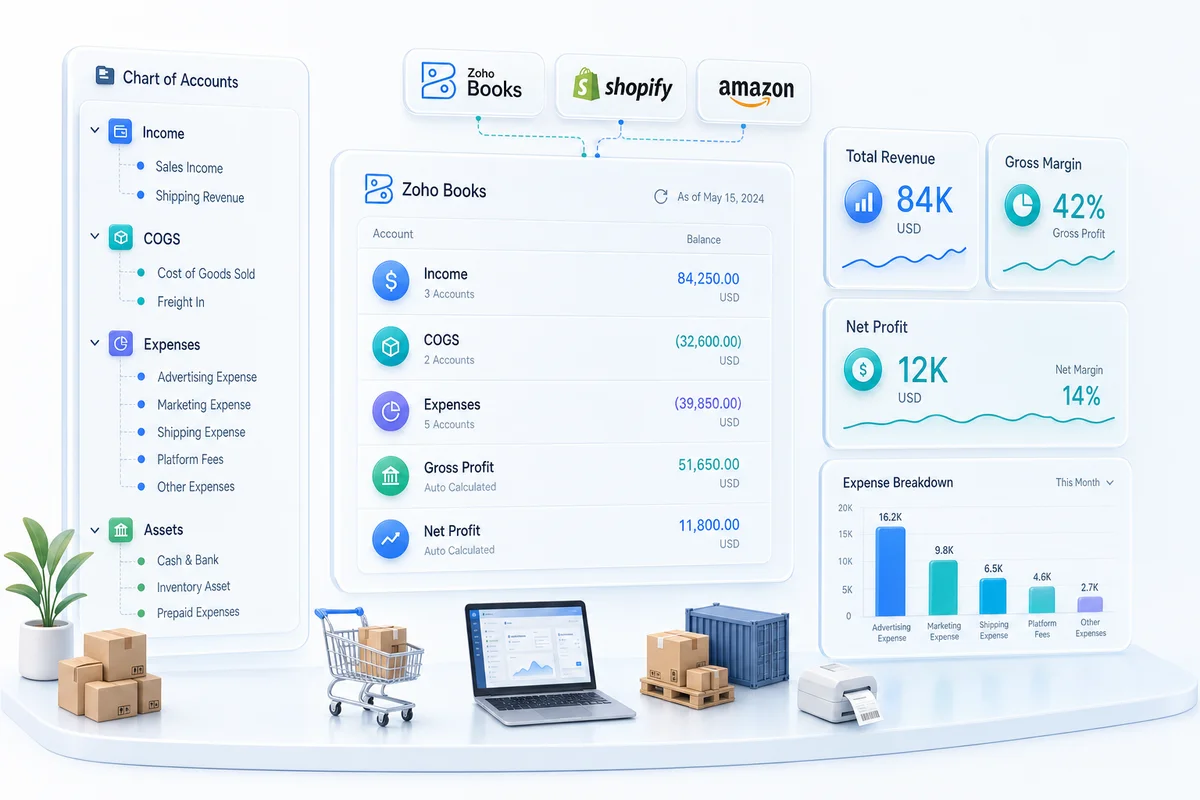
The correct eCommerce chart of accounts separates revenue by sales channel, separates fees by marketplace and type, structures COGS to feed automatically from Zoho Inventory, and creates clearing accounts for each payment processor. This guide covers the complete account structure for Shopify, Amazon, WooCommerce, eBay, and Etsy sellers using Zoho Books.
Direct answer: An eCommerce Zoho Books chart of accounts needs separate revenue accounts per channel, separate expense accounts per fee type and marketplace, clearing accounts for each payment processor, and COGS accounts linked to Zoho Inventory for automatic posting. Zoho Books' default chart of accounts requires significant customization before it supports accurate per-channel financial reporting.
Q4 is when the chart of accounts either works or it doesn't. November and December volumes on Shopify and Amazon run 3–5x any other quarter for most sellers. Every pooled fee account and every collapsed revenue line multiplies with that volume. Sellers who have the structure in place before Black Friday enter year-end with clean data that closes correctly. Those who don't are reconciling a six-week high-volume backlog in January while also trying to close the fiscal year. For a year-end close checklist that maps directly to this account structure, see Year-End Accounting Checklist for eCommerce Sellers in Zoho Books.
Why the default Zoho Books chart of accounts doesn't work for eCommerce
The problem with one "Sales" account
Zoho Books ships with a single "Sales" account under Income. For a single-channel Shopify store with one product category, that is manageable. For a multi-channel seller on Shopify, Amazon, and WooCommerce with separate margin profiles per channel, a single "Sales" account means:
- No per-channel P&L
- No visibility that Amazon has a structurally higher COGS percentage than Shopify (because of FBA referral fees)
- No way to identify that a WooCommerce promotional period compressed margin
- No channel-level trend data to use when deciding where to focus growth
The fix: separate revenue accounts per channel from day one.
The problem with pooled fee expenses
Generic accounting setups typically have one or two accounts for bank and payment charges. eCommerce sellers pay fees to four to six different entities: Shopify for processing, Amazon for referral fees and FBA, PayPal for gateway services, eBay for listing and final value, and Etsy for transactions and offsite ads. Each has a different tax treatment and margin impact.
Pooling them into "Bank Charges" or "Merchant Fees" hides:
- What it actually costs to sell on Amazon vs Shopify
- Whether Amazon's 15% referral fee is compressing gross margin or just operating profit
- Which fee categories are growing fastest as order volume scales
The problem with manual COGS
Default Zoho Books setups often record COGS as a periodic adjustment rather than a transaction-level calculation. For eCommerce, COGS should calculate automatically per sale based on the inventory cost of the specific SKU sold. Zoho Inventory handles this natively via FIFO or weighted average valuation. But automatic COGS posting only works when the COGS account in Zoho Books is specifically configured to receive postings from Zoho Inventory, which requires the right account type mapping during setup. For a complete guide to valuation method selection, platform-specific COGS configuration, and the most common setup mistakes, see eCommerce COGS tracking in Zoho Books.
The complete eCommerce chart of accounts structure
Income accounts
| Account name | Account type | Notes |
|---|---|---|
| Shopify Product Sales | Income | Gross product revenue from Shopify orders |
| Shopify Shipping Revenue | Income | Shipping charges collected from buyers |
| Amazon Product Sales | Income | Gross product revenue from Amazon orders |
| WooCommerce Product Sales | Income | Gross product revenue from WooCommerce orders |
| eBay Product Sales | Income | Gross product revenue from eBay orders |
| Etsy Product Sales | Income | Gross product revenue from Etsy orders |
| Sales Discounts | Contra Income | Discount amounts reducing gross revenue |
| Sales Returns and Allowances | Contra Income | Refunds and credit memos per channel |
For stores with multiple product categories carrying meaningfully different margins, sub-accounts under each channel account allow tracking by category (e.g., Shopify Product Sales: Accessories, Shopify Product Sales: Apparel). Keep sub-accounts optional until you have a confirmed reporting use for the additional granularity.
Cost of goods sold accounts
| Account name | Type | Notes |
|---|---|---|
| Product COGS | COGS | Auto-posted from Zoho Inventory per fulfilment |
| Inbound Freight / Freight-In | COGS | Cost of getting goods from supplier to warehouse |
| Packaging Materials | COGS | Boxes, labels, poly bags, void fill |
| FBA Inbound Shipping | COGS | Shipping costs to Amazon FBA warehouses |
Product COGS is the critical account. Zoho Inventory calculates COGS per unit sold and posts directly to this account on each fulfilment event. No manual COGS entry is required at period end. The valuation method (FIFO or weighted average) is set once at setup and applies consistently across all channels.
Inbound freight belongs in COGS, not operating expenses. Under both GAAP and IFRS, the cost of inventory includes all costs required to bring the goods to their present location and condition. Freight-in is an inventory cost; shipping to the customer is a selling expense.
Marketplace fee expense accounts
This is the category that most default setups get wrong. Each fee type needs its own account, and the account classification matters: Cost of Sales fees affect gross margin, while Advertising fees affect operating profit.
Amazon fee accounts:
| Account name | Type | Rate notes |
|---|---|---|
| Amazon Referral Fees | Cost of Sales | 8–15% of sale price, category dependent |
| Amazon FBA Fulfillment Fees | Cost of Sales | Per-unit pick, pack, ship; weight and size dependent |
| Amazon FBA Storage Fees | Operating Expense | Monthly and long-term storage; escalates at 181 days |
| Amazon Advertising (Sponsored Products) | Advertising Expense | PPC spend within Amazon; separate from transaction economics |
| Amazon Closing Fees | Cost of Sales | Per-transaction fee in media categories |
Shopify fee accounts:
| Account name | Type | Rate notes |
|---|---|---|
| Shopify Processing Fees | Cost of Sales | 2.4–2.9% + $0.30 per transaction via Shopify Payments |
| Shopify Transaction Fees | Operating Expense | 0.5–2.0% when using non-Shopify Payments gateway |
| Shopify Chargeback Expense | Operating Expense | $15 dispute fee plus reversed revenue |
eBay fee accounts:
| Account name | Type | Rate notes |
|---|---|---|
| eBay Final Value Fees | Cost of Sales | 10–15.55% of sale price + $0.30 |
| eBay Listing Fees | Operating Expense | $0.35 per listing, varies by category |
| eBay Promoted Listings | Advertising Expense | 2–20% of sale on promoted items |
| eBay International Transaction Fees | Cost of Sales | 1.65% on cross-border sales |
| eBay Payment Processing | Cost of Sales | 2.35% + $0.30 per transaction |
Etsy fee accounts:
| Account name | Type | Rate notes |
|---|---|---|
| Etsy Transaction Fees | Cost of Sales | 6.5% of sale price including shipping |
| Etsy Listing Fees | Operating Expense | $0.20 per active listing |
| Etsy Offsite Ads | Advertising Expense | 12–15% of offsite-driven sales |
| Etsy Payment Processing | Cost of Sales | 3% + $0.25 per transaction |
The split between Cost of Sales fees and Advertising fees matters for margin analysis. Amazon Referral Fees are Cost of Sales: they reduce gross margin. Amazon Sponsored Products are advertising: they reduce operating profit but do not touch gross margin. Treating them the same hides whether a channel is structurally profitable before you add paid acquisition.
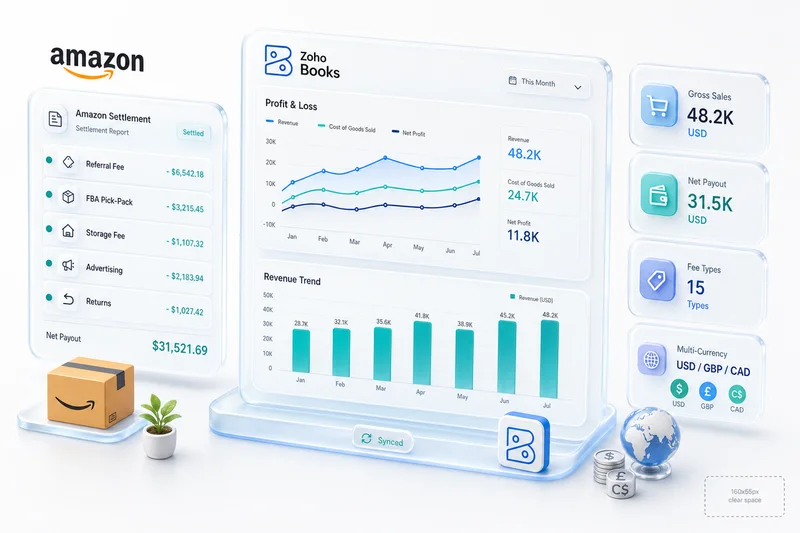
For how each of these Amazon fee account types maps to the actual line items in an Amazon settlement report, Amazon seller accounting on Zoho Books covers the full settlement-to-account mapping, including the fees that don't appear until the biweekly payout.
Current asset accounts: payment processor clearing
Clearing accounts are the accounts most consistently missing from eCommerce setups in Zoho Books.
| Account name | Type | Purpose |
|---|---|---|
| Shopify Payments Clearing | Current Asset | Holds Shopify gross sales from order date until Shopify Payments settles to bank |
| Amazon Payout Clearing | Current Asset | Holds Amazon settlement balance between biweekly statement and bank deposit |
| PayPal Clearing | Current Asset | Holds PayPal balance for WooCommerce or multi-channel stores |
| Stripe Clearing | Current Asset | Holds Stripe balance for WooCommerce or direct-to-consumer stores |
Each clearing account should reconcile to $0 at the end of each payout cycle. A non-zero balance signals either an unmatched payout or a categorization error. The clearing account structure makes those discrepancies visible rather than creating unexplained bank reconciliation differences.
For more detail on Shopify Payments clearing account setup and bank rules, the Shopify Payments Zoho Books reconciliation guide covers the full configuration.
For Amazon's biweekly settlement reconciliation, the Amazon FBA accounting setup covers the 15+ fee types that appear in Amazon settlement reports and how each maps to the account structure above.
For sellers looking to automate the Amazon settlement import rather than reconciling manually each fortnight, the Amazon Zoho integration covers the full Seller Central connection and what Zolify configures end to end.
For the complete workflow that uses these clearing accounts each month across Shopify, Amazon, and PayPal, the Zoho Books bank reconciliation guide for eCommerce covers the full journal entry sequence and bank rule setup.
Liability accounts: tax
| Account name | Type | Notes |
|---|---|---|
| Sales Tax Collected (Pass-Through) | Current Liability | Tax collected from buyers in states where you are merchant of record (primarily WooCommerce) |
| Sales Tax Payable | Current Liability | Tax owed to authorities on seller-direct collections |
Amazon, Shopify, and eBay are marketplace facilitators in most US states. Tax they collect and remit on your behalf does not pass through your books. Sales Tax Collected (Pass-Through) is primarily needed for WooCommerce stores in states where you have nexus, since WooCommerce is not a marketplace facilitator.
For a full breakdown of eCommerce sales tax configuration in Zoho Books, the eCommerce sales tax setup guide covers nexus rules, multi-state configuration, and the tax accounts setup for each channel. For subscription box businesses, the liability structure also includes a Deferred Revenue account under Current Liabilities for prepaid subscription orders — the subscription box accounting guide for Zoho Books covers the full deferred revenue setup and ASC 606 recognition schedule.
How this structure produces per-channel P&L
With separate revenue and expense accounts per channel, Zoho Books generates a per-channel income statement on demand. Group by channel and you see, for each platform:
- Gross sales
- Returns and discounts
- Net revenue
- Product COGS (from Zoho Inventory)
- Gross margin amount and percentage
- Channel-specific fees (Cost of Sales fees only)
- Net contribution margin per channel
This is the report that shows Amazon's higher volume comes at a cost: gross margin sits 8 percentage points lower than Shopify DTC, because Amazon Referral Fees and FBA Fulfillment Fees are visible as Cost of Sales items per channel rather than pooled into a single operating expense.
Zoho Analytics for eCommerce takes the per-channel P&L a step further by adding inventory turn data and customer lifetime value from Zoho Inventory and Zoho CRM into the same reporting layer. For eCommerce portfolio operators running two or more brands under separate legal entities, the multi-entity eCommerce accounting guide for Zoho Books covers how to extend this chart of accounts structure with separate Zoho Books organizations, inter-company clearing accounts, and consolidated brand-level P&L.
Q4 closing entries for eCommerce sellers in Zoho Books
Year-end close for a multi-channel eCommerce seller is not the same exercise as closing the books for a service business. Three account categories require specific attention in Q4 that don't arise during regular monthly close.
Inventory write-downs
Physical count often shows on-hand quantity lower than Zoho Inventory records: shrinkage, damage, FBA removal orders not yet processed. When that happens, post the adjustment before locking December:
| Entry | Debit | Credit |
|---|---|---|
| Stock physically confirmed as damaged or lost | Inventory Write-Down Expense | Inventory Asset |
| Slow-moving stock with estimated recovery below cost | Inventory Reserve Expense | Inventory Reserve (Contra Asset) |
Create Inventory Write-Down Expense as an Operating Expense account if you don't have one. This is not COGS. It is a period charge for stock you won't sell, not a cost of stock you did sell. Booking it to COGS overstates cost of goods and compresses your gross margin report for the year.
COGS reconciliation
Zoho Inventory posts COGS automatically per fulfillment event throughout the year. Before closing December, run the Inventory Valuation Summary report in Zoho Inventory for the full year and compare the total COGS figure to the Product COGS account balance in Zoho Books. The two numbers should match.
A gap means either a fulfillment event didn't sync, or an invoice was entered manually in Zoho Books without going through Zoho Inventory. Fix the source before closing the period. A manual year-end COGS journal entry that doesn't trace to a specific identified gap will misstate cost of goods in your annual financials. For guidance on choosing FIFO vs weighted average (and what that choice means for your year-end COGS calculation specifically), see FIFO vs Weighted Average: Inventory Valuation for eCommerce Sellers in Zoho Books.
Amazon settlement cut-off
Amazon's biweekly settlement cycle means some December revenue won't hit your bank until January. To recognize it in the correct period:
| Situation | Debit | Credit |
|---|---|---|
| Revenue earned in December; payout not yet received | Amazon Payout Clearing | Deferred Amazon Revenue |
| January: settlement arrives and is matched to the bank deposit | Deferred Amazon Revenue | Amazon Payout Clearing |
The December-to-January gap is typically 5–10 days. Without the cut-off entry, December revenue is understated by the value of one full settlement cycle.
Year-end inventory reconciliation in Zoho Books
For sellers with stock at a warehouse, 3PL, or Amazon FBA, the year-end physical count creates a reconciliation step that must complete before December is closed.
What to compare, by location
| Stock location | Data to pull | Common gap causes |
|---|---|---|
| Own warehouse or 3PL | Physical count sheet vs. Zoho Inventory stock on hand | Unprocessed receiving POs, damage recorded after count date |
| Amazon FBA | FBA Inventory report from Seller Central vs. Zoho Inventory | Stranded inventory, removal orders still in transit |
| Shopify-fulfilled stock | Shopify inventory count vs. Zoho Inventory | Orders fulfilled outside Zoho, manual adjustments made in Shopify |
How to post the adjustment
Post each variance as an Inventory Adjustment inside Zoho Inventory, not as a manual journal entry in Zoho Books. The adjustment record in Zoho Inventory ties the quantity change to the valuation method and automatically posts the resulting amount to the linked account in Zoho Books. A journal entry written directly in Zoho Books skips that connection and creates a mismatch between inventory quantity and book value.
Pull the Stock on Hand report in Zoho Inventory as at December 31 before posting adjustments. You need a clear baseline. Adjustments posted after the period closes are harder to trace, and if the fiscal year isn't locked yet, they may land in the wrong period.
How long setup takes and what migration involves
For a new Zoho Books setup, configuring the eCommerce chart of accounts takes 1–2 days. It is the first step in any eCommerce implementation because every other configuration (bank rules, inventory connections, tax setup) depends on the correct account structure being in place.
For sellers migrating from QuickBooks, the Zoho Books import process brings over the existing chart of accounts, which then requires a mapping and restructuring step. The import does not automatically restructure a generic COA into the eCommerce-specific format. The QuickBooks to Zoho Books migration guide covers what the migration import handles and what requires manual COA restructuring post-import. For a plan-by-plan cost comparison that includes the connector subscriptions most QuickBooks eCommerce setups require, see Zoho Books vs QuickBooks for eCommerce Sellers.
Zoho's official documentation for chart of accounts in Zoho Books covers account types and the technical setup. The eCommerce-specific account structure above supplements that documentation with the category decisions that eCommerce operations require.
Zolify's chart of accounts standard for eCommerce
Across 100+ eCommerce implementations, Zolify's Chartered Accountant designs the chart of accounts as the first deliverable in every Zoho Books engagement. The clearing account structure, channel-separated revenue, and Zoho Inventory COGS connection described above are the three configurations that separate accurate eCommerce books from books that require manual fixes every month-end. For the complete workflow that uses this account structure each period, see the Shopify monthly bookkeeping in Zoho Books guide. For how the clearing accounts and AP/AR cycles combine into a working capital view — particularly the gap between Q4 inventory spend and Q1 settlements — see the eCommerce cash flow management guide for Zoho Books.
As an Official Zoho Authorized Partner, Zolify configures the chart of accounts with the full eCommerce account structure and validates it against your specific channel mix: Shopify only, Shopify and Amazon, or the full five-channel setup covering Shopify, Amazon, WooCommerce, eBay, and Etsy.
Get your eCommerce chart of accounts set up correctly
If your current Zoho Books setup uses the default chart of accounts, your per-channel P&L data is either unavailable or requires manual extraction each period. The fix is a COA restructure: adding the channel-specific revenue accounts, fee expense accounts, and clearing accounts described in this guide.
Get an eCommerce Ops Audit and Zolify's CA reviews your current chart of accounts, identifies what is missing for your specific channel mix, and maps the restructure to your existing transaction history without disrupting prior periods.
The chart of accounts is the accounting foundation for the full Zoho eCommerce operations stack. For how Zoho Books connects with inventory, CRM, and order management across Shopify, Amazon, WooCommerce, eBay, and Etsy, see Zoho for eCommerce: The Complete Operations Platform Guide.
Frequently Asked Questions
An eCommerce chart of accounts in Zoho Books requires: separate revenue accounts per sales channel (Shopify Sales, Amazon Sales, WooCommerce Sales), separate expense accounts per marketplace fee type (Amazon Referral Fees, Amazon FBA Fulfillment Fees, Shopify Processing Fees, eBay Final Value Fees), clearing accounts for each payment processor (Shopify Payments Clearing, Amazon Payout Clearing), COGS accounts that receive automatic postings from Zoho Inventory, and contra-revenue accounts for returns and discounts per channel. Zoho Books' default chart of accounts requires significant customization before it supports per-channel P&L reporting.
Yes, separate revenue accounts per channel are the foundation of eCommerce reporting in Zoho Books. With separate accounts for Shopify Product Sales, Amazon Product Sales, and WooCommerce Product Sales, you can produce a per-channel income statement on demand. This shows gross revenue, returns, COGS, and channel fees side by side for each platform. Without separate channel accounts, all revenue collapses into one line and you cannot see which channel is most profitable or how channel mix is shifting.
Create a dedicated expense account for each fee type per platform: Amazon Referral Fees (8–15% of sale price, Cost of Sales), Amazon FBA Fulfillment Fees (per-unit, Cost of Sales), Amazon FBA Storage Fees (monthly and long-term, Operations Expense), Shopify Processing Fees (2.4–2.9% + $0.30, Cost of Sales), eBay Final Value Fees (10–15.55%, Cost of Sales), eBay Promoted Listings (Advertising Expense), Etsy Transaction Fees (6.5%, Cost of Sales), and Etsy Offsite Ads (12–15%, Advertising Expense). Separating Cost of Sales fees from Advertising fees matters for gross margin calculation: COGS-adjacent fees reduce gross margin, while advertising fees reduce operating profit.
A clearing account is a temporary holding account in your chart of accounts where funds accumulate between transaction date and settlement date. For eCommerce, you need one clearing account per payment processor: Shopify Payments Clearing (holds Shopify gross sales until Shopify Payments settles to your bank), Amazon Payout Clearing (holds Amazon settlement balance between statement and deposit), and PayPal or Stripe clearing accounts if you use those gateways. Each clearing account should reconcile to $0 at the end of each payout cycle. A non-zero balance means either a payout has not been matched to the bank transaction yet or a categorization error exists. Clearing accounts make outstanding payout balances visible and prevent bank reconciliation differences.
In Zoho Books connected to Zoho Inventory, COGS is calculated automatically per sale based on the inventory cost of the specific SKU fulfilled. Zoho Inventory calculates COGS using FIFO or weighted average (your choice at setup) and posts the amount to the COGS account in Zoho Books each time a fulfilment event occurs. No manual COGS entry is required at period end. For this to work, the COGS account in Zoho Books must be correctly configured to receive automatic postings from Zoho Inventory, which requires specific account type mapping during the chart of accounts setup. Sellers without Zoho Inventory must calculate COGS manually or through a periodic inventory adjustment, which introduces timing errors.
Three closing entry types come up specifically at year-end for eCommerce sellers in Zoho Books. First, inventory write-downs: if physical count shows less stock than Zoho Inventory records (shrinkage, damage, FBA removals in transit), post a debit to Inventory Write-Down Expense and a credit to Inventory Asset before December is closed. Second, COGS reconciliation: compare the Product COGS account balance in Zoho Books to the total COGS figure in Zoho Inventory's Inventory Valuation Summary report; a gap points to a fulfillment sync issue or a manual invoice entry that bypassed inventory, and the source needs fixing before the period locks. Third, Amazon settlement cut-off: for revenue earned in December but paid out in January, post a debit to Amazon Payout Clearing and a credit to Deferred Amazon Revenue in December, then reverse the entry when the settlement arrives. Without the cut-off entry, December revenue is understated by the value of one settlement cycle, typically 5 to 10 days of sales.
See exactly where your Shopify, Amazon, or WooCommerce ops are leaking — free.
Get a personalised eCommerce Ops Audit: inventory gaps, accounting leaks, and order-flow bottlenecks — with a Zoho fix roadmap. Delivered in 48 hours, at no cost.