Zoho Desk for eCommerce: Managing Support Tickets from Shopify, Amazon, and WooCommerce
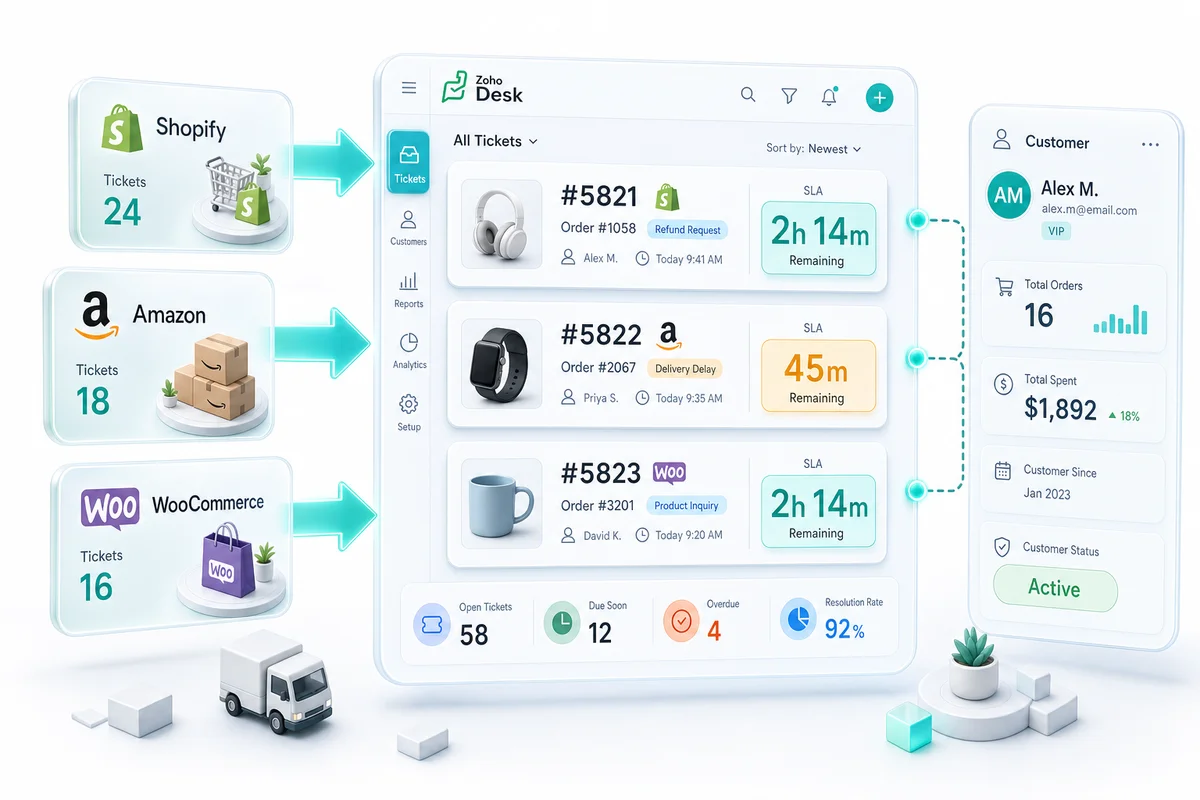
An eCommerce operation receiving support across Shopify contact forms, Amazon Buyer-Seller Messages, and WooCommerce order emails has no way to handle those tickets consistently without a shared system. Zoho Desk unifies all three channels into one ticketing queue, linked to order data in Zoho CRM and Zoho Inventory so agents always have the full order context when a ticket arrives.
Zoho Desk puts your Shopify, Amazon, WooCommerce, eBay, and Etsy support tickets into one queue — connected to order data in Zoho CRM and Zoho Inventory. When a ticket arrives, agents see the customer's order history, open returns, and lifetime value in the sidebar without opening a second tab. That context is what separates a fast, informed response from the kind that sends a buyer straight to a one-star review.
Without a shared ticketing platform, support agents work across disconnected inboxes with no visibility into what a customer ordered when a ticket arrives. Response time tracking requires manual spreadsheets. There is no way to see that the customer who filed a return request last week is now contacting you on Amazon about a different order.
Why Shared Email Inboxes Break Down at Scale
A shared inbox works below 50 orders per month. Past that, three problems compound quickly: tickets fall through when multiple agents work the same folder, there is no audit trail of who responded to what, and agents have no order context without switching to Shopify or Amazon in a separate tab.
At 200–500 orders per month, that last problem is the expensive one. Customers who do not get a timely, informed response to a shipping or damage question churn faster and leave more negative reviews than customers who never had the issue at all.
| Feature | Shared Gmail / Inbox | Zoho Desk |
|---|---|---|
| Ticket assignment | Manual | Automatic routing rules |
| Customer order context | Open Shopify/Amazon separately | Zoho CRM sidebar in ticket |
| Response time tracking | Spreadsheet, if at all | SLA policies with breach alerts |
| Amazon/eBay response rate | No tracking | Per-channel SLA departments |
| All channels in one view | No — separate inboxes | Yes — one queue |
| Return automation | Manual entry in two systems | Zoho Flow triggers Zoho Inventory |
For businesses already running Zoho CRM, Zoho Books, and Zoho Inventory, Zoho Desk is the logical support layer. The customer record that holds order history and lifetime value becomes the context window for every ticket.
Connecting Your eCommerce Storefronts to Zoho Desk
Shopify Contact Form and Email
The Shopify contact form generates an email to your Shopify notification address. In Zoho Desk, configure a support email address and either replace the Shopify notification address or set up forwarding to your Zoho Desk address.
When a Shopify customer sends a contact form message, Zoho Desk creates a ticket with the customer's email as the identifier. If that email exists in Zoho CRM — because they placed an order through Shopify — the ticket automatically shows their order history in the sidebar.
Best practice: Use a subdomain of your store domain for the support email (support@yourstorename.com). Route it to Zoho Desk. Display this address on your Shopify order confirmation page and tracking emails so customers use it rather than replying to automated Shopify emails.
Amazon Buyer-Seller Messages
Amazon's Buyer-Seller Messages use a masked email system. Buyers message sellers through Amazon's interface, and messages route to the seller's notification email as relayed addresses. Zoho Desk receives these messages through its email channel.
The setup: add your Amazon seller notification email as a Zoho Desk email channel. Incoming Buyer-Seller Messages create tickets in Zoho Desk. Agents reply from within Zoho Desk, and the reply routes back through Amazon's messaging system to the buyer.
Important constraint: Amazon's messaging platform is email-based and does not offer a direct API for third-party helpdesk integration. This email relay approach works reliably for most ticket volumes. For Amazon-specific response time requirements — Amazon measures response rate as a seller performance metric — train agents on Amazon's communication policies. Zoho Desk does not enforce these automatically; your SLA configuration handles that.
For how Amazon order and customer data flows into Zoho CRM after a sale, see Amazon and Zoho integration: connecting orders, inventory, and CRM.
WooCommerce Customer Emails
WooCommerce generates customer emails for orders, shipping, and account activity. Support requests typically arrive through a WordPress contact form (via plugins like Contact Form 7 or WPForms) or as replies to WooCommerce order emails.
Configure the WooCommerce contact form plugin to send submissions to your Zoho Desk support address. For order email replies, set the "from" address on WooCommerce transactional emails to your Zoho Desk address so replies route into the ticketing queue.
If your WooCommerce store uses the Zoho integration, order data in Zoho CRM flows into Zoho Desk ticket sidebars in the same way as Shopify orders. See our WooCommerce Zoho integration guide for the data architecture.
eBay Buyer Messages
eBay buyer messages route to the seller's registered notification email address. Add that email as a Zoho Desk channel, and every inbound eBay buyer message creates a ticket automatically. eBay does not provide a direct helpdesk API, so this email-forwarding approach is the standard method.
eBay tracks response rate as a seller performance metric. A Zoho Desk SLA policy for the eBay department — with a 24-hour first response target and escalation alerts at 18 hours — keeps your seller rating intact without relying on agents to manually monitor response windows.
For eBay seller operations and how Zoho handles eBay accounting and reporting, see the eBay seller Zoho Books guide.
Etsy Conversations
Etsy Conversations send buyer messages to your registered Etsy email address. Forward that address to a Zoho Desk channel and inbound Etsy messages create tickets the same way as other email-based channels.
Etsy's Star Seller programme requires a 95% or higher response rate within 24 hours. Missing that threshold risks your Star Seller badge, which affects search visibility on Etsy. A dedicated Etsy department in Zoho Desk with a 24-hour SLA and escalation alerts at 18 hours gives you a reliable way to track and protect that rate.
For sellers expanding to Etsy as a new channel, see Etsy and Zoho integration: connecting your Etsy store to Zoho Books and Inventory.
Department Structure for Multi-Channel eCommerce
Zoho Desk organizes agents and tickets into departments. For a multi-channel eCommerce operation, a practical structure:
| Department | Channels Routed | Ticket Types |
|---|---|---|
| Shopify Support | Shopify contact form, order emails | Product questions, returns, shipping, account issues |
| Amazon Support | Amazon Buyer-Seller Messages | Pre-sale questions, fulfillment issues, return requests |
| WooCommerce Support | WooCommerce contact form, order emails | Order issues, technical site questions |
| eBay Support | eBay buyer messages | Order and returns queries, pre-sale questions |
| Etsy Support | Etsy Conversations | Custom order questions, shipping, returns |
| Priority / VIP | All channels, high-value customers | Escalated tickets from VIP segment |
The Priority department is populated using Zoho Desk's automatic assignment rules, which can read Zoho CRM fields. When a ticket arrives from a customer whose lifetime value field exceeds your VIP threshold, Zoho Desk routes it to the priority queue automatically — no manual triage needed.
Connecting Zoho Desk to Zoho CRM for Order Context
The Zoho Desk to CRM native integration is what makes Zoho Desk more valuable for eCommerce than a standalone helpdesk. When the integration is active:
- A ticket from a known customer email links automatically to the Zoho CRM contact record
- The ticket sidebar shows order history, lifetime value, open orders, and previous tickets
- Agents can create and update CRM records without leaving Zoho Desk
- Return requests handled in Zoho Desk can update contact tags in Zoho CRM, which feeds into Zoho Campaigns for post-resolution email sequences
For this to work, the customer email must match between the Zoho Desk ticket and the Zoho CRM contact record — standard practice in a correctly configured Shopify or Amazon integration. See our Zoho CRM for eCommerce guide for how customer records are structured across the Zoho stack. For how to use those CRM records to drive repeat revenue after a support interaction is resolved, the eCommerce customer retention guide with Zoho CRM covers segmentation and automated re-engagement workflows.
SLA Configuration for eCommerce Ticket Types
Amazon sellers face specific response time obligations. Amazon measures response rate and factors it into seller performance metrics. First response within 24 hours is the Amazon requirement; 12 hours is a better operational target for preserving seller rating.
Zoho Desk SLA policies for an eCommerce operation:
Standard tier (24-hour first response):
- General product questions
- Pre-sale inquiries
- Account access issues
Order tier (12-hour first response):
- Shipping status and tracking
- Damaged item reports
- Order cancellation requests
- Return initiation
Marketplace tier (24-hour strict maximum, 12-hour target):
- All Amazon Buyer-Seller Message tickets
- eBay buyer message tickets
- Etsy Conversation tickets
- Configure a separate SLA for each marketplace department with breach alerts at 18 hours
VIP tier (4–8 hour first response):
- All tickets from customers above the lifetime value threshold
- Breach alerts at 2 hours
Zoho Desk escalates tickets approaching SLA breach to a supervisor or senior agent. For marketplace tickets, configure escalation at the 18-hour mark so a supervisor can intervene before the platform's 24-hour requirement is missed.
Automating Return Requests Between Zoho Desk and Zoho Inventory
Return requests are the highest-volume structured ticket type for most eCommerce sellers. The manual flow: customer submits a return request, agent logs it in Zoho Desk, agent creates the return in Zoho Inventory, agent sends confirmation. Two systems, two manual steps per ticket.
With Zoho Flow connecting them, that process looks different:
- Customer submits return request; ticket created in Zoho Desk
- Agent reviews, confirms validity, applies "Return Approved" tag in Zoho Desk
- Zoho Flow detects the tag change and calls the Zoho Inventory API to create a sales return linked to the original order
- Agent receives a notification in Zoho Desk that the return is created; customer receives return instructions
At 100+ returns per month, this saves 5–10 minutes per ticket and eliminates the most common manual error: wrong order referenced when creating the return in Zoho Inventory. For a broader view of what Zoho Flow handles natively for eCommerce and where it hands off to custom integration, see Zoho Flow for eCommerce automation.
For return workflow details on the inventory and accounting side, see our eCommerce returns management with Zoho guide.
BFCM Peak Season: Scaling Your Zoho Desk Support
Black Friday through Cyber Monday is the stretch where your support configuration gets tested at maximum volume. Shopify, Amazon, WooCommerce, eBay, and Etsy orders spike simultaneously — and so do the tickets that follow. A correctly configured Zoho Desk handles the surge; an under-configured one turns BFCM weekend into a cascading SLA miss.
Pre-BFCM Queue Audit (Two Weeks Out)
Clear your backlog before Black Friday arrives. Run a ticket age report in Zoho Desk filtered by department; close anything older than 14 days with no customer reply in the past seven. Recurring ticket types from October — missing FBA shipments, eBay item-not-received disputes, WooCommerce payment errors — point to upstream problems that BFCM volume will amplify. Fix the cause, not just the tickets.
Set your BFCM business hours schedule in Zoho Desk now. This adjusts SLA countdown clocks to reflect actual operating hours during the surge instead of running against a standard weekday schedule. For how queue readiness connects with inventory and fulfillment prep, the BFCM inventory planning guide for Shopify, Amazon, and Zoho covers the upstream setup that reduces ticket volume before it reaches your support queue.
Canned Responses, Macros, and Round-the-Clock Coverage
Build your BFCM canned response library two weeks before Black Friday. The five categories you need: order confirmation delays, shipping carrier cut-off dates, extended return windows, discount code issues, and stockout apologies. Each response goes into Zoho Desk's Canned Responses library, then gets bundled into a macro that sets the ticket status and applies the relevant department tag. An agent handling a damaged-item report at 2 AM on Black Friday should resolve it in under a minute — no judgment calls, no hunting for policy wording.
Multi-timezone shift coverage is what separates operations that hold their SLAs through BFCM from those that don't. In Zoho Desk's Business Hours and Shift scheduling, assign at least one agent per marketplace department to cover overnight hours from Thursday through Cyber Monday. Amazon's 24-hour response window runs continuously — a three-hour gap in overnight coverage on Black Friday evening shows up in your seller performance metrics by Saturday morning. eBay's rolling response rate is equally unforgiving. Set the schedule before the surge, not during it.
SLA Tightening During Peak
Amazon's 24-hour response requirement does not flex for BFCM. When ticket volume triples, a 12-hour internal target gives you the buffer to meet Amazon's requirement even if queue processing slows. eBay's response rate is a rolling percentage — a cluster of missed responses on a busy Friday morning drops the metric fast, with direct implications for seller standing.
Duplicate your standard SLA policies and create BFCM versions active from Thursday evening through Cyber Monday:
| Department | Standard First Response | BFCM Target | Escalation Alert |
|---|---|---|---|
| Amazon Support | 12 hr | 8 hr | 6 hr |
| eBay Support | 24 hr | 12 hr | 8 hr |
| Etsy Support | 24 hr | 12 hr | 8 hr |
| Shopify / WooCommerce | 24 hr | 12 hr | 8 hr |
Revert to standard SLA policies after Cyber Monday closes. The switch takes two minutes in Zoho Desk — build it into your Thursday pre-BFCM checklist.
AI Deflection for Queue Overflow
Zoho Desk's AI assistant, Zia, handles order status lookups, shipping queries, and return policy questions directly from your knowledge base — no agent time required. During BFCM, configure Zia to auto-respond to the five ticket types your October data shows as highest-volume: "where is my order," "I want to return a Black Friday purchase," "my item arrived damaged," "I ordered the wrong size," and "my discount code didn't apply."
Deflecting 20–30% of tier-1 tickets through Zia frees agents for the decisions that require human judgment — Amazon FBA damage claims, eBay INR escalations, Shopify chargeback disputes, Etsy custom order complications.
BFCM Return Surge Automation
BFCM return windows concentrate in late November and December as gift recipients exchange items. The Zoho Flow return automation described above handles individual returns cleanly, but add a BFCM-specific routing rule on top: set a Zoho Desk workflow trigger so any ticket containing "Black Friday," "Cyber Monday," or "BFCM" alongside "return" or "exchange" auto-applies a BFCM Return tag and routes it through the return approval workflow.
Spell out your extended BFCM return window in the Zoho Desk knowledge base before Black Friday goes live. Buyers checking policy eligibility get an immediate Zia response rather than a queued ticket waiting for agent review. For what happens after a BFCM return is processed — retention sequences, discount recovery, and repeat purchase campaigns — the BFCM customer retention guide with Zoho CRM covers the post-resolution workflow.
What Zolify Sets Up for eCommerce Support Operations
Most Zoho Desk implementations we audit for eCommerce operations share two gaps: they are not connected to Zoho CRM order data, and the department structure does not reflect the full channel mix of the business. A seller active on Shopify, Amazon, eBay, and Etsy needs departments and SLA policies for all four — not a generic inbox with manual routing.
Connecting Zoho Desk correctly means ensuring the customer email identifier is consistent across every storefront and Zoho CRM — which requires the storefront integrations to be set up first, capturing the correct email field. The CRM connection then gives agents full order context on every ticket without switching systems.
Zolify implements Zoho Desk as part of the broader eCommerce operations stack. The CRM connection, SLA configuration, return workflow automation, and multi-channel department structure are included in the initial setup — not optional add-ons. We've done 100+ eCommerce implementations, have a CA on staff who reviews data flows before go-live, and are an Official Zoho Finance Partner. Zoho Desk gets set up alongside Zoho Inventory and Zoho Books from the start. Teams moving from Freshdesk can reference the Freshdesk to Zoho Desk migration guide, which covers ticket history transfer, SLA rebuilds, and the full migration timeline. Teams migrating from Zendesk can find the full ticket export workflow, automation rebuild steps, Zwitch tool walkthrough, and a direct pricing comparison in the Zendesk to Zoho Desk migration guide.
Book an eCommerce Ops Audit to assess your current support setup and see how Zoho Desk fits into your operations.
Customer support is one operational layer within the wider Zoho eCommerce platform. For how Zoho Desk connects with inventory, accounting, and order management across Shopify, Amazon, WooCommerce, eBay, and Etsy, see Zoho for eCommerce: The Complete Operations Platform Guide.
Frequently Asked Questions
Yes, all three route to Zoho Desk via email forwarding. Amazon Buyer-Seller Messages, eBay buyer messages, and Etsy Conversations each send buyer communications to the seller's registered notification email. Forward that address to a Zoho Desk support channel and every inbound message creates a ticket automatically. Agents reply from within Zoho Desk and the reply delivers back to the buyer through Amazon's, eBay's, or Etsy's messaging system respectively. None of these platforms expose a direct helpdesk API, so the email relay approach is the standard method. Zoho Desk SLA policies handle the response time requirements each platform enforces: Amazon requires first response within 24 hours, eBay tracks response rate as a seller metric, and Etsy's Star Seller programme requires a 95%+ response rate within 24 hours.
Zoho Desk connects to Zoho CRM through a native integration. When a ticket arrives from a customer, Zoho Desk looks up the contact in Zoho CRM and displays their order history, lifetime value, open orders, and previous support tickets in the ticket sidebar. For this to work, Shopify or WooCommerce order data must be syncing into Zoho CRM with the customer email as the unique identifier. Agents see the relevant order without switching systems.
Most eCommerce operations use two to three SLA tiers. Standard tickets (general inquiries, product questions) get a 24-hour first response target. Order issues (late delivery, damage, tracking) get a 12-hour target, as these directly affect retention. VIP customers — identified by Zoho CRM lifetime value fields — get a 4–8 hour target. SLAs in Zoho Desk trigger escalation notifications when a ticket approaches breach time, alerting a supervisor before the SLA is actually missed.
Yes. Zoho Desk supports multiple departments, each with their own agents, SLAs, and workflow automations. You can create a Shopify department and a WooCommerce department with routing rules that assign tickets based on the email channel they arrived from. This separation lets you track first response time and resolution time by platform independently and identify which storefront generates the highest support load.
Return request tickets in Zoho Desk can trigger a workflow that creates a return in Zoho Inventory when a specific tag is applied or the ticket status changes. With Zoho Flow handling the automation: approving a return in Zoho Desk triggers the inventory adjustment automatically, so agents are not manually creating returns in a second system. At 100+ returns per month, this saves roughly 5–10 minutes per ticket and eliminates the most common error — referencing the wrong order when creating the return in Zoho Inventory. Without automation, agents handle return requests in Zoho Desk and create the return in Zoho Inventory manually. Both approaches work; the automated one removes the manual reconciliation step.
See exactly where your Shopify, Amazon, or WooCommerce ops are leaking — free.
Get a personalised eCommerce Ops Audit: inventory gaps, accounting leaks, and order-flow bottlenecks — with a Zoho fix roadmap. Delivered in 48 hours, at no cost.