Zoho for Startups: Which Products to Start With at Each Stage
You don't need 45 Zoho apps on day one. You need 2-3. Here's which products to start with based on your stage, team size, and what actually matters right now.
The worst thing a startup can do with Zoho is sign up for Zoho One on day one and activate 20 apps. You'll spend a month configuring tools you don't need yet, your team will be overwhelmed, and half the apps will sit unused with default settings that don't match your workflow.
The best approach: start with the 1-2 products that solve your most immediate problem. Configure them properly. Add more as your business grows into them.
Here's what that looks like at each stage.
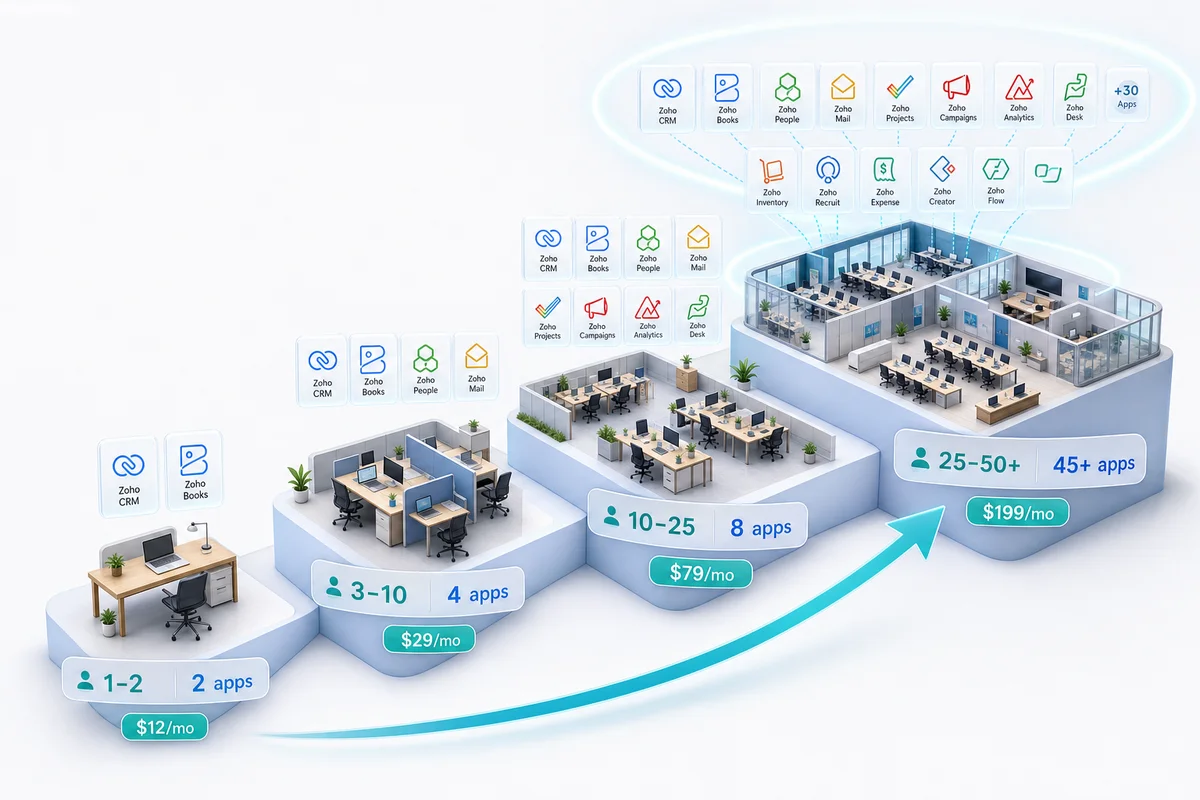
Stage 1: Solo founder or co-founders (1-3 people)
Your problems right now: Tracking leads without losing them. Sending invoices. Looking professional enough that prospects don't question whether you're a real company.
What you need:
Zoho CRM Free or Zoho Bigin ($9/user/month). You need somewhere to track leads and deals that isn't your email inbox or a Notes app. CRM Free supports 3 users with basic pipeline management. Bigin is slightly more capable (pipeline views, phone integration, email templates) and costs less than two coffees a month.
Don't use full Zoho CRM Professional at this stage. You don't need custom modules, Blueprint, or lead scoring when you have 30 contacts. You need a place to write down who you talked to and what they need.
Zoho Books Free or Standard ($15/org/month). You need to send invoices and track what's paid. Books Free works for businesses under $50K annual revenue. Standard adds bank reconciliation and basic reporting.
Skip Zoho Inventory, Analytics, Projects, and everything else. You don't have enough data, transactions, or team members to justify them.
Total cost: $0-$24/month
Stage 2: First hires (4-10 people)
Your problems right now: Leads are slipping through cracks because multiple people touch the pipeline. You need to onboard customers consistently. Financial reporting needs to be real, not "check the bank balance."
What to add:
Upgrade to Zoho CRM Standard ($20/user) or Professional ($35/user). With multiple salespeople, you need assignment rules (who handles which leads), workflow automation (follow-up reminders), and reporting (pipeline by rep). Professional adds Blueprint for process enforcement, worth it if you're building a repeatable sales process.
Zoho Books Professional ($30/org/month). You now need proper chart of accounts, bank reconciliation, recurring invoices, and basic reporting for your accountant. If you sell physical products, Books connects to Zoho Inventory for stock tracking.
Zoho Inventory Standard ($39/org/month): only if you sell physical products. If you're a service business, skip this.
Consider: Zoho One ($45/user/month). This is the crossover point. At 5+ users needing CRM + Books, individual subscriptions approach $200-$300/month. Zoho One at $225/month (5 × $45) gives you both plus 43 more apps. Run the math with our Zoho One vs individual apps breakdown.
Total cost: $150-$450/month (depending on team size and whether you go Zoho One)
Stage 3: Growth mode (10-25 people)
Your problems right now: Operations are getting complex. Sales and fulfillment are disconnected. Customer support requests need a system, not a shared inbox. You need dashboards, not spreadsheets.
What to add:
Zoho Analytics. You now have enough data across CRM and Books to build meaningful dashboards: revenue trends, pipeline forecast, customer acquisition cost, margin analysis. Don't build 30 reports. Build the 5 dashboards that drive decisions.
Zoho Desk. Customer support requests are exceeding what email can handle. You need ticket routing, SLAs, and a knowledge base that deflects common questions. Desk integrates with CRM so support agents see the customer's full history.
Zoho Projects. For service businesses and agencies, you need project management with time tracking and billing integration. For product companies, Projects handles internal product development coordination.
Zoho Campaigns. Email marketing beyond manually BCC'ing your customer list. Automated welcome sequences, product announcements, and re-engagement campaigns. See our Zoho Campaigns review for a full breakdown of pricing and what each plan includes.
At this stage, you should definitely be on Zoho One. Buying Analytics + Desk + Projects + Campaigns individually costs more than the Zoho One subscription that includes all of them.
Total cost: $450-$1,125/month (Zoho One × 10-25 users)
Stage 4: Scaling (25-50+ people)
Your problems right now: Multiple departments with different needs. New hires need structured onboarding. Data governance becomes important. You need processes that work without the founders being involved in everything.
What to add:
Zoho People. HR management: leave tracking, attendance, org charts, onboarding checklists. This used to be a spreadsheet. At 25+ employees, it can't be anymore.
Zoho Creator. You now have workflows that don't fit standard modules, such as custom approval chains, vendor portals, or commission calculators. Creator builds these without hiring developers.
Zoho Sign. Contract and document signing. At this scale, printing-signing-scanning is a bottleneck.
Zoho WorkDrive. File management with version control, team folders, and access permissions. Replaces shared Google Drive or Dropbox with something integrated into your Zoho workflow.
Proper implementation. This is also the stage where getting a Zoho implementation partner makes sense if you haven't already. The cost of misconfiguration at 25+ users is significant: a wrong CRM setup means 25 people using a broken process, not 3.
Total cost: $1,125-$2,250/month (Zoho One × 25-50 users)
The products most startups never need
Not every Zoho app is relevant to every startup:
- Zoho Recruit, unless you're hiring 10+ positions per quarter
- Zoho Survey, unless customer research is a core activity
- Zoho Vault, unless you have specific password management compliance needs
- Zoho Backstage, unless you host events
- Zoho Commerce, unless you need a standalone webshop (most startups use Shopify or WooCommerce)
Having access to these through Zoho One doesn't mean you should activate them. Tool bloat is worse than tool scarcity.
The startup advantage: no re-migration
The biggest benefit of starting on Zoho isn't the cost; it's avoiding the migration tax.
Companies that start on HubSpot Free → outgrow it → buy Salesforce → realize it's expensive → migrate to Zoho spend 6-12 months and $10,000+ on platform switches. Each migration means data cleanup, workflow rebuilds, and team retraining.
Starting on Zoho means your first CRM record, your first invoice, and your first support ticket are all in the same ecosystem you'll use at 100 employees. No migration. No data loss. No retraining.
For startups evaluating the full ecosystem, explore our solutions overview or see how Zoho works for eCommerce, professional services, and manufacturing.
Getting started
If you're a startup figuring out which Zoho products to begin with, book a free consultation. We'll map your current stage to the right products and configuration. No upselling to tools you don't need yet.
Frequently Asked Questions
Yes, particularly for startups that expect to need CRM, accounting, and operations tools as they grow. Zoho's advantage is that you start with 1-2 products and expand within the same ecosystem as your needs grow, with no re-migration and no data silos. The cost is 40-70% lower than comparable tools (Salesforce, QuickBooks + HubSpot stacks), which matters when you're pre-revenue or capital-constrained.
Yes. Zoho CRM has a free tier for up to 3 users. Zoho Books has a free tier for businesses under $50K annual revenue. Zoho Bigin (lightweight CRM) costs $9/user/month. For startups using multiple products, Zoho One at $45/user/month bundles everything, which is cheaper than buying 3+ products individually.
Zoho Bigin is a lightweight CRM designed for small teams with simple sales processes. It costs $9/user/month and covers pipeline management, contacts, calls, and basic automation. Choose Bigin if you have a simple sales cycle and fewer than 10 contacts per day. Choose Zoho CRM Standard ($20/user) or Professional ($35/user) if you need custom modules, workflow automation, lead scoring, or integration with Zoho Books and Inventory.
When any of these happen: you have more than 50 active leads or customers, more than one person needs access to the same data, you're losing deals because follow-ups are falling through cracks, or your monthly bookkeeping takes more than 4 hours. These are signals that manual tracking is costing you more than a tool subscription.
Yes, and this is the recommended approach. Start with the product that solves your most pressing problem (usually CRM or Books). Add products as needs emerge. Data flows between Zoho apps natively, so there's no migration cost when you expand within the ecosystem. You can also switch to Zoho One later when the bundle becomes more economical.
See exactly where your Shopify, Amazon, or WooCommerce ops are leaking — free.
Get a personalised eCommerce Ops Audit: inventory gaps, accounting leaks, and order-flow bottlenecks — with a Zoho fix roadmap. Delivered in 48 hours, at no cost.