BFCM Inventory Planning for Shopify and Amazon Sellers: How to Use Zoho Inventory to Avoid Q4 Stockouts
Most Shopify and Amazon sellers head into BFCM with inventory settings calibrated for a normal week. Reorder points built for October velocity fire too late in November. This guide covers the October configuration window: seasonal reorder points, multi-channel stock allocation, purchase order automation, and the BFCM readiness checklist that keeps operations running when order volume hits 10x.
BFCM stockouts are not caused by insufficient inventory. They are caused by inventory settings that were never updated for peak velocity.
The Shopify and Amazon sellers who run out of stock on Black Friday are not under-stocked in October. They have products in a warehouse. What they have is a reorder point built for a typical week, sitting unchanged since the last time someone logged into Zoho Inventory. When November order velocity runs 8 to 12 times above baseline, those static thresholds fire too late. The PO triggers after the stock is already gone. Zoho Inventory lets you set BFCM-specific reorder rules, sync live counts across Shopify and Amazon, and automate purchase orders before the window closes. October is when to do it.
Why BFCM breaks inventory systems that work fine the rest of the year
Order velocity runs 8 to 12 times above baseline, and static reorder points fire too late
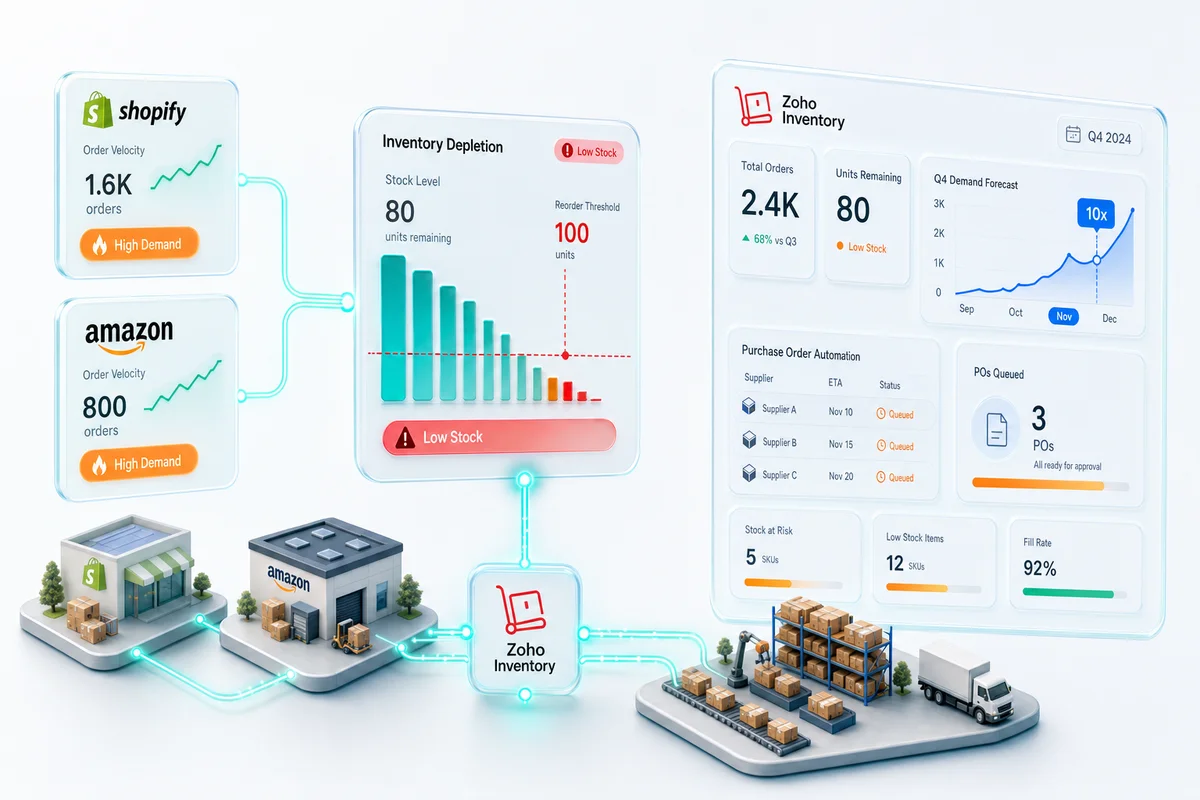
A reorder point calibrated to your September daily sales velocity of 15 units will trigger a purchase order when stock drops to around 75 units (assuming a 5-day lead time). At BFCM, that same SKU might sell 130 units on Black Friday alone. The PO fires, but stock is already gone by the time the supplier ships. The problem is not the reorder point logic. The input is wrong for the season: daily velocity.
How Shopify and Amazon update stock counts at different speeds
Shopify decrements inventory the moment an order is placed. Amazon FBA updates fulfillment status and inventory counts on a delay that can reach 12 to 24 hours during peak processing periods. When both channels draw from the same Zoho Inventory record, a gap opens: Shopify sees the current count, Amazon FBA is reporting last night's count. Without a channel-specific safety reserve, that lag creates oversell windows during BFCM when orders come in faster than confirmations process.
The stockout math: what a 3-day Shopify stockout costs at BFCM pricing
A product your store sells at $60 during BFCM (discounted from $80) with a daily BFCM velocity of 80 units generates roughly $4,800 per day at full run rate. A 3-day stockout on that SKU (the typical window before emergency inventory arrives) represents approximately $14,400 in lost revenue on a single product. Multiply that across your top-5 SKUs and the cost of not updating a reorder point in October becomes material.
The BFCM inventory planning timeline (October is the window)
6 weeks out (early October): audit current stock levels and supplier lead times
Pull the Inventory Summary report in Zoho Inventory for Shopify and check every SKU with BFCM volume history. For each, confirm the current on-hand quantity, current reorder point, current reorder quantity, and your supplier's stated lead time for Q4. Lead times in October and November run longer than the rest of the year; a supplier that ships in 10 days in August may need 18 to 20 days in November due to freight volume. Use Q4-specific lead times in every reorder point calculation, not the lead time from your last PO in spring.
4 weeks out (mid-October): set BFCM reorder points in Zoho Inventory
Update the reorder point on every top-10 SKU by revenue using the BFCM formula: (BFCM daily velocity × lead time in days) + (BFCM daily velocity × safety stock days). BFCM daily velocity is your best estimate of daily units sold on Black Friday and Cyber Monday, typically 8 to 12 times your September average for high-demand products. That September baseline comes from pulling 12-month velocity data in Zoho Inventory and calculating a seasonal index — the eCommerce demand forecasting setup guide covers that process if you haven't built it yet. Safety stock days should be 3 to 5 days of BFCM velocity to absorb demand spikes above the forecast. The formula details are in the configuration section below; update these in Zoho Inventory before moving to purchase orders.
3 weeks out (late October): send purchase orders and configure low-stock alerts
By late October, every PO for BFCM-critical SKUs should already be sent or confirmed with suppliers. The BFCM vendor purchase order strategy guide covers how to calculate Q4 quantities, structure and approve POs in Zoho Books, and track vendor commitments before the lead time window closes. Any PO issued after early November carries real risk of not arriving before Amazon's FBA inbound blackout. In Zoho Inventory, enable low-stock email alerts for every SKU with a BFCM reorder point so your team gets notified when a threshold triggers, not when someone thinks to check the dashboard. FBA sellers who ran the August planning cycle — sizing Q4 inbound quantities and placing purchase orders before Amazon's capacity window closed — arrive at this point with stock already confirmed in FBA; the Amazon FBA Q4 inventory planning guide covers the August demand forecasting and PO timing that makes the October BFCM configuration straightforward.
2 weeks out (early November): freeze product master and validate channel stock counts
Stop making configuration changes to your Zoho Inventory item records in early November. A product master freeze prevents last-minute reorder point edits from creating confusion about which settings are live. Validate that Shopify and Amazon channel stock counts match your Zoho Inventory available quantity. Any discrepancy found now is fixable. A discrepancy found on Black Friday morning is not.
Week of BFCM: monitor live in Zoho Inventory dashboard and escalate on velocity anomalies
Run the Inventory Summary report daily during BFCM week, sorted by days-of-runway ascending. Any SKU below 7 days of remaining stock at current velocity needs immediate attention. If automated POs have already been triggered, confirm delivery ETAs. If stock is running faster than forecast and no PO is active, contact your supplier for an expedited order (3 to 4 times the cost of a planned one, but less than a stockout).
How to configure Zoho Inventory for BFCM demand on Shopify and Amazon
Setting seasonal reorder points (formula: BFCM velocity × lead time × safety stock multiplier)
The reorder point field in Zoho Inventory sits on the item record under the Purchasing section. Update it on each of your top SKUs. For a simplified formula that works for most Shopify and Amazon sellers: multiply your estimated BFCM daily units by your Q4 supplier lead time in days, then add a safety buffer equal to 4 days of BFCM velocity. If you sell across multiple warehouses, set reorder points at the warehouse level so regional stockouts generate separate POs rather than a single aggregate trigger.
These seasonal demand buffers build on year-round velocity baselines. The Zoho Inventory demand forecasting setup guide for eCommerce sellers covers how to pull those baselines from the Sales by Item report and calculate safety stock before adjusting for BFCM peaks.
Enabling low-stock alerts across Shopify and Amazon channels simultaneously
Zoho Inventory's notification rules send low-stock alerts by email when any SKU hits its reorder threshold. Configure alerts at 120% of the reorder point, not at the threshold itself; that gives your team a day or two before the automated PO fires, useful if supplier availability has changed. The multi-channel stock sync across Shopify, Amazon, and WooCommerce covers how channel-specific counts flow back to the central Zoho Inventory record that the alert logic reads.
Automating purchase orders when reorder point triggers fire
Zoho Inventory's reorder rules can auto-generate a draft PO or a confirmed PO to the preferred vendor when stock hits the threshold. For BFCM planning, set the rule to generate a confirmed PO (not a draft) so the order goes to the supplier immediately without requiring manual approval. Confirm that every affected SKU has a preferred vendor record with current pricing, minimum order quantities, and accurate lead time before enabling auto-PO. A PO sent to a vendor with stale pricing is worse than no automation. It creates a pricing dispute that delays the shipment. When those automated POs convert to supplier bills on goods receipt, eCommerce AP automation in Zoho Books handles the 3-way matching, multi-approver workflows, and payment release without manual intervention. The purchase order timing those automated POs create is also the input your working capital model needs: the BFCM cash flow planning guide shows how to sequence those supplier invoice due dates against your Shopify and Amazon settlement calendar so October does not become a cash crunch.
Using composite items for BFCM bundles without double-counting stock
If you sell BFCM bundles (gift sets, multi-packs, or curated kits), configure them as composite items in Zoho Inventory so the system deducts component-level stock when a bundle sells, not just a bundle-level unit. A composite item with two components (1 unit of SKU-A and 1 unit of SKU-B) reduces available quantity for both components with each sale. Without composite item configuration, bundle sales leave your reorder rules unaware of component depletion, and you end up with a stockout on a core SKU that also doubles as a bundle component.
Multi-channel stock allocation: Shopify vs Amazon vs WooCommerce
Why you cannot over-allocate to Amazon FBA without a Shopify buffer
Amazon FBA inventory is physically committed to Amazon's fulfillment network. Once you send stock to FBA, it cannot be pulled back to fulfil Shopify or WooCommerce orders without a removal order, a process that takes 7 to 14 business days and incurs removal fees. Sending 100% of your BFCM stock to FBA is a bet that Amazon will outperform your other channels by the full inventory amount. Most multi-channel sellers do better holding 15 to 25% of BFCM stock as non-FBA buffer, available for Shopify and WooCommerce fulfilment from their own warehouse. The Zoho Inventory multi-channel guide covers the year-round channel allocation rules and per-warehouse reorder logic that make this buffer sustainable outside the BFCM season. For sellers also running eBay alongside Shopify and Amazon, the multi-channel BFCM operations guide covers the three-channel priority order and stock reservation configuration that prevents the eBay BFCM surge from depleting stock reserved for the November 26 Shopify peak.
How Zoho Inventory holds a safety reserve for non-FBA channels
Zoho Inventory's channel allocation settings allow you to reserve a minimum quantity for specific channels. Set a non-FBA safety reserve before BFCM: a hard floor below which Zoho will not commit inventory to Amazon, regardless of order volume there. This prevents an Amazon sales spike from depleting the available pool and causing Shopify oversells. For Shopify and Zoho integration setups, the reserve ensures Shopify's real-time stock display reflects what's available for Shopify fulfilment, not the total across all channels.
Managing FBA replenishment timelines: Amazon's 2-week inbound window before BFCM
Amazon typically closes or restricts FBA inbound shipments roughly 2 weeks before Black Friday to manage warehouse capacity. Any stock you want in FBA for BFCM needs to arrive at an Amazon fulfillment center before early November. For the Amazon and Zoho integration, Zoho Inventory's FBA quantity field reflects units Amazon has confirmed as available, not units in transit. Track in-transit FBA shipments separately.
BFCM readiness checklist (Zoho Inventory)
Run through this before November 1:
- Reorder points updated. All top-10 SKUs recalculated with BFCM velocity estimates and Q4 supplier lead times, not your September baseline.
- Purchase orders sent. POs for BFCM replenishment confirmed with suppliers; FBA shipments en route to arrive before early November.
- Composite items configured. All BFCM bundles set up as composite items with correct component mappings so bundle sales deplete component stock accurately.
- Channels synced. Shopify and Amazon stock counts reconciled against Zoho Inventory available quantity, with no unexplained discrepancies.
- Low-stock alerts live. Email notifications enabled for all BFCM-critical SKUs at 120% of reorder point, not at the threshold itself.
- Team access confirmed. Everyone who needs to act on a stockout alert has Zoho Inventory access and knows the escalation path.
- COGS cost updated. Item costs in Zoho Inventory reflect current landed cost, not last year's pricing.
- Returns workflow configured. Return-to-stock process validated so BFCM returns land back in available inventory without manual intervention.
- FBA safety reserve set. Non-FBA channel buffer configured in Zoho Inventory so Shopify orders cannot draw from stock already committed to Amazon.
- Operations partner briefed. If you use a Zoho partner for managed ops, they have the BFCM configuration and are on call for the peak period.
What to do if BFCM planning reveals operational gaps
The 3 gaps that consistently appear in DIY Zoho Inventory setups at BFCM time
Across 100+ eCommerce implementations on Zoho, the same three gaps surface in self-configured setups when BFCM planning begins.
The most common: reorder points set at onboarding and never revisited. The default values in Zoho Inventory are placeholders; most self-implementations leave them at whatever the onboarding wizard suggested based on a few sample orders, not actual velocity data. At BFCM, those placeholders generate POs a week after the stock is already gone.
The second: FBA and non-FBA stock pooled together in Zoho Inventory with no allocation rules. Amazon and Shopify both draw from the same available count with no priority order, and whichever channel orders faster wins the remaining stock. WooCommerce orders can deplete the FBA pool on a Wednesday, leaving Amazon with nothing to ship by Friday.
The third: composite item configuration skipped for bundles. BFCM bundles created as standalone SKUs in Zoho Inventory with a separate physical bundle count, rather than as composite items drawing from component stock, produce double-counting errors that make the inventory summary report untrustworthy. For a detailed look at how these setup gaps compound, see the Q4 readiness guide for eCommerce operations on Zoho.
With inventory configured for peak demand, the next layer is the CRM setup that retains the first-time buyers BFCM brings in, and the email campaigns that drive them to buy in the first place. BFCM customer retention in Zoho CRM covers the post-sale automation: custom fields, workflow triggers, and the 30-day Campaigns sequence to configure before November 27. BFCM email marketing budget planning in Zoho Campaigns covers the pre-sale side: list segmentation from Zoho CRM, the five-email campaign calendar, send budget, and attribution setup — the eight-week pre-BFCM marketing work that runs in parallel with the inventory configuration here. BFCM sales tax compliance for Shopify and Amazon in Zoho Books covers the third operational layer: monitoring economic nexus thresholds during peak week, configuring Zoho Books to handle Shopify and Amazon tax collection correctly, and preparing Q4 multi-state filings before December 31. For WooCommerce sellers, BFCM drives abandoned cart rates 3 to 5 times the year-round baseline; the WooCommerce BFCM abandoned checkout recovery guide covers the Zoho CRM re-engagement workflow, BFCM sequence timing, and CA-validated discount accounting in Zoho Books to configure before November. Once stock is allocated and purchase order automation is in place, the pricing layer is next: how to configure BFCM price lists in Zoho Inventory for Shopify and WooCommerce covers discount structure, channel assignment, CA-validated margin floor, and the automatic rollback at season end.
What a Zolify eCommerce Ops Audit covers (and why October is the right time to book one)
A Zolify eCommerce Ops Audit reviews your Zoho Inventory configuration against your actual BFCM volume profile: reorder logic, channel allocation rules, composite item setup, PO automation, and the integration between Zoho Inventory and your Shopify, Amazon, and WooCommerce channels. The audit identifies the specific gaps before November makes them expensive. Zolify has a Chartered Accountant on staff and has delivered 100+ eCommerce implementations on Zoho, including Q4 go-lives on Shopify and Amazon. As an Official Zoho Authorized Partner, the team knows the configuration paths that self-implementations typically miss.
October is the window. A gap found now takes days to fix. The same gap found on Black Friday takes weeks to recover from.
Frequently asked questions
When should I update reorder points for BFCM?
Early to mid-October, six to four weeks before BFCM weekend. Updating reorder points in Zoho Inventory is non-destructive: it does not affect open orders, existing POs, or inventory valuations. Updates made after early November carry real risk because supplier lead times in Q4 are longer, and stock ordered in mid-November typically does not arrive before the peak.
How does Zoho Inventory sync stock counts between Shopify and Amazon?
Zoho Inventory is the central stock record. When a Shopify order ships, the integration decrements the SKU count and pushes the updated quantity to all connected channels, including Amazon Seller Central, typically within minutes. FBA confirmation lag (Amazon's status update can trail the shipment by 12 to 24 hours at peak) means Shopify can show slightly higher available stock than Amazon has confirmed, which is why a channel safety reserve matters for BFCM.
Can Zoho Inventory automate BFCM purchase orders?
Yes. Reorder rules trigger a draft or confirmed PO automatically when stock falls to the configured threshold. For BFCM, set the rule to generate a confirmed PO and make sure the preferred vendor record has current pricing and lead time. An automated PO triggered by a BFCM-calibrated reorder point fires earlier and in larger quantities than your baseline setup.
What is the difference between safety stock and reorder point in Zoho Inventory?
The reorder point is the stock level that triggers a purchase order. Safety stock is the buffer built into that calculation to absorb demand spikes without hitting zero. For BFCM: reorder point = (BFCM daily velocity × lead time in days) + (BFCM daily velocity × 4 days safety buffer). At 80 units/day BFCM velocity and 14-day supplier lead time, the reorder point is (80 × 14) + (80 × 4) = 1,440 units.
What happens if I run out of stock on Amazon FBA during BFCM?
Your listing goes inactive, your Best Seller Rank drops and takes 7 to 14 days to recover after restocking, and Amazon's FBA inbound window (which closes roughly 2 weeks before BFCM) means emergency replenishment sent in mid-November will not arrive in time. The only mitigation is holding non-FBA buffer stock for Shopify and WooCommerce fulfilment from your own warehouse while FBA restocks.
Frequently Asked Questions
The window is early to mid-October, six to four weeks before BFCM weekend. Updating reorder points in Zoho Inventory is non-destructive: it does not affect open orders, existing purchase orders, or inventory valuations. It only changes when the next automated PO triggers. Any reorder point update made after early November is probably too late for replenishment to arrive before the peak because supplier lead times in October are already running longer than August. For top-10 SKUs by revenue, recalculate your BFCM reorder point using your BFCM daily velocity estimate (normal daily velocity multiplied by 8 to 10) times your supplier lead time in days, plus a safety stock buffer of 3 to 5 days of BFCM velocity.
Zoho Inventory acts as the central stock record. When a Shopify order ships, Zoho Inventory decrements the SKU count and pushes the updated available quantity to all connected channels (including your Amazon Seller Central listing) typically within minutes. The same happens for Amazon FBA sales: fulfilled units are subtracted from the Zoho Inventory total and reflected back to Shopify. The sync is near real-time under normal load, though FBA confirmation lag (Amazon's fulfillment status update can trail the actual shipment by 12 to 24 hours during peak) means available quantity shown on Shopify can be slightly ahead of the Amazon-confirmed count. For BFCM, this lag is why a channel-specific safety reserve matters: it prevents Shopify from selling units that Amazon FBA has already committed.
Yes. Zoho Inventory's reorder rules can trigger a draft or confirmed purchase order automatically when stock falls to the reorder point threshold. The PO goes to the preferred vendor on file at the configured reorder quantity. For BFCM planning, the key setup steps are: update the reorder point to reflect BFCM velocity before October ends, confirm that the preferred vendor record has current pricing and a valid lead time, and set the reorder quantity to cover the full BFCM demand period rather than your normal replenishment cycle. Automated POs triggered by a BFCM-calibrated reorder point will fire earlier and in larger quantities than your baseline setup, which is exactly the intent.
The reorder point is the stock level that triggers a new purchase order. Safety stock is the buffer quantity built into that calculation to absorb demand spikes or supplier delays without hitting zero. In Zoho Inventory, you set the reorder point on the item record; the safety stock is not a separate field but is included in the reorder point calculation. For BFCM, a simplified formula is: reorder point equals (BFCM daily velocity multiplied by supplier lead time in days) plus (BFCM daily velocity multiplied by 3 to 5 days as safety buffer). If your supplier takes 14 days and your BFCM daily velocity is 80 units, a reorder point of roughly 1,500 units builds in a 5-day safety buffer at peak velocity.
An FBA stockout during BFCM has three compounding consequences. First, your Amazon listing goes inactive or shows as unavailable, which drops your Best Seller Rank and typically takes 7 to 14 days to recover after stock is restored. Second, Amazon's FBA inbound processing window closes approximately 2 weeks before BFCM, meaning emergency replenishment sent after early November will not arrive in FBA warehouses in time. Third, any units allocated to FBA cannot quickly move to fulfil Shopify or WooCommerce orders; FBA inventory is physically committed to Amazon's network. The only mitigation for a late-breaking FBA shortage is holding non-FBA (FBM) buffer stock that can fulfil orders from your own warehouse while FBA restocks.
See exactly where your Shopify, Amazon, or WooCommerce ops are leaking — free.
Get a personalised eCommerce Ops Audit: inventory gaps, accounting leaks, and order-flow bottlenecks — with a Zoho fix roadmap. Delivered in 48 hours, at no cost.