eCommerce Accounts Payable Automation in Zoho Books: How Shopify and Amazon Sellers Eliminate Manual Supplier Payments
Shopify and Amazon sellers managing 10 or more active suppliers lose 3 to 5 hours every week on manual accounts payable. Zoho Books eliminates that with native 3-way matching, multi-approver bill workflows, and scheduled batch payments (no Zapier required). This guide covers the full AP automation cycle and what to configure before Q4 BFCM volume arrives.
Shopify and Amazon sellers managing more than 10 active suppliers lose 3 to 5 hours every week on manual accounts payable: matching invoices against purchase orders, routing payment approvals by email, and releasing payments in batches from a spreadsheet. Zoho Books automates the entire cycle from PO creation through payment release. The 3-way matching (PO against goods receipt against bill), multi-approver workflows, and scheduled bulk payments are all built into the platform. eCommerce accounts payable automation in Zoho Books is the operational layer most sellers skip until Q4 volume makes the manual process unworkable. October is the window to get it right before BFCM.
Zoho Books handles both sides of the eCommerce finance cycle. This guide covers the outbound payment cycle: supplier PO matching, bill approval workflows, and batch payment release. For the inbound cash collection side, the accounts receivable automation guide covers payment reminder sequences, late-fee policies, and AR aging for B2B wholesale accounts. For how AP and AR cycles combine into a working capital framework across peak seasons, the eCommerce cash flow management guide for Zoho Books covers 13-week rolling forecasts and cash buffer targets for Shopify and Amazon sellers. For the multi-channel accounting layer that sits above AP — separate revenue accounts, per-channel fee mapping, and clearing account reconciliation across Shopify, Amazon, and WooCommerce — see the multi-channel eCommerce accounting guide for Zoho Books.
Why eCommerce AP breaks with manual processes at 10+ suppliers
At 10 active suppliers, manual AP becomes error-prone; the volume of POs, receipts, and invoices exceeds what a spreadsheet tracks reliably. At 20 or more, the mistakes become material.
The PO-to-payment gap: when Shopify restocks and supplier invoices don't match
A Shopify restock triggers a PO. The supplier ships but invoices for a slightly different quantity, a different unit price, or a different SKU breakdown. Without a structured 3-way match, that discrepancy goes undetected until month-end, or not at all. The result is either an overpayment (paying for units not received) or an underpayment (creating a disputed bill that delays the next shipment). For sellers running 30 to 50 active POs during Q4, the manual reconciliation between POs and invoices is the single biggest AP bottleneck.
How Amazon FBA inbound costs create AP entries most sellers track in spreadsheets
Amazon FBA inbound shipments generate supplier costs before any item sells: freight to the fulfillment center, prep service fees, and pallet handling charges. Most sellers track these in a spreadsheet column rather than as AP entries in their accounting system. The result is a landed cost figure that lives outside the books, a COGS calculation that excludes inbound freight, and an AP aging report that understates real obligations. For Amazon + Zoho integration setups, mapping FBA inbound costs directly to supplier bills in Zoho Books makes the landed cost calculation automatic and AP aging accurate.
The cost of a missed payment term on a $50K/month supplier
A supplier offering 2/10 net 30 terms gives a 2% discount if you pay within 10 days. On a $50,000 monthly order, that is $1,000 monthly, roughly $12,000 per year from a single vendor relationship. Manual AP processes miss these windows because payment runs happen on a fixed calendar rather than against individual invoice terms. An automated AP workflow in Zoho Books flags early-pay discount windows by vendor before they close and schedules payments accordingly.
The Zoho Books AP automation cycle for eCommerce sellers
The automation runs in four steps: PO creation and approval, conversion to bill on goods receipt, bill routing through a multi-approver workflow, and scheduled batch payment release.
Step 1: Create and approve purchase orders (PO workflow with Shopify reorder triggers)
Zoho Books purchase orders can be created manually or triggered via a Shopify reorder rule through Zoho Inventory. When a product's reorder point hits, a draft PO generates automatically to the configured vendor and routes to the approver defined in the PO approval workflow. The approver reviews and confirms, the PO goes to the supplier, and the record sits open in Zoho Books awaiting a goods receipt. For Shopify + Zoho integration setups, the reorder trigger and PO creation happen without manual input.
For the complete PO setup — vendor master configuration, credit terms, approval thresholds, and goods receipt workflows — the eCommerce purchase order management guide for Zoho Books covers the full PO lifecycle that feeds the AP cycle from Step 2 onward.
Step 2: Convert POs to bills on receipt (3-way matching: PO, goods receipt, bill)
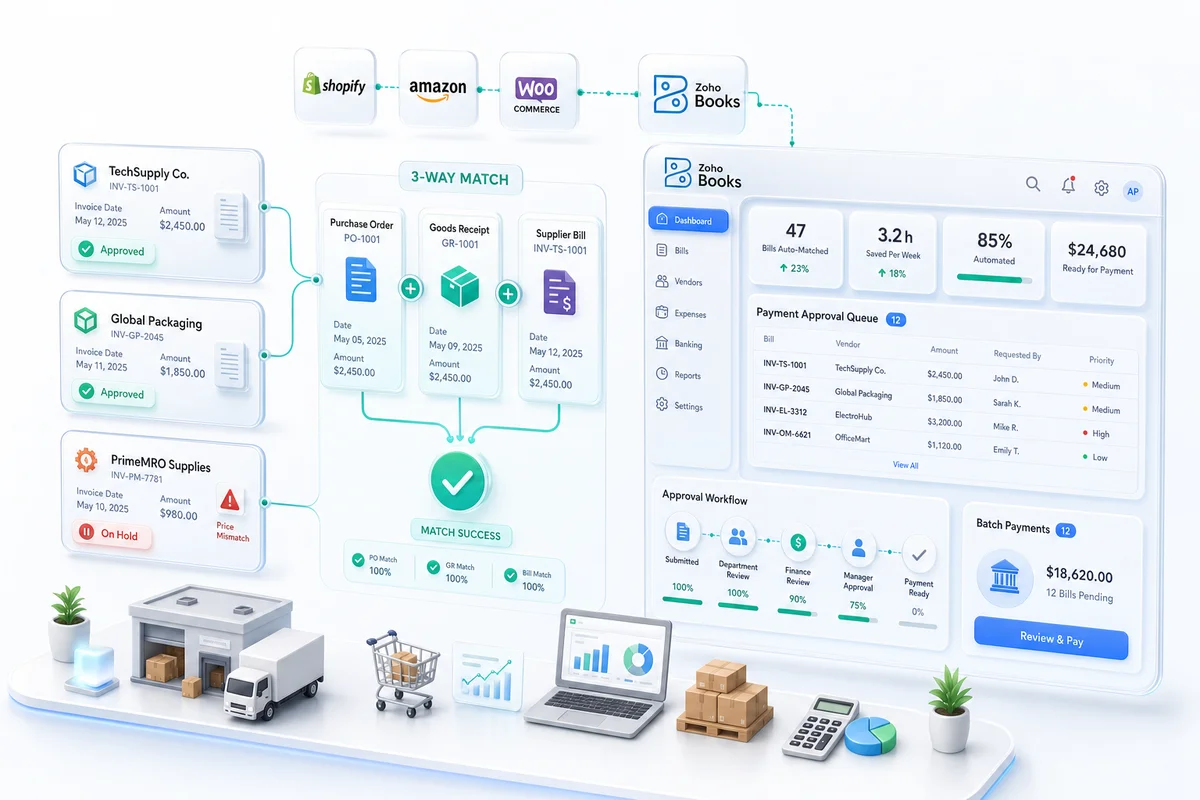
When goods arrive, the receiving team logs a goods receipt in Zoho Books. The system then compares three records: the original PO (what was ordered), the goods receipt (what was received), and the supplier's bill (what is being invoiced). If the quantities and amounts match within the configured tolerance, Zoho Books converts the goods receipt to a bill automatically. A mismatch holds the bill for review. That 3-way match is the control point that prevents overpayment, duplicate payments, and invoice fraud. No Zapier workflow replicates it. Zapier has no concept of matched financial documents.
Step 3: Route bills through multi-approver workflows (CFO, ops, payment release)
Zoho Books bill approval workflows route based on bill amount, vendor category, or department. A bill under $5,000 might route directly to the operations manager. A bill over $20,000 routes first to the CFO before payment release. Multi-level workflows are configured once in Zoho Books and run automatically on every bill that meets the criteria. Every approval action is timestamped and logged in the bill record, producing a complete approval trail for audit.
Step 4: Schedule and batch supplier payments (ACH, wire, card in a single run)
Once a bill clears approval, Zoho Books schedules the payment against the vendor's payment terms. Batch payment runs release multiple vendor payments in a single operation, with Zoho Books recording the payment event, updating the AP aging, and reducing the open balance on each vendor account. For sellers managing 20 to 50 active vendor accounts, a weekly batch run replaces dozens of individual payment actions.
AP automation specifically for Amazon FBA sellers
Amazon FBA introduces AP complexity beyond standard supplier invoices. Inbound shipment costs, vendor chargebacks, and irregular Amazon settlement timing all create accounts payable entries that sit outside the normal PO cycle — particularly for sellers managing FBA alongside Shopify and WooCommerce in a unified Zoho Inventory setup.
Mapping FBA inbound shipment costs to supplier bills in Zoho Books
Every FBA inbound shipment generates costs: prep service charges, freight invoices from the carrier, and Amazon's inbound placement fees. In a configured Zoho Books setup, each of these maps to a vendor bill against the relevant supplier or carrier account, with bill line items tied to the specific FBA shipment ID. This makes the landed cost for FBA inventory calculable from Zoho Books directly, without a separate spreadsheet. The chart of accounts should include a dedicated FBA Inbound Shipping account under Cost of Sales so these costs feed the correct margin calculation.
Handling Amazon vendor chargebacks as AP debit notes
Amazon issues chargebacks to sellers for compliance violations: labeling errors, ASN issues, pallet non-compliance. These are deductions from the Amazon settlement balance, not cash outflows, but they represent a financial obligation that needs to be recorded. In Zoho Books, Amazon chargebacks map to debit notes against the Amazon vendor account, reducing the outstanding AP balance for that settlement cycle. Tracking them as debit notes keeps AP aging accurate and ensures chargebacks appear in the period they were issued rather than being absorbed silently into the next settlement reconciliation.
Reconciling Amazon's irregular payment timing against open AP aging
Amazon pays on a biweekly cycle with no fixed calendar date. For sellers who also have supplier payments due in the same window, the AP aging in Zoho Books provides the cash flow view: what is due in the next 7 days, what is overdue, and what upcoming payments can be timed against an expected Amazon settlement. The Zoho Books AP aging report gives this picture on demand. A manual spreadsheet cannot.
Where Zapier and Make fall short on AP automation
Zapier can create a bill. It cannot match that bill to a goods receipt, run it through a conditional multi-approver workflow, or flag a quantity discrepancy between the PO and the invoice. Those are native Zoho Books functions — and the ones that matter for operator-grade AP.
What Zapier can do (trigger creation) vs what Zoho Books does natively
| Capability | Zapier / Make | Zoho Books native |
|---|---|---|
| Create a bill from a trigger | Yes | Yes |
| 3-way PO match (PO, receipt, bill) | No | Yes |
| Multi-approver bill workflow | No | Yes |
| Early-pay discount detection | No | Yes |
| Batch payment scheduling by vendor terms | No | Yes |
| Audit-ready approval trail | Basic logs only | Timestamped, per-user |
| AP aging report from matched data | No | Yes |
The audit trail gap: why middleware-driven AP fails in a CPA-reviewed close
A CPA reviewing AP close expects a documented approval trail: who approved each bill, when, and under what authorization level. Zapier logs show that a workflow ran. They do not show that a specific authorized user reviewed and confirmed a specific financial document. Zoho Books AP workflows log every approval action against the bill record, making the audit trail retrievable from within the accounting system, not from a third-party workflow tool's history export. For businesses with a Chartered Accountant involved in the monthly close, this distinction matters directly.
Multi-approver authorization is not a Zap; it's a workflow engine
Zapier runs linear workflows: trigger, action, action. AP approval workflows are conditional: this bill amount goes to this approver, above this threshold it escalates, this vendor category bypasses standard routing. Zapier cannot run conditional approval logic without custom code. Zoho Books' workflow engine handles rule-based routing, conditional escalation, and approval gates across 3 to 5 tiers without any custom development.
Setting up Zoho Books AP automation: what to configure before Q4
Three areas need to be configured before Q4 volume arrives: the vendor master, recurring bill automation, and the 3-way match rules. The Q2 financial close is the natural checkpoint for initiating H2 AP configuration: the H2 cash forecast built during the June 30 close gives you the cash position and forward vendor payment commitments needed to calibrate approval thresholds before Q4 volume arrives. For the full Q2 close process including H2 cash forecast, see the eCommerce Q2 close checklist for Zoho Books.
Vendor master setup: payment terms, bank details, approval thresholds
Every vendor in Zoho Books should have payment terms (net 30, 2/10 net 30, etc.), bank details for direct payment, and an approval threshold defined. Approval thresholds configure the workflow routing: bills below a set amount from a given vendor can auto-approve; bills above route to the designated reviewer. For Q4, when supplier orders are larger and more frequent, these thresholds prevent approval bottlenecks from delaying critical restocking payments.
Automating recurring bills (SaaS, 3PL fees, Shopify and Amazon platform fees)
Fixed monthly AP obligations (3PL warehousing fees, Shopify subscription charges, Amazon FBA storage estimates) can be automated in Zoho Books as recurring bills set to generate on a specific schedule. For the complete Zoho Books setup covering recurring bill configuration, vendor payment terms, and the underlying account structure, that guide covers the foundational configuration steps. Recurring bills eliminate the manual entry of predictable AP obligations and ensure they appear in AP aging before the payment due date.
Note that Shopify Payments processing fees work differently from subscription AP: they are deducted from each payout rather than invoiced as a separate bill, so they sit outside the standard AP cycle. For the correct Zoho Books configuration to track and reconcile those deductions, the Shopify Payments fee reconciliation guide covers clearing account setup and the bank rules that route each payout component to the right account.
The 3-way match configuration walkthrough
In Zoho Books, enable 3-way matching under Purchase Settings. Configure the tolerance threshold (1 to 2% quantity tolerance is standard for eCommerce to account for goods-in-transit rounding). Set bills created from POs to require goods receipt confirmation before the bill converts to payable status. Zoho's official purchase order documentation covers the specific Purchase Settings fields. The configuration takes under 30 minutes and eliminates the manual reconciliation step that most eCommerce AP processes run on every invoice.
AP automation checklist for eCommerce sellers (before Oct 15)
Q4 AP volume begins ramping in late October as BFCM inventory orders land — for the inventory configuration side, the BFCM inventory planning guide covers the seasonal reorder points and PO automation that drive those AP entries. Configure AP before the rush:
- Vendor master complete. Every active supplier has payment terms, bank details, and an approval threshold set in Zoho Books.
- 3-way match enabled. Purchase Settings updated; tolerance threshold configured; goods receipt required before bill converts to payable.
- Bill approval workflows active. Multi-approver routing configured for the relevant bill amount tiers.
- Recurring bills automated. Fixed monthly AP obligations (3PL, SaaS, platform fees) set to auto-generate.
- FBA inbound cost accounts mapped. Freight and prep fee bills map to FBA Inbound Shipping under Cost of Sales in the chart of accounts.
- Batch payment run scheduled. Weekly or biweekly payment run configured to release approved bills.
- AP aging report validated. Open balances match actual outstanding supplier obligations before Q4 orders land.
- Approval chain tested. A test bill has been routed through the full workflow and confirmed to reach the right reviewer at each tier.
When to bring in an AP automation specialist
Most Zoho Books setups can handle the vendor master and recurring bill configuration in-house. Three situations are worth bringing in a Zoho Finance Partner before Q4.
More than 20 active suppliers with different payment terms, currency requirements, or multi-entity routing: the workflow logic for multi-entity AP (routing bills to the correct entity in a multi-company Zoho Books setup) requires configuration beyond the standard settings walkthrough.
AP volume exceeding $200,000 monthly: a misconfigured 3-way match tolerance or approval threshold at that scale creates real financial exposure. Zolify has a Chartered Accountant on staff who validates AP workflow configuration against the financial controls the business requires.
Existing AP that is already behind going into Q4: clearing a backlog of unmatched bills, disputed invoices, and unapproved POs while configuring new automation simultaneously is a multi-week project that disrupts the close if not sequenced correctly. For AP and reconciliation patterns that break specifically during BFCM peak operations — and how to triage them without taking anything offline — the Q4 eCommerce operations guide for Zoho covers the live-season workflow.
Across 100+ eCommerce implementations on Zoho, including AP automation setups for Shopify and Amazon sellers managing 20 to 50 active supplier relationships, Zolify configures the full AP stack as an Official Zoho Finance Partner. The scope covers vendor master, 3-way matching, approval workflows, batch payments, and the chart of accounts structure that makes AP reporting accurate at period end.
Frequently asked questions
Can Zoho Books automate supplier payments for Amazon FBA sellers?
Yes. Zoho Books handles the full AP cycle for Amazon FBA: PO creation for inbound shipments, goods receipt to bill conversion, multi-approver workflows, and batch payment release. FBA inbound freight, prep fees, and Amazon placement charges all map to vendor bills against the relevant supplier or carrier account. For the Amazon + Zoho integration configuration that connects Seller Central data to Zoho Books AP records, that guide covers the full setup.
Does Zoho Books support 3-way PO matching?
Yes. Zoho Books compares the purchase order, the goods receipt, and the supplier's bill. A match within the configured tolerance converts the receipt to a payable bill automatically. A mismatch holds the bill for review. Enable it under Purchase Settings and set the quantity tolerance, typically 1 to 2% for eCommerce.
How is Zoho Books AP automation different from Zapier?
Zapier can create a bill. It cannot match a bill to a goods receipt, run conditional approval routing, flag an early-pay discount window, or release a batch payment. Those are native Zoho Books functions. The audit trail gap is also meaningful: Zoho Books logs every approval by user and timestamp within the bill record; Zapier produces basic workflow run logs with no financial document attribution.
What's the right time to set up AP automation for an eCommerce business?
Before Q4. eCommerce AP volume typically runs 3 to 5 times higher from October through December. AP automation configured in September or early October is operational before the volume spike. The vendor master, 3-way match rules, bill approval workflows, and recurring bill automation take 1 to 3 days to configure correctly for a business with 10 to 20 active suppliers.
How does AP automation in Zoho Books handle WooCommerce dropship supplier payments?
WooCommerce dropship operations generate AP entries when a dropship supplier fulfils an order. In Zoho Books, each dropship supplier has a vendor account with configured payment terms and an approval threshold. When a dropship order is placed, a PO is created against the supplier and converts to a payable bill when the supplier confirms fulfilment. Batch payment runs release all approved dropship vendor bills in a single weekly operation.
Frequently Asked Questions
Yes. Zoho Books supports the full AP cycle for Amazon FBA sellers, including purchase order creation for inbound shipments, conversion of goods receipts to bills, multi-approver bill workflows, and scheduled batch payment release. Amazon-specific costs (inbound freight, prep service fees, and Amazon inbound placement charges) can be mapped to vendor bills in Zoho Books and tied to the relevant FBA shipment ID. This makes the landed cost calculation for FBA inventory trackable from within Zoho Books rather than in a separate spreadsheet. Amazon vendor chargebacks are handled as debit notes against the Amazon vendor account, keeping AP aging accurate across irregular Amazon settlement cycles.
Yes. Zoho Books natively supports 3-way matching between the original purchase order, the goods receipt, and the supplier's bill. When a goods receipt is logged, Zoho Books compares the three documents for quantity and amount. If they match within the configured tolerance (typically 1 to 2% for eCommerce), the goods receipt converts to a payable bill automatically. A mismatch holds the bill for review, preventing overpayment and duplicate payments. To enable it: go to Purchase Settings in Zoho Books, enable goods receipt confirmation before bill conversion, and set the tolerance threshold. The setup takes under 30 minutes.
Zapier can trigger a bill creation event. It cannot run 3-way PO matching, route a bill through a multi-approver workflow with conditional escalation logic, detect early-pay discount windows, or release a batch payment run. Those functions require a workflow engine with accounting logic built in, which is what Zoho Books provides natively. The other meaningful gap is the audit trail. Zoho Books logs every approval action against the bill record with timestamps and user attribution, producing the audit-ready documentation a CPA expects at close. Zapier produces basic activity logs that show a workflow ran, not who authorized which financial document.
Before Q4. eCommerce AP volume typically runs 3 to 5 times higher in October through December than in the rest of the year, driven by BFCM inventory orders, seasonal supplier contracts, and higher platform fee billing. AP automation configured in September or early October is operational before the volume spike. The core configuration items (vendor master with payment terms and approval thresholds, 3-way match rules, bill approval workflows, and recurring bill automation) take 1 to 3 days to set up correctly. For sellers with more than 20 active suppliers or monthly AP above $200K, a Zoho Finance Partner configuration is faster and avoids the workflow logic errors that commonly appear in self-configured setups.
WooCommerce dropship operations generate AP entries when a dropship supplier fulfils an order on the seller's behalf. In Zoho Books, each dropship supplier is a vendor account with configured payment terms and an approval threshold. When a dropship order is placed, a purchase order is created in Zoho Books for the supplier, which converts to a payable bill when the supplier confirms fulfilment. The 3-way match for dropship differs from a standard inbound goods receipt: fulfilment confirmation from the supplier or carrier substitutes for a physical goods receipt. For multi-supplier dropship setups on WooCommerce, batch payment runs release all approved dropship vendor bills in a single weekly operation.
See exactly where your Shopify, Amazon, or WooCommerce ops are leaking — free.
Get a personalised eCommerce Ops Audit: inventory gaps, accounting leaks, and order-flow bottlenecks — with a Zoho fix roadmap. Delivered in 48 hours, at no cost.